Downloadable Files
You can download AE Spell Checker for free at the end of this page.
✨ No More Embarrassing Typos
If you’ve ever sent a project to a client and then suddenly noticed a typo… you know how frustrating that feels. It’s a small mistake, but it can really affect how professional your work looks.
That’s exactly why AE Spell Checker exists. It helps you catch those errors before anyone else does—quickly.
🔍 What Is AE Spell Checker and Why You Need It
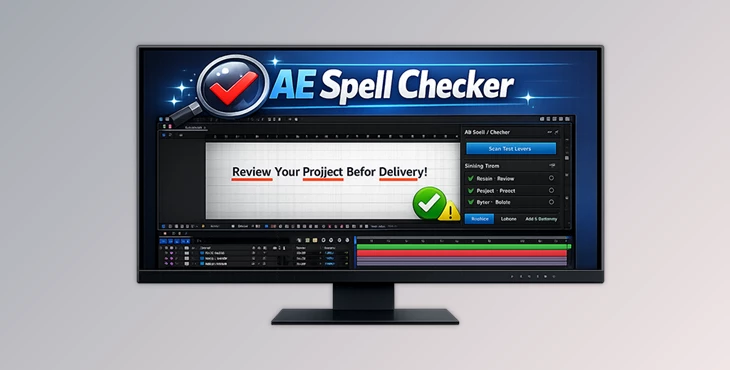
AE Spell Checker is basically a built-in assistant for After Effects that checks all your text layers for spelling mistakes.
Instead of going layer by layer and reading everything manually, this tool scans your project in seconds and shows you where the problems are.
Why does it make a difference?
- When you're working fast, mistakes happen
- In big projects, checking everything manually is almost impossible
- Fixing errors late can waste a lot of time
With this tool:
- You scan everything in one go
- Errors get highlighted
- You get suggestions to fix them instantly
In short, it helps you work faster and deliver cleaner, more professional results.
🚀 Introducing AE Spell Checker
This plugin is designed to fit right into your workflow without slowing you down. You don’t need to leave After Effects or use any extra tools.
🔹 Features
- Spell check directly inside After Effects
No copy-paste, no switching apps. - Smart suggestions for mistakes
Quickly replace wrong words with better options. - Custom dictionary
Add your own words like brand names or technical terms. - Easy navigation between errors
Jump straight to each mistake and fix it fast. - Works on both Windows and Mac
- Supports multiple languages
English (US), English (UK), Spanish
🎬 Real Example
Imagine you’re working on a promo video with lots of text layers. Instead of checking everything manually, you just run the plugin—and in a few seconds, all the typos are right in front of you.
💡 Tips to Use It Better
✔️ Add your common words
If you use specific names or terms often, add them to the dictionary once and save time later.
✔️ Always run it before export
Make it part of your final step. It can save you from awkward corrections after delivery.
✔️ Use navigation smartly
Jumping between errors is much faster than searching manually—use it to your advantage.
🎯 Final Thoughts
AE Spell Checker is one of those tools that quietly improves your workflow. It doesn’t change how you design—but it makes sure your final result looks clean and professional.
If you deal with text in After Effects, even occasionally, this is definitely something worth trying.