Downloadable Files
You can download OCD Renamer for free at the end of this page.
✨ Tired of Messy Layer Names? Let’s Fix That
If you’ve ever opened a complex project and felt overwhelmed by chaotic layer names like “Layer 1 copy 23,” you’re not alone. Keeping things organized in motion graphics or compositing can quickly turn into a nightmare. That’s exactly where OCD Renamer comes in. It’s a smart, time-saving tool that automatically renames your layers based on their properties—so you can focus on creativity instead of cleanup.
🧠 What Is OCD Renamer & Why It Matters
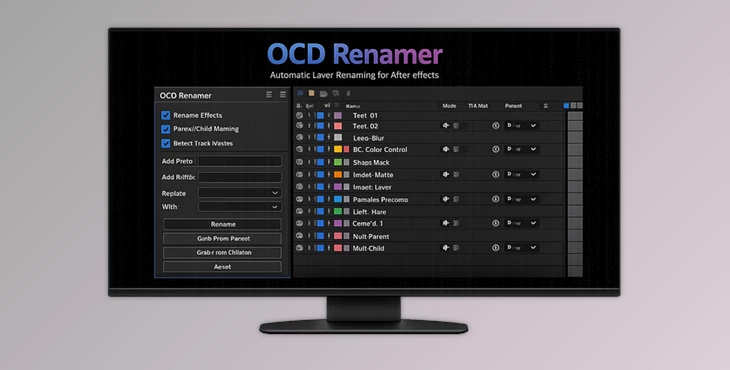
At its core, OCD Renamer is an intelligent layer-renaming tool designed to organize your project automatically. Instead of manually renaming dozens (or hundreds) of layers, this tool analyzes:
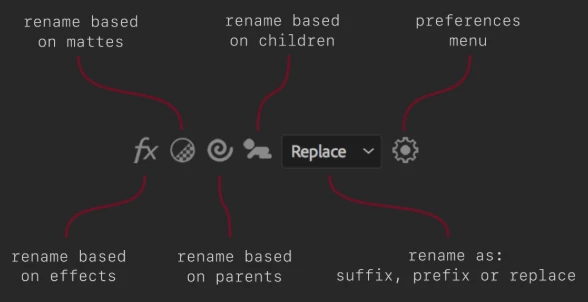
- Effects applied to layers
- Parent-child relationships
- Track mattresses and their types
🎯 Real-World Use Cases
- A layer with a Hue/Saturation effect can automatically be renamed to something like HSL_Adjustment
- Child layers can inherit naming logic from their parent—keeping hierarchies clear
- Matte layers get renamed based on their type (e.g., Alpha, Alpha Inverted)
💡 Why This Improves Your Workflow
- Faster navigation in complex timelines
- Cleaner, more professional project files
- Reduced mistakes when collaborating with others
In short, better naming = better control.
🚀 Meet OCD Renamer – Your Workflow Upgrade
OCD Renamer simplifies layer management and makes your projects easier to understand, edit, and share.
🔥 Features
- Selection-Based & Global Renaming: Rename only selected layers or apply changes across the entire project.
- Flexible Naming Options: Use replace, prefix, or suffix to customize naming styles.
- Smart Effect-Based Naming: Automatically rename layers based on applied effects.
- Parent & Child Relationship Detection: Rename children based on parents, or parents based on children.
- Matte Recognition System: Detects matte types and renames layers accordingly.
- Custom Aliases: Create your own naming shortcuts - (e.g., “Hue/Saturation” → “HSL”, “Alpha Inverted” → “Alpha Inv”)
- Duplicate Effect Filtering: Prevents repeated effect names from cluttering layer titles.
🎬 Example in Action
Imagine working on a motion graphics project with dozens of adjustment layers: Instead of:
- Layer 12 copy 4
You get:
- BG_HSL_Adjustment_AlphaInv
Now everything is instantly understandable—even if you revisit the project months later.

🎯 Pro Tips for Better Results
- Use consistent aliases
- Use prefixes for each category of effect.
- Combine both effects and hierarchy in your project.
- Keep it simple; the goal is to have readable aliases.
- Perform a global find and replace one last time before you export your project.
💬 Final Thoughts
When you think about what tool you need the most, especially for video projects, OCD Renamer is one you likely did not think of until you encountered it—and then you can’t imagine how you would work without it. It will save you time and allow you to have an overview of your projects at any given time. Give it a try and see how easy your projects will be with this tool.

Files Password : gfxplugin.com OR 123456