Downloadable Files
You can download MassRename for free at the end of this page.
🎬 A Smarter Start: Stop Wasting Time on File Names
If you've ever finished a movie shoot and opened your project file to find hundreds of clips with chaotic filenames, you know the pain.
Files named IMG_4392.MOV or A001_C003_0115.Braw aren't exactly helpful.
MassRename changes that instantly. This tool allows you to rename all your project files in just a few seconds. No more clicking through and renaming each file individually.
💡 What Is MassRename & Why It Matters
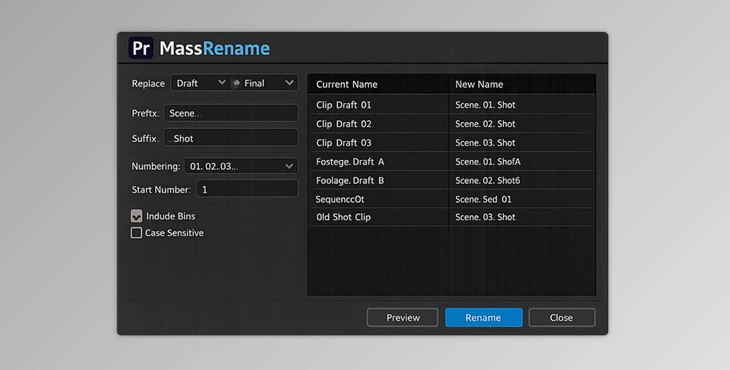
This product is a batch renaming tool for Adobe Premiere Pro that allows you to rename project items at the same time.
🔍 Real-World Uses
MassRename can help you rename files in the following ways:
- Rename interview clips to Interview_01, Interview_02
- Add a suffix to all files, such as a Final version
- Edit text across all project files, changing “Draft” to “Final.”
- Clean up all your project files with a simple click to rename them to a structured naming system
🎯 Why This Improves Your Workflow
- Saves hours of manual work
- Prevents naming mistakes that can break project links
- Keeps projects organized, especially in team environments
- Improves collaboration, since everyone understands the file structure
In short: better names = faster editing + fewer errors.
🚀 Meet the Tool: MassRename for Premiere Pro
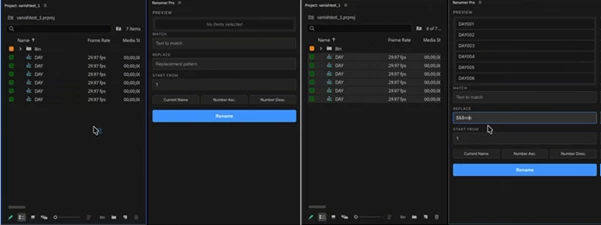
MassRename is built to simplify one of the most annoying parts of editing—file organization. It integrates directly into Premiere Pro and gives you a clean, functional UI focused on speed and clarity.
Features
⚡ Batch Rename Instantly:
- Rename hundreds of clips in a single click.
👁️ Live Preview:
- See exactly what each filename will become before applying changes.
🔤 Smart Token System
- $n → sequential numbers
- $nn → padded numbers (01, 02, 03…)
- $& → original filename
🔍 Find & Replace
Quickly swap specific words across all selected items.
🎞️ Full Project Support
- Works with clips, audio, sequences, bins, graphics, and more.
🔒 Offline & Secure
- Runs locally—perfect for NDA or sensitive projects.
🎥 Example in Action
Imagine renaming 800 clips from a documentary shoot: Instead of:
A001_C003_0115.braw You get:
Interview_01, Interview_02, Interview_03… Or instantly convert:
Project_Draft_01 → Project_Final_01 That’s not just cleaner—it’s production-ready.
🧠 Pro Tips for Better Results
- Use consistent naming patterns from the start (e.g., Scene_Shot_Take)
- Preview everything before applying changes—avoid surprises.
- Combine tokens smartly → Scene_$nn_$& for hybrid naming.
- Use Find & Replace for version control (Draft → Final → V2).
- Keep names short but meaningful—clarity beats complexity.
These small habits can make your projects look and feel far more professional.
✨ Final Thoughts: Small Tool, Big Impact
MassRename may seem like a simple tool, but it solves a common problem editors face every day. It saves editors time and effort and makes the editing process more enjoyable from the very start. Regardless of whether editors work alone or as part of a team, having a tool that makes file naming easy is a productivity must-have. MassRename makes it effortless. For editors who value speed, focus, and clarity in their work, MassRename is definitely worth trying.

Files Password : gfxplugin.com OR 123456