Downloadable Files
You can download the product Root for free at the end of this page.
🚀 Turn Chaos Into Clean Projects
If you’ve ever opened an After Effects project and been hit with missing files, scattered assets, or messy folders—you’re not alone. It’s one of the most frustrating parts of motion design.
That’s exactly where Root comes in. Imagine taking all those disorganized files spread across your desktop, downloads, or even external drives—and turning them into a clean, structured, fully packaged project in seconds. No stress, no missing links, no confusion.
💡 What Is Root and Why It Matters
At its core, Root is an asset organizer for After Effects. It gathers, organizes, relinks, and packages everything your project actually uses into one clean, self-contained structure.
Why is this important?
Because messy projects lead to:
- Missing files during delivery
- Broken links when moving systems
- Confusion when collaborating
What does Root solve?
- It finds missing assets instantly
- It collects only what’s needed
- It organizes everything into structured folders
Real-world example:
You finish a project for a client. Instead of manually collecting files, checking links, and organizing folders—Root does it all automatically. The result? A clean, professional delivery package ready to send. This not only saves time but also makes your workflow more reliable and professional.
🧰 Meet Root – Your After Effects Asset Manager
Root simplifies one of the most tedious parts of motion design: asset management. It turns complex, messy workflows into fast, clean, and repeatable processes.
✨ Features
📂 Gather & Relink
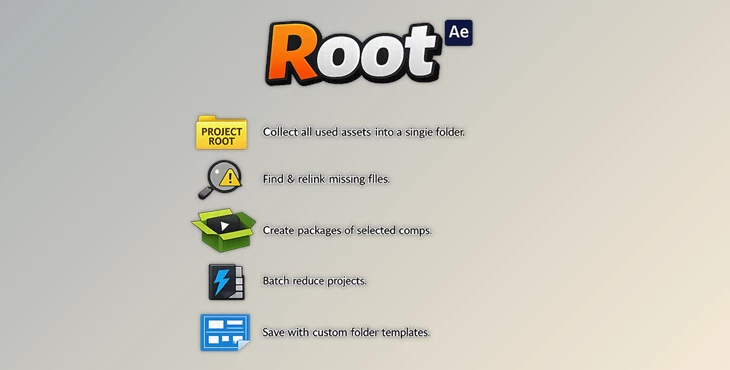
Root will automatically gather all of your project’s files into one organized project structure and automatically relink all files within After Effects to the newly organized project root.
🔍 Smart Search
Root will automatically find all of your project’s missing files using a recursive search of your machine.
📦 Collect & Package
Root will allow you to easily collect your projects into well-organized folders and automatically zip them for easy sharing.
⚡ Batch Reduce
Reduce the size of your projects to share with others with larger files.
🎯 Drag & Drop Workflow
Just drop all of your project files into Root, and it will automatically find, copy, and relink all your files.
🗂 Custom Folder Templates
Create custom project folder structures that you can use for each client or project type.
📊 Live Project Status
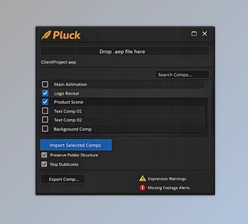
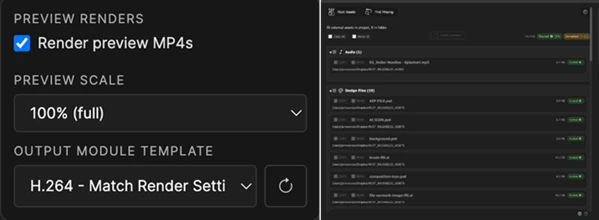
Root will show you the status of your project in real time, with the number of files: In project root, Outside project root, Missing files
⚙️ Full Customization
Organize your files however you like with Root.
✅ Organize projects by file type
✅ Create custom file categories
🎯 Batch Reduce
Reduce the size of your projects to share with others with larger files.
🎬 Real Impact Example
Let’s say you have created three different projects for the same client. Each has its essential elements.
With Root, instead of spending hours organizing their files and folders, you can:
✅ Select the project comps that you want to collect
✅ Click the collect button, and Root will create well-organized folders for each project, zipping them up for easy sharing.
This will save you time and effort that would normally take several hours to complete.
🎯 Pro Tips for Better Results
- Use folder templates to quickly create new projects for the same clients.
- Always use the smart search function before you export your projects to ensure you have all the files you need.
- Organize your projects by category and file type to make the collection process easier.
- Use the batch reduce feature to automatically share projects with others in smaller files.
- Enable the auto-refresh feature to monitor your projects as they develop.
💡 Tip: Create templates for each client in your library so that when you work on new projects for them, you can simply use the template to organize your files and maintain a professional appearance in your projects.
🔥 Final Thoughts
Root isn’t just a tool—it’s a workflow upgrade. It removes one of the most frustrating parts of After Effects and replaces it with something fast, clean, and reliable. Whether you’re delivering projects, archiving work, or collaborating with others, Root keeps everything exactly where it should be. Once you start using it, going back to manual organization feels impossible.
 Root - Asset organizer for Ae by Aescripts (v1.1.3 for Win, Mac).rar (Size: 2.8 MB - Date: 6/10/2026 1:47:41 PM)
- Root - Asset organizer for Ae by Aescripts (v1.1.1 for Win, Mac).rar (Size: 3.4 MB - Date: 5/9/2026 12:37:19 PM)
- Root - Asset organizer for Ae by Aescripts (v1.1.0 for Win, Mac).rar (Size: 4.7 MB - Date: 4/15/2026 11:35:50 AM)
- Root - Asset organizer for Ae by Aescripts (v1.0.9 for Win, Mac).rar (Size: 3.4 MB - Date: 4/8/2026 4:22:38 PM)
- Aescripts - Root v1.0.2.rar (Size: 33.6 MB - Date: 3/26/2026 2:28:12 PM)
Files Password : gfxplugin.com OR 123456