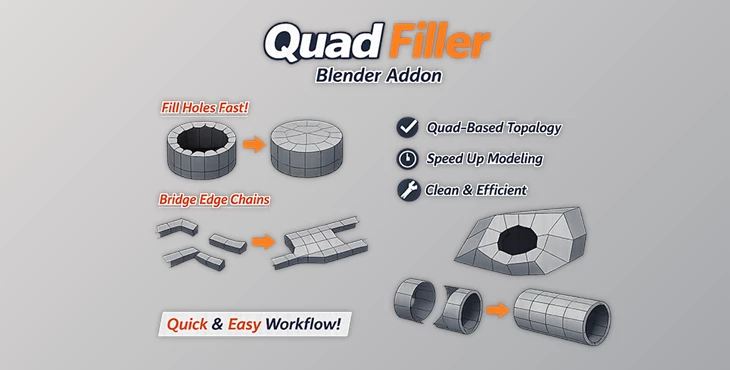
Downloadable Files
You can download Quad Filler for free at the end of this page.
A Faster Way to Fix Topology Gaps
If you’ve ever struggled with messy topology while trying to patch holes in your mesh, you know how time-consuming manual bridging can be. That’s exactly where Quad Filler steps in.
This lightweight Blender add-on simplifies one of the most tedious parts of modeling—connecting open edge chains—into a fast, clean, and almost effortless process. With just one click, you can generate a clean quad-based topology and keep your creative flow uninterrupted.
What Is Quad Filler and Why It Matters
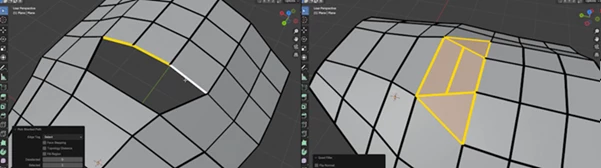
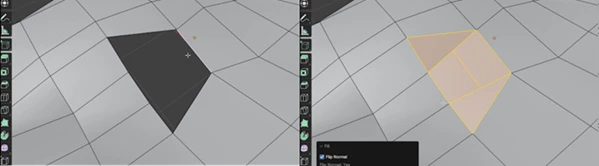
At its core, Quad Filler is a tool designed to bridge two open-edge chains and convert them into a clean, quad-first surface.
Why is this important?
Good topology is essential for:
- Smooth shading
- Easy deformation (especially for animation)
- Cleaner editing and sculpting workflows
Real-world example
Imagine you’re modeling a character or a hard-surface object and accidentally delete a section—or need to connect two mismatched edges. Normally, you'd:
- Manually bridge edges
- Fix triangles and n-gons
- Adjust the flow afterward
With Quad Filler, that entire process becomes:
👉 Select → Click → Done Even in uneven edge counts, the tool intelligently creates mostly quads, minimizing cleanup and preserving a natural edge flow.
Meet Quad Filler – A Smart Blender Add-on
Quad Filler is built for speed, simplicity, and clean results. It turns complex topology fixes into a one-step operation, helping you stay focused on modeling instead of technical corrections.
Features
One-Click Quad Bridging
- Instantly connect two open edge chains with a quad-first topology.
- Supports Multiple Edge Combinations
Works with different edge counts like:
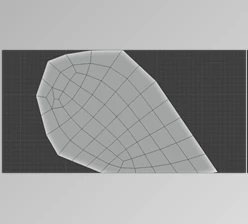
- 5 → 3 (All quads)
- 4 → 2 (All quads)
- 3 → 2 (Quads + 1 triangle)
- 4 → 1 (Quads + 1 n-gon)
- And more...
Equal Edge Bridging (1-to-1)
- Supports up to 49 edges on each side with fully quad-based results.
Clean Topology Output
- Designed to minimize triangles and n-gons while keeping geometry easy to edit.
Hotkey Friendly Workflow
- Default shortcut: Shift + F
- You can assign your own shortcut and even record it directly.
Quick Context Menu Access
- Right-click → Quad Filler → Done.
Lightweight & Fast
- No heavy setup, no unnecessary complexity—just a focused tool that does one job really well.
Example Use Cases
- Fixing holes in character meshes
- Connecting mismatched edge loops in hard surface models
- Speeding up retopology workflows
- Cleaning up scanned or imported meshes
Pro Tips for Better Results
To get the most out of Quad Filler, keep these tips in mind:
- Always use open-edge chains: Closed loops are not supported—make sure your selections are open.
- Work in Edge Select Mode: This ensures accurate selection and better results.
- Match edge flow direction: Try to select edge chains in a logical order for cleaner topology flow.
- Use it as a “quick patch tool”: Assign a shortcut and integrate it into your modeling muscle memory.
- Refine when needed: In mixed cases (triangles or n-gons), a quick tweak can perfect the result.
Final Thoughts
Quad Filler is one of those tools that quietly transforms your workflow. It doesn’t try to do everything—it just solves a very specific problem extremely well. By reducing manual work and producing clean, reliable topology, it helps you stay focused on creativity instead of cleanup. Whether you're a beginner or a seasoned Blender user, this add-on can save you time and frustration on almost every project. Give it a try—you’ll probably wonder how you modeled without it.

Files Password : gfxplugin.com OR 123456