Downloadable Files
You can download Markers Command Center for free at the end of this page.
A Smarter Way to Control Your Premiere Pro Markers
If you’ve ever worked with markers inside Adobe Premiere Pro, you probably know how quickly things can become messy. Managing dozens—or even hundreds—of markers in a complex timeline can slow down your workflow and make precise editing harder than it should be. That’s exactly where Markers Command Center comes in. This extension gives you powerful tools to automate, edit, and manage markers directly within Premiere Pro. Say goodbye to manually editing markers and automate your editing process to save time and maintain control over your markers.
What Are Timeline Markers and Why Do They Matter?
In video editing, markers are small timeline indicators used to highlight important moments in footage. Editors rely on them to mark beats in music, identify cut points, leave notes, track feedback, or structure chapters in a video. Markers are especially useful when working on projects such as:
- YouTube videos with chapter timestamps
- Music videos where cuts must match the beat
- Documentary edits with multiple notes and cues
- Collaborative projects with review comments
However, Premiere Pro’s default markers panel is quite limited. Editing markers individually or reorganizing large groups can quickly become tedious.
Tools like Markers Command Center solve this by introducing batch editing, automation, and advanced organization features. Instead of repeating the same manual steps over and over, you can control entire groups of markers at once, dramatically improving both speed and accuracy in your editing workflow.
Meet the Professional Tool: Markers Command Center
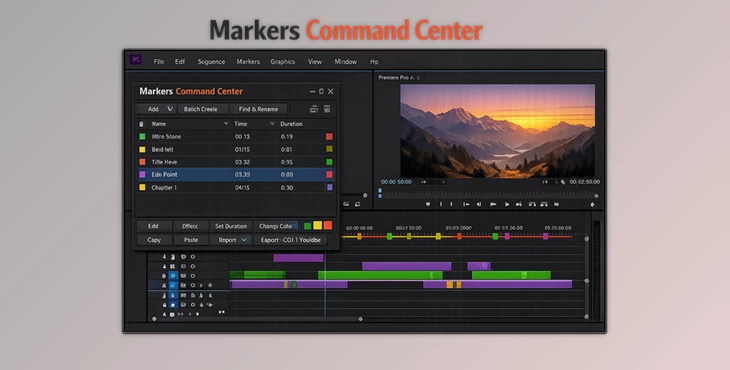
Markers Command Center is a professional extension designed to replace and enhance Premiere Pro’s basic markers panel. It introduces powerful batch-processing tools and automation features that make marker management faster, cleaner, and far more efficient. With its modern interface and smart workflow tools, editors can manage hundreds of markers without losing control of the timeline.
Features
Advanced Marker Operations
One of the biggest strengths of Markers Command Center is its ability to perform advanced operations on multiple markers at once.
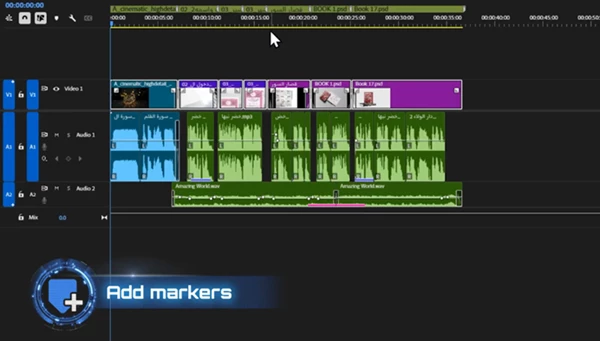
Add Markers Automatically
You can instantly generate markers at even intervals across the timeline—perfect for creating beat grids or timing references. The tool can also automatically place markers at the start and end of clips, which is extremely useful when organizing multi-clip sequences.
Shift Marker Timing
When edits change your timeline structure, markers often fall out of sync. With the shift feature, you can nudge groups of markers forward or backward using exact timecodes, keeping everything perfectly aligned.
Set Marker Duration
Instead of manually adjusting marker lengths one by one, you can apply consistent durations across multiple markers in seconds.
Copy and Paste Marker Structures
This feature allows you to duplicate an entire set of markers while preserving their exact relative spacing. For editors working with repeating segments or templates, this saves an incredible amount of time.
Batch Automation Tools
Managing markers in bulk becomes incredibly easy thanks to the automation features included in the extension.
Batch Rename
Automatically rename multiple markers using prefixes and customizable numbering. This is perfect for organizing chapters, cues, or structured editing notes.
Find and Replace Text
Need to update marker names or comments across the entire timeline? The find-and-replace function allows instant text updates across all markers.
Color Management
Markers can be filtered and organized using Premiere Pro’s 8 native colors, allowing editors to visually categorize tasks, feedback notes, or scene sections.
Undo and Redo System
Large edits can be intimidating without safety nets. The built-in undo/redo system ensures you can experiment freely without worrying about mistakes.
Seamless Export Options
Markers Command Center also makes exporting marker data incredibly simple.
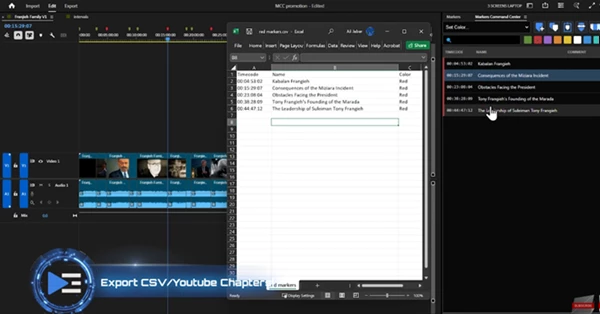
Advanced CSV Export
Export marker data with customizable columns, allowing you to integrate the information into spreadsheets or external production workflows.
YouTube Chapters Generator
With a single click, the extension automatically generates YouTube chapter timestamps and copies them directly to your clipboard. This makes publishing structured content much faster.
Filtered Exports
Exports respect any active color or text filters, meaning you can export only the markers you actually need.
Fluid Interface and Inline Editing
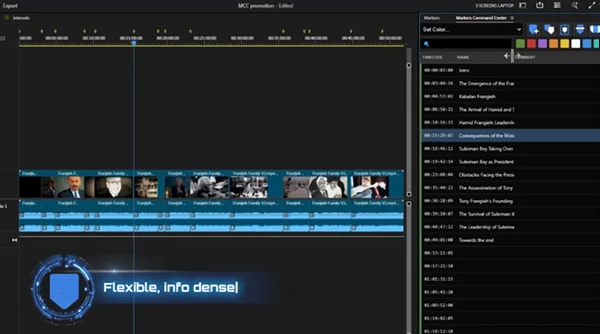
The extension features a modern, dark interface designed for efficiency. Editors can directly edit timecodes, names, and comments by simply double-clicking the fields. This eliminates unnecessary clicks and speeds up marker management significantly.
The resizable name column also solves a common limitation of Premiere’s default markers panel.
Keyboard shortcuts such as Ctrl+Click and Shift+Click allow rapid multi-selection, making it easy to manage large groups of markers without slowing down your workflow.
Smart Filtering and Frame.io Compatibility
When timelines become crowded with markers, finding specific ones can be difficult. Markers Command Center solves this with smart filtering tools. You can instantly filter markers by color or search for specific words inside marker names and comments. For teams using Frame.io, the extension automatically isolates comment markers so they don’t interfere with your primary editing markers—keeping collaborative workflows clean and organized.
Practical Editing Tips for Better Results
To get the most out of Markers Command Center, here are a few practical techniques used by professional editors:
Use Color Coding Strategically
Assign different marker colors to different editing tasks—such as music beats, transitions, dialogue cues, or review notes. This makes the timeline easier to read at a glance.
Create Beat Grids for Music Editing
Use interval marker generation to place markers on every beat or bar. This technique helps editors align cuts perfectly with the rhythm of a soundtrack.
Duplicate Marker Templates
If you frequently produce structured videos like tutorials or YouTube content, save time by copying and pasting marker structures across sequences.
Filter Before Exporting
When exporting markers for clients or team members, filter out unnecessary markers so only the relevant ones appear in your export. These simple habits can dramatically improve both editing speed and project organization.
Final Thoughts
Markers are arguably one of the most underrated tools within video editing. Despite its importance in maintaining organization within complex editing timelines, Premiere Pro’s built-in marker system is lacking in many respects.
Enter: Markers Command Center.
With its batch editing tools, automation features, smart filtering capabilities, and export options, this plugin will transform the way you manage markers within Premiere Pro.
From YouTube videos to documentaries and everything in between, Markers Command Center will give you better control over your editing timelines.
For anyone looking to increase the speed, organization, and cleanliness of their editing process, Markers Command Center is definitely a tool worth exploring.
 Markers Command Center for Pr by Aescripts (v1.5.0).rar (Size: 1.5 MB - Date: 6/6/2026 11:12:48 AM)
- Markers Command Center high-density, professional replacement for Pr by Aescripts (v1.1.0).rar (Size: 42.7 MB - Date: 3/29/2026 4:32:16 PM)
- Aescripts - Markers Command Center v1.0.0.rar (Size: 42.6 MB - Date: 3/16/2026 10:06:41 AM)
Files Password : gfxplugin.com OR 123456