Downloadable Files
You can download the CRTX product for free from the end of this page.
Bringing Real CRT Life Back to Your Footage
Have you ever watched old footage on a CRT monitor and noticed how alive it felt? The glow of highlights, the subtle flicker of scanlines, the way colors bloom and smear slightly — it’s not just nostalgia, it’s physics.
Modern digital screens are clean and perfect, but sometimes that perfection removes the character that made analog video so memorable. That’s where CRTX comes in.
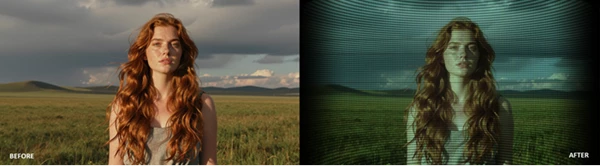
This isn’t just another retro filter. Instead of placing static overlays on top of your footage, it rebuilds every frame as if a real CRT beam is painting it. The result is dynamic, reactive, and surprisingly authentic. Highlights breathe, colors react to motion, and the entire signal behaves like a living analog display.
If you want footage that feels like it was captured from a real tube monitor rather than digitally processed, this tool makes that possible inside Adobe After Effects.
What Exactly Is CRTX and Why It Matters
At its core, CRTX is a simulation engine for Adobe After Effects that recreates the physics and imperfections of classic CRT displays.
Instead of simply layering scanlines or noise, CRTX analyzes the motion, luminance, and edges of your footage and uses that information to simulate how an actual CRT would display the signal.
Why This Makes a Difference
Traditional CRT effects often look artificial because they apply the same pattern to every frame. Real CRT displays behave differently — they react to the image signal itself. CRTX recreates this behavior through several physical characteristics:
- Beam bloom makes bright highlights flare like overloaded phosphor on real tubes.
- Phosphor persistence allows light to linger briefly, creating subtle motion trails.
- Signal instability introduces natural analog imperfections such as tearing or jitter.
- Glass surface simulation adds haze, glare, and reflections that mimic a real screen.
Because these effects react to the footage itself, the final result feels organic and believable, rather than like a preset filter.
Real-World Use Cases
Creators use CRT simulation for many types of projects:
- Retro-themed music videos
- VHS-style cinematic sequences
- Synthwave or vaporwave visuals
- Analog horror aesthetics
- Motion graphics inspired by vintage broadcast systems
- Game trailers recreating classic arcade displays
In all of these cases, the goal is the same: make digital footage feel like it exists in the analog world.
Meet the Tool: CRTX
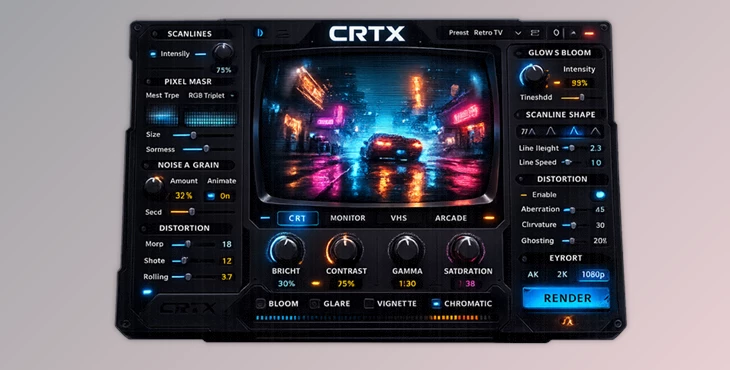
This tool is a professional-grade CRT physics simulation plugin for Adobe After Effects. It transforms modern footage into something that feels like it came directly from a vintage display.
Instead of stacking effects manually, CRTX provides a unified system that simulates the beam, signal, screen surface, and analog instability all together.
Even better, the plugin includes 150+ presets, allowing users to instantly apply looks ranging from authentic CRT monitors to extreme glitch-heavy aesthetics.
The workflow is simple:
Apply the effect, choose a preset, tweak a few controls, and render. Thanks to GPU acceleration, the process stays interactive and responsive.
Features
Real CRT Physics Simulation
CRTX recreates the actual visual behavior of CRT displays, including:
- Beam bloom and glow
- Phosphor persistence and decay
- Scanline structure
- Mask patterns
- Glass haze and surface reflections
- Analog instability and signal distortion
These elements work together rather than independently, producing a far more convincing result.
150+ Creative Presets
This product includes a large preset library that allows you to instantly transform your footage. Some presets emulate real displays, while others push the look into creative territory, such as:
- Neon CRT aesthetics
- Heavy bloom looks
- Retro-futuristic styles
- Broadcast glitch simulations
This makes it easy to go from clean footage to a finished CRT look in seconds.
Advanced Glitch and Signal Effects
CRTX also includes a wide range of analog destruction and glitch effects, including:
- Sync tearing
- Signal chew
- Circuit bending visuals
- Analog broadcast failure
- RF interference bars
These effects are perfect for experimental visuals, glitch art, or analog horror projects.
Degauss Pulse Effects
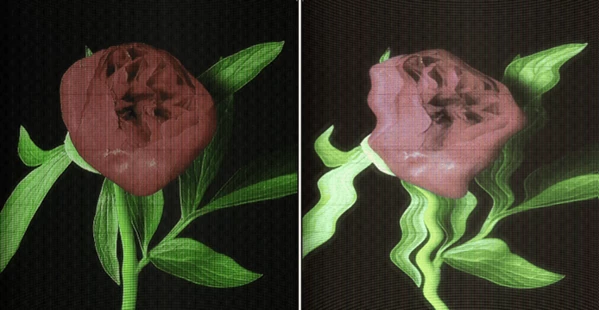
The classic CRT degauss effect is recreated with magnetic warp and intense color bloom. This effect simulates the moment when a CRT monitor demagnetizes its screen, producing dramatic color distortions and geometric warping. It’s visually striking and often used as a transition or stylized effect.
Full Analog Signal Simulation
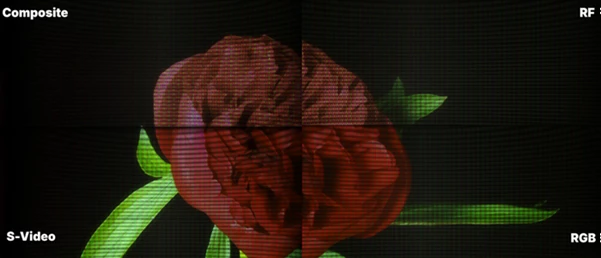
CRTX can recreate different video signal types, each with its own characteristics. Examples include: Tape Effects
- VHS head switch noise
- Tracking errors
- Tape stops and worn oxide distortion
RF Signal Effects
- Weak broadcast signals
- Ghosting artifacts
- Interference bars
Camera Filming Effects
- Rolling shutter distortion
- Interlace drift
- Vertical hold errors
Phosphor Behavior
- Afterglow trails
- Persistence effects
- Ghost echo motion
Screen Surface Details
- Glass glare
- Dust and dirt
- Screen reflections
- Soft haze
These layers help simulate the full experience of watching a video on a physical CRT screen.
Pro Tips for Better Results
Even though CRTX includes powerful presets, a few small tweaks can significantly improve realism.
Start with Subtle Settings
Real CRT displays rarely look extreme. Begin with mild bloom, gentle scanlines, and small amounts of instability.
Match the Signal Type
If you want a VHS look, combine tape noise with RF interference. For arcade monitors, focus more on scan structure and phosphor glow.
Use Instability Carefully
Effects like jitter, tearing, or sync chew are powerful but should be used sparingly unless you’re creating glitch art.
Combine with Motion
This reacts to motion and brightness. Footage with movement, highlights, and strong contrast will produce more dynamic CRT behavior.
Adjust Geometry
Slight curvature, overscan, and convergence shifts can instantly make the image feel like it lives on a real CRT screen.
Final Thoughts
This tool is more than just a retro filter. It’s a full CRT simulation system.
With CRTX, you get a range of features that give the filter an authentic, organic, and alive look that was characteristic of CRT screens.
Filmmakers, motion graphic designers, and anyone who enjoys the analog aesthetics should give this filter a try.
Whether you’re looking to add that retro touch to a broadcast, a music video, or any other type of video project, CRTX is a filter that will give you the control and realism you need to bring your ideas to life.
For those who enjoy retro and analog visuals, CRTX is definitely a tool worth exploring.
 CRTX - Step Beyond Crt Simulation in Ae by Aescripts (v1.2.3 for Win, Mac).rar (Size: 846.0 KB - Date: 6/8/2026 12:49:47 PM)
- CRTX - Step Beyond Crt Simulation in Ae by Aescripts (v1.2.1 for Win, Mac).rar (Size: 2.2 MB - Date: 4/16/2026 12:16:05 PM)
- CRTX - Step Beyond Crt Simulation in Ae by Aescripts (v1.2.0 for Win, Mac).rar (Size: 2.2 MB - Date: 4/11/2026 12:24:04 PM)
- CRTX - Step Beyond Crt Simulation in Ae by Aescripts (v1.1.1).rar (Size: 88.0 MB - Date: 3/28/2026 1:01:22 PM)
- CRTX - Step Beyond Crt Simulation in Ae by Aescripts (v1.1).rar (Size: 950.0 KB - Date: 3/18/2026 12:15:20 PM)
- Aescripts - CRTX v1.0.0.rar (Size: 87.1 MB - Date: 3/16/2026 10:06:39 AM)
Files Password : gfxplugin.com OR 123456