Downloadable Files
You can download Fast HSB Color for free from the end of this page.
A Faster Way to Control Colors in After Effects
Working with colors in After Effects can sometimes slow down the creative process. Color buttons are scattered throughout the interface, and every time you want to adjust a color, you often have to open the native color picker window. That small interruption can break your workflow and cost valuable time.
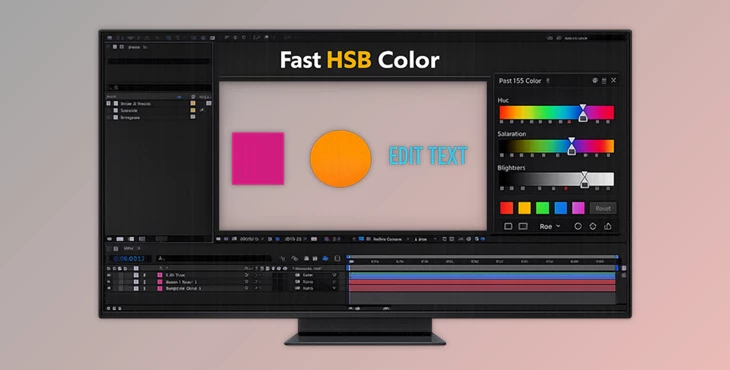
Fast HSB Color solves this problem by bringing intuitive HSB color sliders directly into the After Effects interface. Instead of searching for color controls or opening pop-up windows, you can instantly access and adjust the colors of your selected layers right where you work.
The result is a smoother, faster, and much more enjoyable color-editing workflow that keeps your focus on creativity rather than interface navigation.
What Is Fast HSB Color and Why Is It Useful?
Fast HSB Color is a workflow-enhancing tool for After Effects that simplifies color adjustments. It automatically detects color properties in your selected layers and presents them in a convenient list with Hue, Saturation, and Brightness sliders.
Instead of manually hunting for color properties in different panels, the tool collects them for you and lets you modify them instantly.
Real-World Uses
Imagine you are designing:
- A motion graphics intro with multiple colored shapes
- A text animation where the color needs quick variations
- A UI animation with several layers sharing the same palette
Normally, adjusting colors across many layers requires opening multiple color pickers and navigating through effect settings.
With Fast HSB Color, you can simply:
- Select your layers
- See all color properties automatically detected
- Adjust them instantly using HSB sliders
Because changes happen directly inside the interface, you can experiment with colors faster and achieve better visual balance in your projects.
This streamlined workflow helps designers:
- Maintain visual consistency
- Experiment with color variations quickly
- Save significant time during production
Meet the Tool: Fast HSB Color
Fast HSB Color is designed to simplify and accelerate color workflows inside After Effects. By integrating color sliders directly into the interface, it removes the need for constant pop-up color pickers and scattered controls.
Features
Direct HSB/HSL Sliders in the Interface
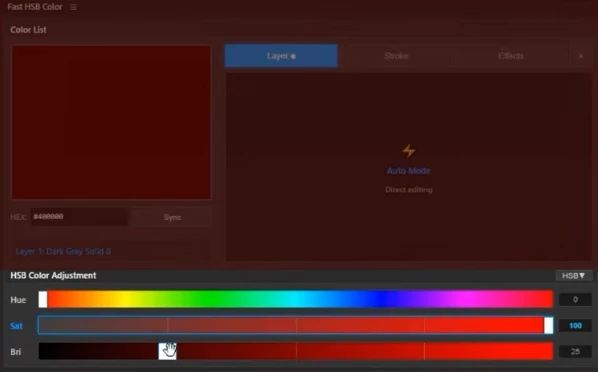
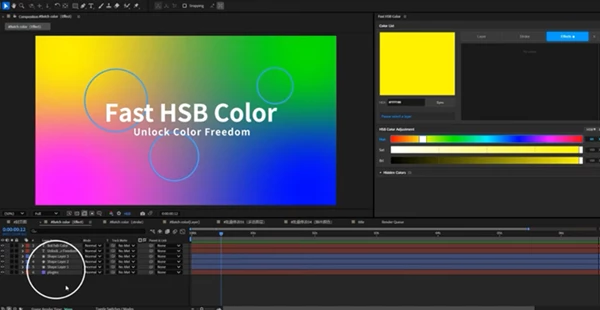
The tool places Hue, Saturation, and Brightness sliders directly inside the After Effects workspace, allowing instant color adjustments without opening additional windows.
Automatic Color Property Detection
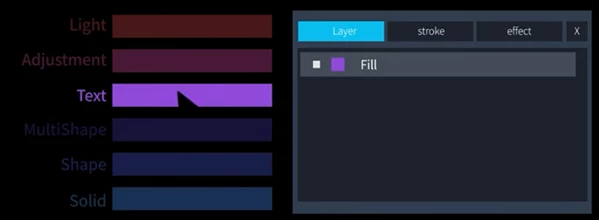
Fast HSB Color scans the selected layers and automatically detects editable color properties. This includes colors from solids, text layers, shapes, lights, adjustment layers, and effects.
Batch Color Editing
You can modify multiple colors across multiple layers simultaneously. Adjust once and update everything at the same time.
Keyboard-Driven Adjustments
For users who prefer speed, keyboard shortcuts make color editing even faster.
- Press 1 / 2 / 3 to activate Hue, Saturation, or Brightness
- Use Arrow keys for fine adjustments (±1)
- Hold Shift for larger adjustments (Hue ±30°, Saturation/Brightness ±25%)
Visual Reference Ruler
A visual ruler helps you better understand color changes while adjusting sliders, making it easier to fine-tune your palette.
Wide Layer Support
The tool works with nearly every color source in After Effects, including:
- Solid layers
- Text layers
- Shape layers
- Adjustment layers
- Light layers
- Fill and stroke colors
- Effect color parameters
Professional Tips for Faster Color Workflows
Even with a powerful tool like Fast HSB Color, a few small techniques can make your workflow even smoother.
Use Batch Editing for Consistent Palettes
When working with motion graphics that share a color scheme, select multiple layers and adjust them together. This ensures consistent color harmony across the entire composition.
Use Keyboard Controls for Precision
Keyboard shortcuts allow you to fine-tune colors without leaving the keyboard. Small ±1 adjustments are great for subtle changes that maintain visual balance.
Experiment Quickly with Hue
Changing hue while keeping saturation and brightness stable is a great way to explore different color styles for the same design.
Adjust Brightness for Depth
Small brightness changes can create stronger contrast between foreground and background elements, making animations feel more dynamic.
Final Thoughts
Fast HSB Color is a small tool that can make a big difference. This tool gathers all color properties in one place and allows you to adjust them directly using sliders and keyboard shortcuts.
This tool is useful for anyone working on motion graphics or text effects.
Anyone who finds themselves opening the color picker multiple times can benefit from this tool.
 Fast HSB Color on-interface HSB color sliders in Ae by Aescripts (v2.3.0).rar (Size: 4.5 MB - Date: 5/23/2026 12:48:52 PM)
- Fast HSB Color on-interface HSB color sliders in Ae by Aescripts (v2.2.0).rar (Size: 4.4 MB - Date: 5/5/2026 11:49:42 AM)
- Fast HSB Color on-interface HSB color sliders in Ae by Aescripts (v2.0.0).rar (Size: 14.5 MB - Date: 4/25/2026 1:47:59 PM)
- Aescripts - Fast HSB Color v1.0.rar (Size: 10.8 MB - Date: 3/14/2026 12:30:52 PM)
Files Password : gfxplugin.com OR 123456