Downloadable Files
You can download the Classic Mini Lab product for free from the end of this page.
A Warm Film Look for the Digital Age
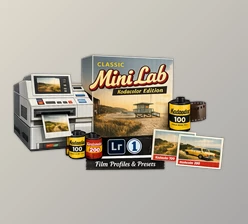
If you enjoy the nostalgic charm of classic film photography but prefer the convenience of digital editing, the Classic Mini Lab Gold Edition (2026) might quickly become one of your favorite tools. This carefully designed preset collection recreates the iconic look of popular Kodak films inside Adobe Lightroom and Camera Raw. Inspired by professional mini lab scans, this set brings the warm tones, natural color balance, and soft highlight roll-off that many photographers associate with traditional film. Instead of spending hours adjusting colors manually, you can achieve a timeless film aesthetic with just a few clicks. Whether you're editing travel photos, lifestyle shots, or everyday memories, these presets make your images feel more alive, expressive, and cinematic.
What Is Classic Mini Lab and Why Does It Matter?
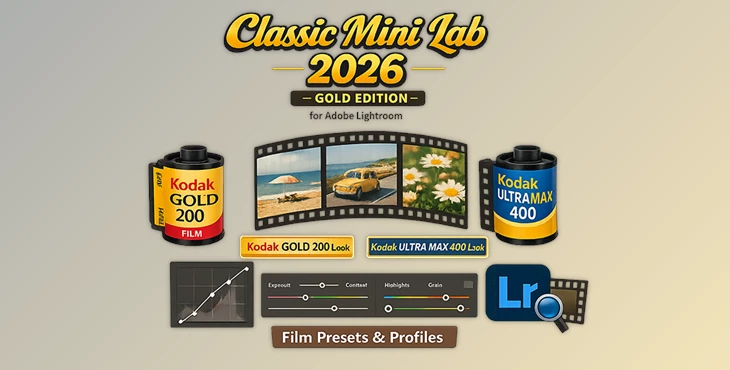
At its core, Classic Mini Lab is a collection of film-inspired color profiles and presets designed to simulate the look of classic Kodak color films such as Gold 200 and Ultra Max 400. These films have been popular for decades because they produce:
- Warm and vibrant colors
- Smooth tonal transitions
- Soft yet pleasing contrast
- Generous exposure latitude
The Classic Mini Lab Gold Edition recreates these characteristics using data from professional lab scans created with Fujifilm Frontier SP3000 and Noritsu HS1800 scanners. These scanners are widely used in photo labs to digitize film negatives with accurate color and tonal detail.
Why This Matters for Photographers
Modern digital cameras capture extremely clean and sharp images, but they often lack the subtle imperfections and character that make film photography feel special. With film-style profiles like Classic Mini Lab, photographers can:
- Add natural warmth and personality to digital images
- Achieve smoother highlight transitions
- Simulate realistic overexposure behavior
- Create consistent color grading across entire photo sets
For example, a travel photo taken under bright sunlight can gain a nostalgic vacation vibe, while a portrait can feel softer and more organic with gentle highlight roll-off.
Meet the Tool: Classic Mini Lab Gold Edition
The Classic Mini Lab Gold Edition (2026) is a premium preset and profile pack created specifically for Adobe Lightroom and Adobe Camera Raw users. It recreates the everyday, reliable color aesthetic of Kodak’s most beloved consumer films. Instead of simply applying generic filters, this pack simulates how real film behaves at different exposure levels, allowing photographers to preserve the authentic look of lab-developed negatives.
Features
Film Profiles Based on Real Lab Scans
This set is built using recent professional scans from Frontier SP3000 and Noritsu HS1800 lab scanners. These scans capture the true color science and tonal response of classic Kodak films.
Inspired by Kodak Gold 200 and Ultra Max 400
Both films are famous for their lively yet natural color rendering. The presets replicate their signature look, including warm tones, vibrant colors, and balanced contrast.
12 Carefully Tuned Profiles
The pack includes twelve finely calibrated profiles designed to match normal exposures as well as slightly overexposed film negatives. This gives photographers more flexibility when editing different lighting conditions.
Flexible Preset Controls
Complementary presets such as:
- Shadow Strong
- Highlights Soft
allow users to adjust contrast and tonal balance quickly while maintaining an authentic film look.
Authentic Highlight Roll-Off
Film handles bright highlights differently than digital sensors. This pack mimics that soft highlight transition, which helps create a more cinematic and natural feel.
Real-World Creative Possibilities
Photographers can use the Classic Mini Lab presets in many types of projects:
- Travel Photography: Give landscapes and city scenes a warm vacation vibe.
- Street Photography: Recreate the everyday documentary feel of classic film.
- Portrait Sessions: Add subtle warmth and softer highlights to skin tones.
- Lifestyle Photography: Make casual moments look timeless and nostalgic.
For example, a bright afternoon street shot can gain the vibrant yet natural colors of Kodak Ultra Max, while a portrait captured during golden hour may benefit from the warmth of Kodak Gold.



Pro Tips for Getting the Best Results
Slight Overexposure Works Wonders
Film stocks like Kodak Gold are known for handling overexposure beautifully. Try increasing exposure slightly before applying the preset to recreate that classic film glow.
Use the Highlight Control Carefully
If highlights look too bright, adjust them gently rather than lowering exposure too much. This preserves the film-style highlight roll-off.
Combine with Grain for Extra Realism
Adding a small amount of grain in Lightroom can enhance the film illusion and give images a more organic texture.
Keep White Balance Natural
Film presets work best when the white balance is relatively neutral. Avoid extreme color temperature adjustments before applying the profile.
Experiment with Shadow Presets
Presets like Shadow Strong can add drama and contrast, especially in street photography or low-light scenes.
Final Thoughts
The Classic Mini Lab Gold Edition (2026) offers a simple yet powerful way to bring the beloved character of Kodak color film into modern digital photography. Using real lab scan data and carefully-tuned presets, this plugin allows photographers to achieve the warm colors, contrast, and nostalgic feeling that many photographers love about Kodak film. Photographers who want their digital photos to have that timeless and expressive feeling can benefit from tools like Classic Mini Lab. If you enjoy film-inspired color grading or want to give your photos that classic mini lab aesthetic, then this preset pack is definitely worth exploring. It is an easy and creative way to transform your ordinary photos into photographs with a nostalgic charm.

Files Password : gfxplugin.com OR 123456