Downloadable Files
You can download Wrap It for After Effects for free at the end of this page.
Discover a New Way to Work with 3D in After Effects
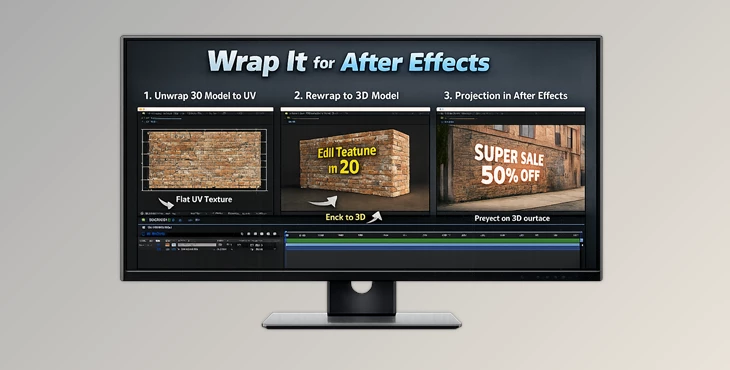
If you work in VFX or motion graphics, you may be familiar with the limitations of traditional 2D projection techniques inside programs like After Effects. Many artists have come to rely on clever tricks to simulate 3D workflows. Still, these methods typically come with many restrictions and can be relatively time-consuming. Wrap It for After Effects enters the scene as a tool that introduces real 3D camera projection to the AE environment, allowing artists to work with actual 3D geometry instead of fake 2D projections. Using Alembic files, UV unwrapping, and texture rewrapping, this tool promises to provide a smoother workflow between 3D software and After Effects.
Understanding the Core Idea Behind the Tool
At its core, the concept behind this tool is true 3D camera projection inside After Effects. In traditional compositing workflows, artists often project images onto simple geometry to recreate perspective. However, without real geometry support, the process can quickly become complicated or inaccurate. With Wrap It for After Effects, you can load real 3D models and work directly with their geometry and UV maps. This means your textures, projections, and compositing adjustments behave exactly as they would in a dedicated 3D application. For example:
- Imagine you tracked a shot of a building and want to extract the wall textures. With the unwrap feature, the geometry can be flattened into UV space, letting you paint or clean the texture easily.
- If you need to add graphics to a moving surface—like a billboard or sign—you can edit the texture in 2D and reapply it back onto the 3D surface with perfect alignment.
- When working on VFX shots, you can integrate graphics or fixes directly onto animated 3D geometry.
These capabilities help artists achieve more accurate projections, cleaner textures, and faster workflows, ultimately improving the final visual result.
Meet the Tool: Wrap It for After Effects
Wrap It for After Effects is designed to bridge the gap between full 3D software and compositing workflows. Instead of constantly switching between different programs, artists can now perform complex projection tasks directly inside After Effects. This not only saves time but also keeps the creative process more fluid and flexible.
Features
True 3D Camera Projection
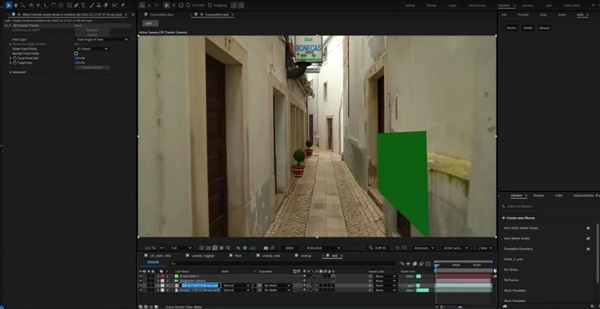
- The plugin enables real 3D camera projection inside After Effects. Artists can project footage onto actual geometry rather than flat layers, producing far more realistic results.
Alembic File Support
- You can load Alembic files directly, allowing the use of detailed and animated geometry exported from popular 3D applications.
Unwrap Mode (3D → UV)
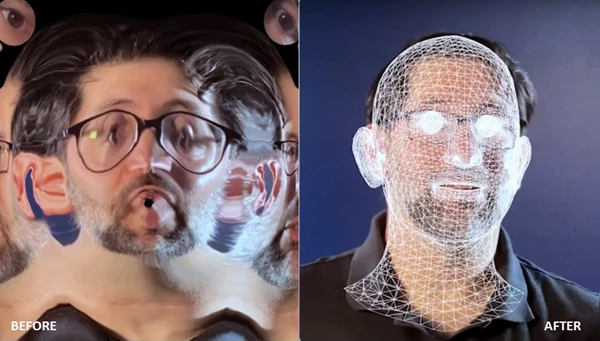
- This mode converts your 3D geometry into flat UV space. It allows you to extract textures from projected camera footage and create clean texture plates from tracked shots.
Rewrap Mode (UV → 3D)
- After editing textures in 2D, this feature lets you reapply them onto the 3D model through the camera projection. It’s ideal for adding graphics, repairing textures, or compositing surface-based effects.
Animated Geometry Support
- The plugin works with animated models, making it suitable for dynamic VFX shots and complex scenes.
GPU Acceleration
- For smoother performance, GPU acceleration helps process geometry and textures faster, especially in high-resolution projects.
Pro Tips for Better Results
To get the most out of Wrap It for After Effects, a few practical techniques can make a big difference.
Start with Clean Tracking Data
- Accurate camera tracking is the foundation of good projection work. Ensure your tracked camera and geometry match the scene as closely as possible before unwrapping textures.
Work in UV Space for Precision Fixes
- If you need to remove blemishes, paint details, or fix texture artifacts, editing in UV space gives you much more control than working directly in perspective view.
Keep Texture Resolution High
- When extracting textures from camera projections, use high-resolution footage whenever possible. This ensures your textures remain sharp after rewrapping onto geometry.
Use Layered Compositing
- Instead of applying all edits at once, build your textures in layers. This makes it easier to tweak elements later without starting over.
Final Thoughts
If you’re a regular user of VFX compositing, camera tracking, and 3D integration, Wrap It for After Effects can help you reduce the time spent performing compositing tasks. You can bring the advantages of true 3D geometry projection into After Effects and say goodbye to the restrictions of a 2D projection workflow. The ability to unwrap a texture, edit it in UV space, and re-wrap it onto a texture-mapped 3D object gives you a higher degree of accuracy when it comes to adding detailed effects. If you’d like to upgrade your compositing workflow and are interested in tools for advanced projection workflows, this is a plugin worth exploring. It can transform your approach to compositing surfaces, textures, and 3D objects within your After Effects projects.

Files Password : gfxplugin.com OR 123456