Downloadable Files
You can download the Copy Face product for free from the end of this very page.
Meet Copy Face: A New Way to Swap Faces with AI
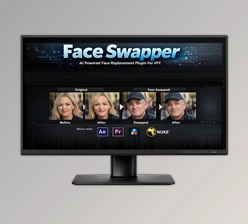
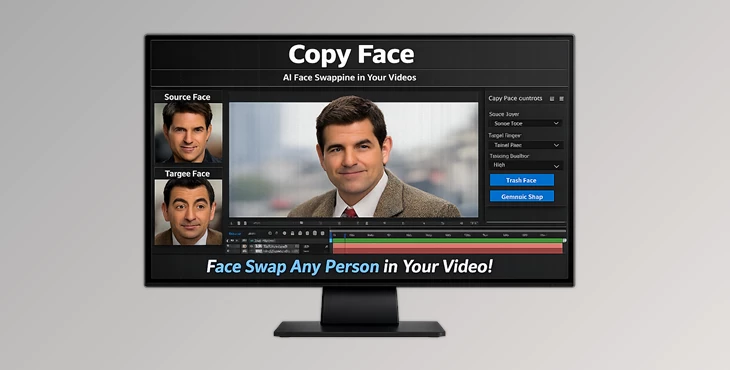
Have you ever seen a movie or video where the characters suddenly look like someone else? Or people are transformed into anime characters or superheroes? This sort of effect can be created using something called Copy Face. Copy Face is an AI-powered face-swapping solution that runs fully locally on your Windows machine. It can intelligently replace a face in your video with another one, and create some pretty convincing and high-quality results. If you are editing a video and want to try out some new creative effects, this type of technology opens the door to a whole new level of creativity. And the best part is that it’s simple enough that regular users can set it up with ease.
What Face Swapping Means and Why It’s Useful
At its core, face swapping is a technique where an AI model detects a face in a video and replaces it with another face while preserving expressions, movement, and lighting. Instead of manually editing frame by frame, the AI performs the heavy lifting. It analyzes facial landmarks and motion to ensure the new face follows the original performance.
Real-World Uses
Here are a few practical scenarios where tools like Copy Face become incredibly useful:
Actor Replacement
Imagine filming a scene and later needing to replace an actor or character. With face-swapping technology, you can substitute the original face with another one without reshooting the entire scene.
Content Personalization
Creators can tailor videos for different audiences by swapping faces with branded characters, mascots, or influencers.
Stylized Visual Effects
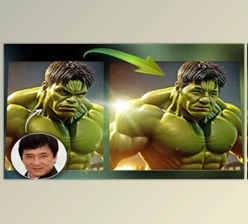
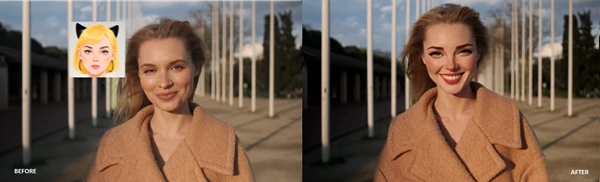
Copy Face also works with stylized faces, meaning you can transform a person into an anime-style character, superhero, or other creative visual identity.
Why These Capabilities Improve Results
AI-based face swapping ensures that:
- Facial expressions remain consistent.
- Movement across frames stays natural.
- Lighting and alignment adapt automatically.
This produces results that look far more realistic and cinematic compared to manual editing methods.
Copy Face: A Professional Face Swapping Tool
Copy Face is designed as a locally running AI plugin that allows users to replace faces in video clips with high-quality results. Because everything runs locally, you maintain full control over your footage and data. Below are some of its most important capabilities.
Features
High-Quality Face Swapping
The AI analyzes your footage and replaces the source face with a new one while preserving motion and expressions across frames. This ensures smooth and convincing visual results.
Works on Real Faces
The tool performs exceptionally well with real human faces. This makes it perfect for actor replacement, editing scenes, and personalized video content.
Supports Stylized Faces
Copy Face is not limited to realistic faces. You can also apply stylized characters such as anime faces, comic book heroes, or artistic designs.
Local AI Processing
All processing happens directly on your machine. This improves privacy and allows creators to work offline without uploading sensitive footage.
Simple Setup and Workflow
The plugin is designed to be easy to configure:
- Apply the effect to a video clip.
- Ensure only one face is present in the footage (current version supports single-face processing).
- Select a layer containing the new face (an image or .cpf file).
- Verify alignment using the New Face option.
Two Processing Modes
One Frame Preview
A quick preview mode that swaps faces frame by frame. This allows fast testing and adjustment of settings, although it may not be temporally stable.
Full Sequence Mode
For final results, this mode processes multiple frames together (around 50 frames at a time). The first frame in each batch may take up to 1–2 minutes, but the frames in between render very quickly and produce more stable results. You can also cancel processing anytime using the Stop Processing option.
Example Use Cases
Creators can use Copy Face for projects such as:
- Replacing a character’s face in a short film
- Creating humorous social media content
- Turning live footage into anime-style visuals
- Producing experimental VFX shots for indie productions

Pro Tips for Better Results
To get the most natural and professional-looking results from Copy Face, keep these practical tips in mind.
Use Clips with Only One Face
Currently, the tool works best when a single face is visible in the frame. Multiple faces can confuse the AI detection.
Center the Replacement Face
Before verification, make sure the new face image is centered and fills the frame properly. This improves alignment accuracy.
Preview Before Full Rendering
Use One Frame Preview to quickly adjust settings before running the heavier Full Sequence processing. Choose Stable Footage
Videos with steady camera movement and clear lighting usually produce the best results.
Match Lighting and Angle
If the new face has lighting and angle similar to the original footage, the final result will look much more natural.
Final Thoughts
Copy Face demonstrates how accessible AI-powered visual effects have become. With the ability to perform high-quality face swapping locally, creators can experiment freely without complex workflows or expensive production pipelines. From actor replacement to anime-style transformations, this tool opens up a wide range of creative possibilities for video editors, content creators, and digital artists. If you enjoy exploring new visual effects and pushing the boundaries of video editing, Copy Face is definitely worth trying. Even simple experiments can lead to surprisingly impressive results.

Files Password : gfxplugin.com OR 123456