Downloadable Files
You can download the Control LMFX product for free from the end of this page.
A Faster Way to Manage Effects in After Effects
Working in Adobe After Effects often means dealing with dozens—or even hundreds—of layers and effects inside multiple compositions. Finding the right layer, managing effects, or adjusting the same parameter across several comps can quickly turn into a repetitive and time-consuming task. This is where Control LMFX becomes incredibly useful. It’s designed to simplify the way you organize layers and control effects, helping you focus on creativity instead of searching through timelines. With smart grouping tools and centralized control, it makes complex projects feel much more manageable. If you’ve ever wished you could control multiple effects or layers from a single place, this tool will immediately spark your curiosity.
What Control LMFX Does and Why It Matters
At its core, Control LMFX is a workflow-enhancing panel built specifically for After Effects users who want faster and more organized project management. Instead of jumping between compositions or manually adjusting effects layer by layer, the panel allows you to group layers and effects and manage them centrally. Imagine working on a motion graphics project with several compositions where the same glow effect appears on multiple layers. Normally, you would open each composition and change the settings individually. With Control LMFX, you can adjust the effect parameter once and apply it across all selected compositions where that effect exists. This kind of control brings several benefits:
- Time savings: Less manual editing across multiple comps
- Better consistency: Effects remain uniform across the project
- Cleaner workflow: Groups and filters help you stay focused on relevant layers
For designers working on motion graphics, visual effects, or animation sequences, this can significantly improve productivity and reduce repetitive work.
Meet the Tool: Control LMFX
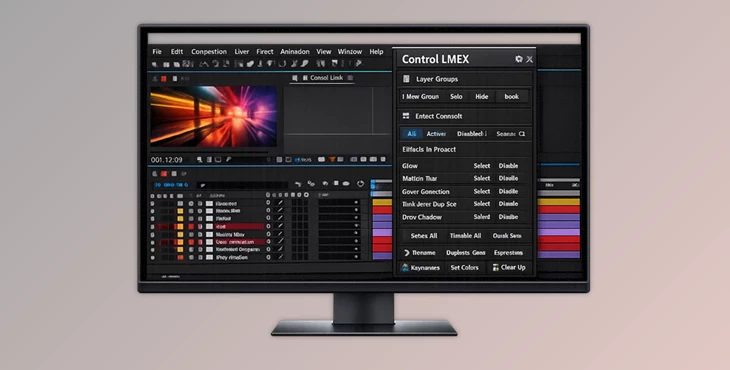
Control LMFX is a professional After Effects panel created to streamline how layers and effects are organized and controlled in complex projects. Instead of treating each composition separately, the tool gives you a unified control space where groups of layers and effects can be managed efficiently. This makes the workflow smoother and reduces the effort required to maintain consistency across multiple compositions. Whether you’re editing motion graphics templates, building animation systems, or managing VFX-heavy timelines, the panel helps simplify the process.
Features
Group Viewer
One of the most powerful components of Control LMFX is the Group Viewer.
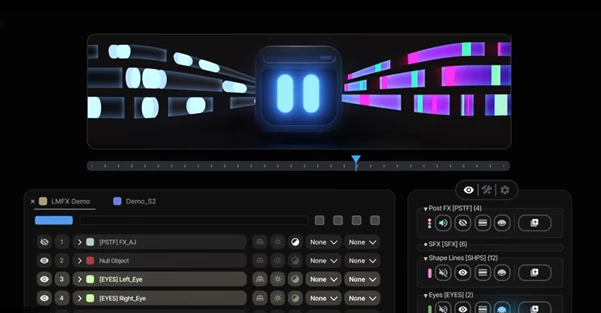
This tool acts as a clear and organized group manager that displays detailed information about your layers. You can group layers and quickly see which ones belong together. Once a group is created, additional tools can be used that work specifically within that group. For example, if you’re animating multiple UI elements in a motion graphics project, you can group them and adjust their effects or settings without affecting unrelated layers.
FX Manager
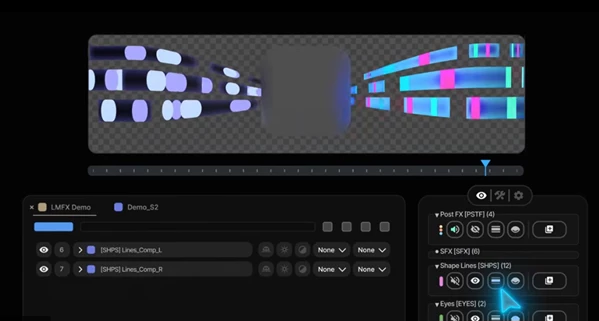
The FX Manager gives you full control over the effects used throughout your project. It allows you to quickly identify which layers have a particular effect enabled. This is extremely helpful in complex compositions where effects are scattered across multiple layers. Instead of hunting through the timeline, you can instantly see where the selected effect is active and control its status. For example, when testing different looks in a cinematic intro animation, you can toggle specific effects on or off across many layers without opening each one manually.
Layer Filters in the Timeline
Another helpful feature is Layer Filters.
These filters allow you to focus only on the layers you need while temporarily hiding the rest. In large projects, timelines often become cluttered with dozens of layers. Preset filters help remove distractions so you can work more efficiently. For instance, when adjusting lighting effects in a motion graphics scene, you can filter the timeline to show only the relevant layers, making the workflow much clearer.
Pro Tips for Using Control LMFX More Effectively
To get the most out of Control LMFX, a few practical workflow habits can make a big difference.
Create logical groups early
As soon as you begin building your composition, start grouping layers that serve the same purpose—such as background elements, lighting effects, or text animations. This keeps everything organized as the project grows.
Use FX Manager for quick testing
When experimenting with different visual styles, use the FX Manager to quickly enable or disable effects. This makes it easier to compare variations without permanently changing settings.
Combine filters with groups
Using layer filters alongside groups can dramatically reduce timeline clutter. Focus on a specific part of the animation while keeping the rest of the project intact.
Maintain consistent effect settings
If the same effect appears across several compositions, adjust it centrally rather than individually. This ensures visual consistency and prevents small mismatches in settings.
Final Thoughts
Control LMFX is a powerful yet practical tool for anyone who spends serious time working inside After Effects. Simplifying how layers and effects are organized removes a lot of the friction that comes with complex timelines. From grouping layers to managing effects across multiple compositions, the panel helps streamline the workflow and makes projects easier to control. The result is more time spent refining creative ideas and less time dealing with repetitive tasks. If you regularly work with motion graphics, visual effects, or large After Effects projects, Control LMFX can become a valuable addition to your toolkit—making your workflow faster, cleaner, and more efficient.
 Control LMFX - Speeds up your workflow in Ae by Aescripts (v1.1.3).rar (Size: 884.1 KB - Date: 5/16/2026 1:40:59 PM)
- Control LMFX - Speeds up your workflow in Ae by Aescripts (v1.1.2).rar (Size: 987.3 KB - Date: 4/6/2026 11:55:56 AM)
- Control LMFX - Speeds up your workflow in Ae by Aescripts (v1.1.0).rar (Size: 9.5 MB - Date: 3/18/2026 12:15:21 PM)
- Aescripts - Control LMFX v1.0.rar (Size: 9.5 MB - Date: 3/7/2026 1:40:37 PM)
Files Password : gfxplugin.com OR 123456