Downloadable Files
You can download the Foldspace product for free from the end of this page.
A New Way to Create Curved 3D Surfaces in After Effects
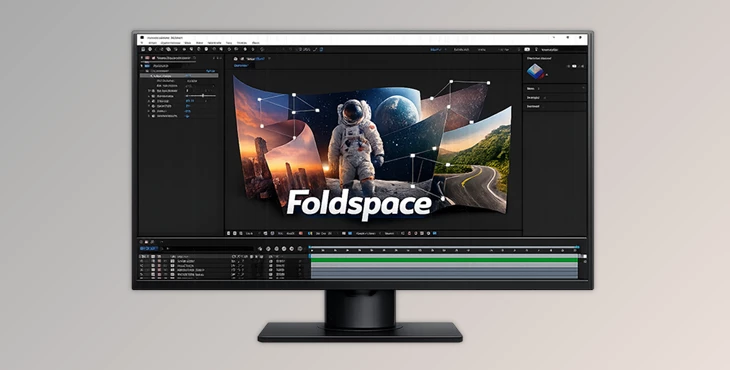
If you’ve ever worked in Adobe After Effects, you probably know that creating true curved 3D surfaces isn’t exactly easy. Native tools are powerful, but when it comes to bending, folding, or shaping surfaces in a flexible way, things can quickly become complicated. That’s where Foldspace comes in. Foldspace is a GPU-accelerated plugin that lets you create, edit, and animate curved 3D surfaces directly inside After Effects. Instead of relying on complex workarounds, you can shape surfaces naturally using control points, apply textures from your composition, and animate them with smooth performance. The result? More creative freedom, faster workflows, and the ability to build complex 3D visuals without leaving After Effects.
Understanding the Idea Behind Foldspace
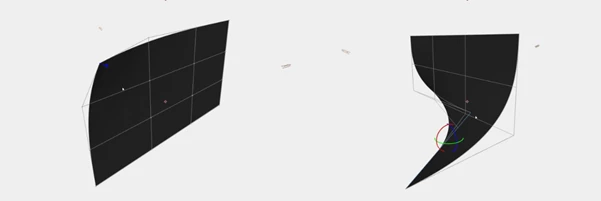
At its core, Foldspace introduces a new way to work with curved surfaces in 3D space inside After Effects. Each surface is built using 16 control points that you can position anywhere in 3D space. By moving these points, you can bend, warp, and reshape the surface into almost any form.
Real-World Use Cases
This flexibility opens up many creative possibilities, such as:
- Designing animated curved screens or UI panels
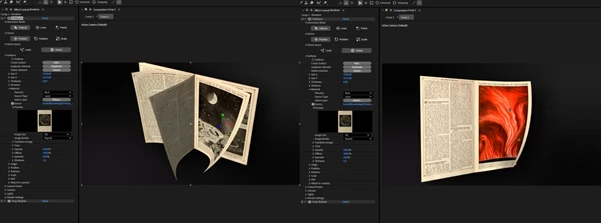
- Creating folding posters or bending surfaces
- Building dynamic cubes or geometric objects
- Producing spirals, tubes, or rolling surfaces
- Adding 3D depth to motion graphics
For example, imagine creating a cube where each face is actually a flexible surface. Instead of rigid geometry, you could animate the faces bending, folding, or rolling in unique ways. This adds a much more organic and dynamic feeling to motion design. Because each control point can also be linked to layers, you can build custom animation rigs that respond to your existing After Effects animations.
Meet the Professional Tool: Foldspace
Foldspace is designed specifically for motion designers who want greater control over 3D surfaces without leaving After Effects. It integrates directly with the software and works alongside native cameras, lights, and layers, making it feel like a natural extension of your workflow. Below are some of the most important capabilities that make this plugin so powerful.
Features
Curved Surface Creation
Foldspace allows you to create surfaces that bend and curve naturally in 3D space. Each surface is defined by 16 adjustable control points, giving you precise control over shape and curvature. You can move these points freely in 3D space to create almost any form. This flexibility makes it possible to build shapes that would normally require external 3D software.
Editable Geometry
All surfaces remain fully editable at any time. You can reposition control points, reshape surfaces, or animate them without rebuilding the object. This non-destructive workflow makes experimentation easier and encourages creative exploration.
Powerful Material System
Every surface can have separate materials for different sides, including:
- Front
- Back
- Left
- Right
- Top
- Bottom (if thickness is enabled)
Each material includes properties such as:
- Diffuse
- Specular
- Shininess
- Opacity
Even better, any layer in your composition can be used as a texture, allowing seamless integration with your existing design elements.
Seamless Integration with After Effects
Foldspace works directly with After Effects cameras, lights, and layers. You can attach surfaces or control points to layers, which means they automatically inherit transformations such as:
- Position
- Rotation
- Scale
- Animation
This allows you to drive complex surface animations using the native animation tools you already know.
Built for Animation Rigs
One of the most powerful aspects of Foldspace is the ability to attach control points to layers. This means each point can be animated independently, enabling the creation of custom animation rigs. For example, you could build a cube where each face is a Foldspace surface and animate it folding, twisting, or unfolding dynamically.
Unlimited Surface Complexity
There is no limit to the number of surfaces you can create. All surfaces exist in the same 3D space and can overlap, intersect, or connect to form larger shapes. This makes it possible to build complex scenes made entirely from curved surfaces.
Custom On-Screen UI
Foldspace includes a dedicated interactive interface inside the viewport. When the effect is selected, you can directly manipulate surfaces and control points using:
- Position gizmos
- Rotation controls
- Scale handles
This visual workflow makes editing surfaces intuitive and much faster than adjusting parameters manually.
Roll Modifier
The Roll Modifier lets you quickly create rolling and spiral animations. With simple parameters like:
- Angle
- Tilt
- Radius
You can transform a flat surface into shapes such as tubes or spirals, perfect for motion graphics and abstract animations.
High-Performance GPU Rendering
Foldspace uses GPU acceleration for fast rendering:
- Vulkan on Windows
- Metal on macOS
This allows the plugin to maintain smooth performance even when working with complex scenes and multiple surfaces.
Multi-Frame Rendering & 32-bit Color
The plugin fully supports:
- 32-bit-per-channel color depth
- After Effects Multi-Frame Rendering
This ensures high image quality while maximizing rendering performance.
Pro Tips for Better Results
Here are a few practical tips to help you get the most out of Foldspace:
Start Simple with Control Points
When creating a new surface, begin with small adjustments to control points. Large movements can quickly create complex shapes, so gradual edits help maintain control.
Use Layers as Animation Drivers
Attach control points to null objects or animated layers. This makes it easier to build flexible rigs and control motion with familiar After Effects tools.
Experiment with Texture Layers
Try using animated layers, gradients, or video clips as textures. Because Foldspace supports composition layers as materials, you can create dynamic surfaces with evolving visuals.
Combine Multiple Surfaces
Instead of forcing one surface to do everything, create several surfaces and combine them. This often produces cleaner shapes and more natural animations.
Final Thoughts
Foldspace brings a completely new level of 3D surface control to After Effects. By allowing you to create curved, flexible surfaces and animate them directly inside your composition, it removes many of the limitations of traditional workflows. Whether you're building dynamic motion graphics, abstract animations, or complex geometric scenes, Foldspace offers a powerful yet intuitive way to expand your creative possibilities. If you enjoy experimenting with shape, motion, and 3D depth in After Effects, this tool can quickly become an essential part of your workflow.