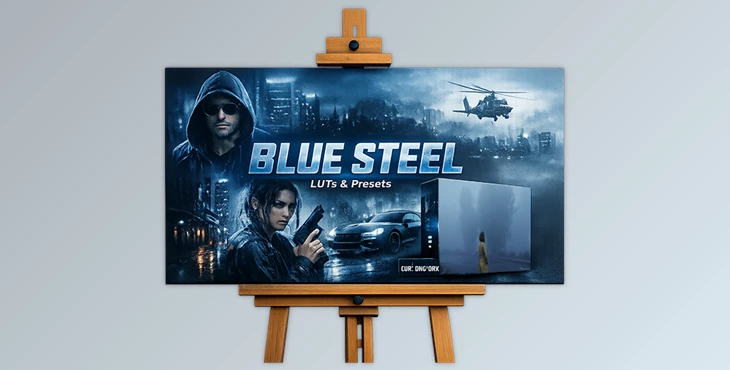
Downloadable Files
You can download the product Blue Steel for free at the end of this page.
A Cool Edge for Your Photos and Videos
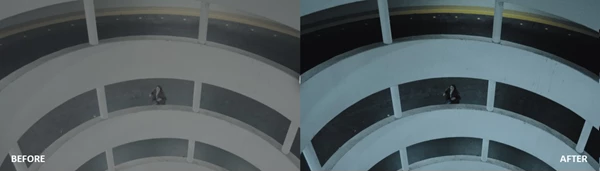
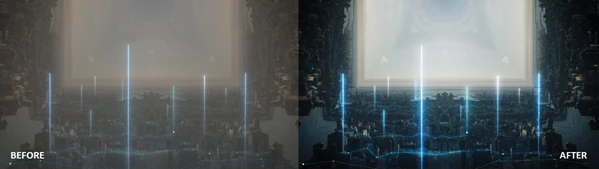
Want your photos and videos to look more cinematic, intense, and visually striking? The best way to get there is through color grading; however, that can take hours of work. This professional pack of LUTs and presets will add a cool, steely tone to your visuals. It gives your work a bold, edgy atmosphere. Whether you’re working on photos, cinematic videos, or social media content, these presets will give you a polished, dramatic look in just a few clicks.
What Are LUTs and Presets and Why Do Creators Use Them?
Before diving deeper, it helps to understand what LUTs and presets actually are. A LUT (Look-Up Table) or preset is essentially a predefined color grading formula. It automatically adjusts colors, contrast, shadows, and highlights to create a specific visual style. Instead of manually adjusting every color setting, a LUT applies a complete color profile instantly.
Why This Matters
Using LUTs and presets offers several practical advantages:
- Consistency: Maintain a consistent color style across multiple photos or videos.
- Speed: Apply complex color grading in seconds.
- Professional Results: Achieve cinematic looks similar to films and professional productions.
- Creative Exploration: Quickly experiment with different visual moods.
For example, a travel creator can use a preset to give all their videos a cool cinematic tone, while a photographer might use it to create a moody portrait style. These tools simplify the editing process while improving the overall visual impact of your work.
Meet Blue Steel – A Professional Color Toolkit
Blue Steel is a curated collection of 19 versatile color looks designed to bring depth, atmosphere, and intensity to your images and videos. Instead of spending hours adjusting color curves and grading nodes, you can simply drag, drop, and go. The pack works across mobile and desktop platforms, making it suitable for photographers, filmmakers, and content creators alike.
Features
19 Unique and Versatile Looks
The Blue Steel pack includes 19 carefully crafted styles, each designed to enhance mood and cinematic depth. These looks add cool tones, controlled contrast, and refined color balance to create a strong visual identity. Whether you’re editing:
- cinematic travel footage
- dramatic portraits
- urban photography
- social media content
You’ll find a look that enhances the atmosphere of your project.
Works in Almost Any Editing Software
One of the biggest strengths of Blue Steel is its broad compatibility. The pack supports common formats such as:
- .cube
- .drx
- .dng
This means the presets work with a wide range of popular editing tools, including:
- Lightroom (Desktop & Mobile)
- Adobe Premiere Pro
- DaVinci Resolve
- Final Cut Pro X
- CapCut
- Vegas Pro
- Avid Media Composer
- LumaFusion
- Photoshop
- After Effects
No matter which software you prefer, you can easily integrate Blue Steel into your workflow.
Mobile and Desktop Ready
Modern creators often switch between devices. You might edit photos on your phone, but finish videos on your desktop. Blue Steel supports Mac, Windows, iOS, and Android, giving you full flexibility. You can:
- edit photos on Lightroom Mobile
- grade videos in Premiere Pro
- color correct footage in DaVinci Resolve
- Create social media edits in CapCut
All use the same consistent color style.
Built for Professional Camera Profiles
Blue Steel is optimized for popular camera profiles such as:
- S-Log
- V-Log
- C-Log
These profiles preserve more dynamic range when shooting, and the presets are designed to work seamlessly with them. The result is cleaner color grading, balanced highlights, and richer tones.

Pro Tips for Getting the Best Results
Even though presets are easy to use, a few simple techniques can help you achieve more natural and professional results.
Adjust Intensity
After applying a preset, slightly reduce or increase its strength. Most editing programs allow you to adjust preset intensity or opacity, helping the final look feel more natural.
Combine with Basic Adjustments
Presets work best when paired with small manual tweaks. Try adjusting:
- exposure
- white balance
- contrast
These quick refinements help the preset blend perfectly with your footage.
Match the Mood of the Scene
Blue Steel’s cool tones work especially well for:
- urban environments
- cinematic travel footage
- night scenes
- dramatic portraits
Choosing the right preset for the scene helps your visuals feel intentional and cinematic.
Final Thoughts
Color grading can completely transform the mood and impact of a photo or video. But achieving professional results often requires time, skill, and experience. Tools like Blue Steel simplify the process. With 19 versatile looks, broad software compatibility, and instant drag-and-drop usability, it allows creators to produce cinematic visuals quickly and effortlessly. If you enjoy experimenting with color styles or want to speed up your editing workflow, Blue Steel is definitely worth exploring. And remember — you can download Blue Steel for free at the end of this page and try the looks yourself.

Files Password : gfxplugin.com OR 123456