Downloadable Files
You can download Ultra Cyber LUTS for free at the bottom of this very page.
Step Into a New Color Dimension
Color grading is where ordinary footage turns into something unforgettable. With just the right tones, contrast, and cinematic balance, a simple clip can suddenly feel futuristic, dramatic, or emotionally powerful. Ultra Cyber LUTS is designed exactly for that transformation. If you’ve ever wanted to give your videos a bold cyber-inspired vibe or a professional cinematic polish in seconds, this bundle opens the door. It’s fast, creative, and surprisingly easy to use — even if you’re not a color grading expert. Curious how much difference color can really make? You’re about to find out.
What Are LUTs and Why Do They Matter?
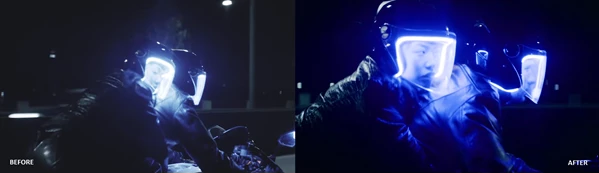
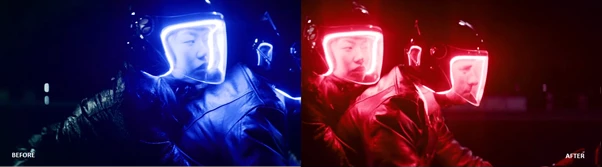
LUT stands for Look-Up Table. In simple terms, a LUT is a preset color profile that instantly changes the color and mood of your footage. Instead of manually adjusting exposure, contrast, highlights, shadows, and color balance, a LUT applies a complete color transformation in one click.
Real-World Uses You Can Imagine
Think about:
- A YouTube vlog that suddenly looks cinematic and high-end
- A short film that needs a futuristic cyberpunk atmosphere
- Social media reels that stand out with bold, vibrant tones
- Commercial ads that require consistent and professional color grading
Using Ultra Cyber LUTS, you can instantly enhance mood, create consistency across scenes, and elevate production quality without spending hours tweaking sliders. Why does this improve your results? Because color grading:
- Enhances emotional impact
- Creates visual consistency
- Makes footage look more expensive and polished
- Strengthens your creative identity
Good color isn’t just decoration — it’s storytelling.
Meet the Professional Tool: Ultra Cyber LUTS
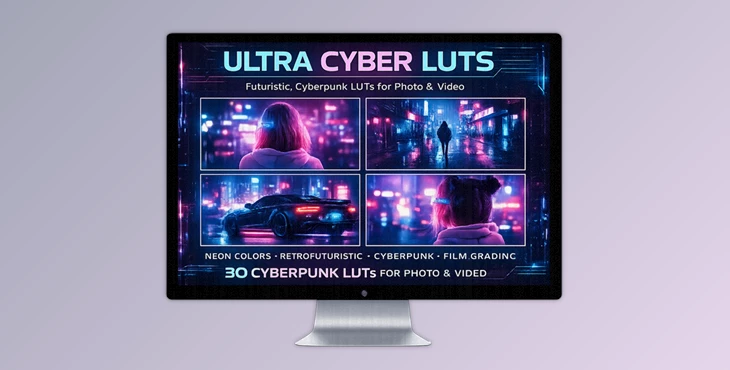
Ultra Cyber LUTS is a massive bundle of over 800 unique LUTs created to give your footage a distinctive cyber-inspired look while maintaining professional quality. This pack is exclusively available on this website and includes everything you need to level up your color grading workflow.
Features
800+ Ultra Cyber LUTs You get access to more than 800 unique LUTs, offering a wide range of cyber tones, cinematic effects, bold contrasts, and creative color moods. This variety allows you to experiment freely and find the perfect style for every project.
Wide Compatibility
Compatible with:
- Adobe Premiere Pro
- Adobe After Effects
- DaVinci Resolve
- Final Cut Pro
- CapCut
- LumaFusion
- And many other desktop, tablet, and mobile editing software
Works on both Windows and macOS, giving you full flexibility regardless of your setup.
Professional .cube Format
All LUTs are delivered in .cube files, the industry-standard format. This ensures seamless performance across major editing platforms.
Multi-Resolution Design
Each LUT is optimized for:
- 4K (3840x2160)
- Full HD (1920x1080)
- Vertical (1080x1350)
- Story (1080x1920)
- Square (1080x1080)
Whether you’re producing cinematic YouTube videos, Instagram stories, TikTok reels, or square social posts, your colors stay consistent and sharp.
Easy Installation & Drag-and-Drop Workflow
A video installation guide is included for each editing software. The process is simple and beginner-friendly — just drag and drop your chosen LUT, and you’re ready to go.
Commercial License
You’re free to use these LUTs in:
- Commercial advertisements
- YouTube content
- Social media projects
- TV broadcasts
- Business presentations
- Short films and feature films
- Advertising campaigns
No limitations on creativity — use them anywhere you imagine.

Pro Tips for Better Results
1. Adjust Intensity for Natural Results
Don’t always use LUTs at 100%. Lowering intensity to 60–80% often creates a more natural and professional look.
2. Fix Exposure First
Before applying a LUT, correct exposure and white balance. A clean base image ensures the LUT performs at its best.
3. Combine with Minor Tweaks
After applying a LUT, fine-tune contrast, highlights, and shadows slightly. Small adjustments can make your footage look custom-graded rather than preset-applied.
4. Match Scenes for Consistency
When editing multiple clips, apply the same LUT and make subtle exposure adjustments to keep visual consistency across the entire project.
5. Experiment Creatively
With 800+ options, don’t settle for the first result. Try different LUTs on the same clip — sometimes the unexpected choice becomes your signature style.
Final Thoughts: Elevate Your Visual Identity
Color is one of the strongest tools in visual storytelling — and Ultra Cyber LUTS gives you instant access to a massive creative arsenal. With over 800 professional LUTs, multi-format optimization, and full software and commercial usage compatibility, this is a LUT bundle you won’t want to miss. Whether you are a content creator, filmmaker, social media editor, or freelance editor, the right color grade can do wonders for the way your audience experiences your content. So explore the possibilities and experiment with these bold, cyber-themed LUTs to give your editing work a professional finish.

Files Password : gfxplugin.com OR 123456


.png)