Downloadable Files
You can download the Marissa Kelly Preset Collection for free at the bottom of this page.
A Dreamy Edit in Just One Click
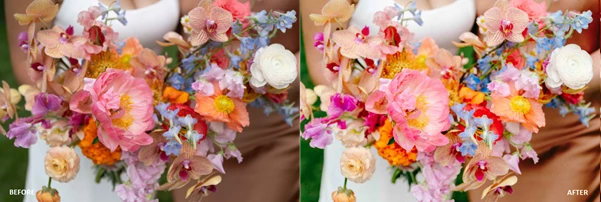
If you’ve ever struggled to find that perfect balance between warmth, softness, and natural vibrancy in your photos, you’re not alone. Editing can sometimes feel like a never-ending cycle of tweaking tones, adjusting contrast, and trying to keep skin colors looking real. The Marissa Kelly Preset Collection was created exactly for that reason—to make your editing workflow effortless while achieving a refined, romantic, and timeless aesthetic. These presets are designed to enhance your photos without overpowering them, giving you soft yet vibrant colors that still feel true to life. Curious how a single preset can completely transform your gallery? Let’s explore.
What Are Lightroom Presets & Why Do They Matter?
At their core, Lightroom presets are pre-configured editing settings that apply a specific look to your photos instantly. Instead of manually adjusting exposure, contrast, tones, color balance, and grain every time, a preset does it in one click. But not all presets are created equal. The Marissa Kelly Preset Collection focuses on:
- Soft yet vibrant colors
- Natural skin tones
- Balanced warmth and brightness
- A cohesive, timeless gallery look
Why This Improves Your Results
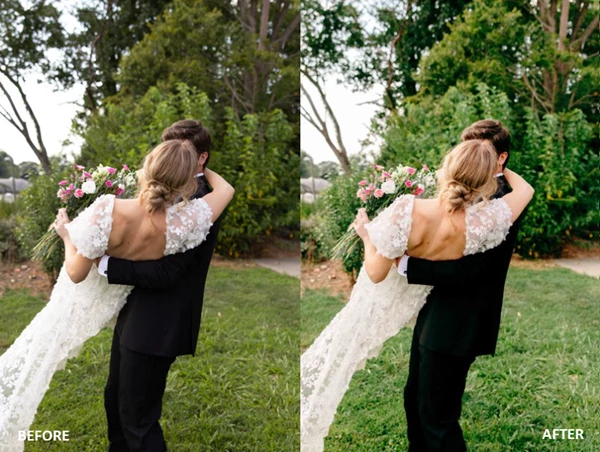
When your images share a consistent color story, your entire portfolio feels more professional. Imagine delivering a wedding gallery where every image flows seamlessly—from bright outdoor portraits to indoor candlelit moments. That consistency builds trust and strengthens your visual identity as a photographer. For example:
- Outdoor summer sessions benefit from vibrant aquas and warm greens.
- Romantic couple shoots glow with delicate pink undertones.
- Backlit portraits retain bright highlights without losing detail.
The result? Images that feel polished, natural, and emotionally engaging.
Meet the Collection
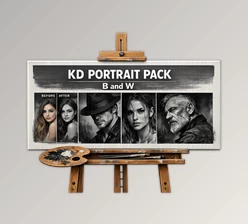
The Marissa Kelly Preset Collection is a curated set of five color presets and two black & white presets for Lightroom Desktop. Each preset includes a unique built-in Lightroom Profile, allowing for quick and flexible adjustments without compromising the original aesthetic. It also includes fourteen bonus modifiers for fine-tuning contrast, colors, tones, and more—plus a 50-minute editing tutorial where Marissa walks through each preset and modifier in action.
Features
1. Seven Unique Lightroom Profiles
Each preset is built with its own Lightroom profile, making it easier to tweak exposure and tones while maintaining the intended look.
2. Five Distinct Color Presets
- Preset 1 – A bright, colorful go-to edit with bright whites, natural skin tones, and soft pink undertones for a romantic finish.
- Preset 2 – Softer shadows and highlights with less contrast, natural reds and oranges, and subtle grain for a fine art film feel.
- Preset 3 – Slightly cooler tones and softer greens, ideal for greenery-rich environments or bright white scenes.
- Preset 4 – The most vibrant and high-contrast option—perfect for bold edits and backlit images.
- Preset 5 – Film-inspired with faded shadows, softened highlights, and subtle green tones for a more understated look.
3. Two Timeless Black & White Presets
- Preset 6 – B&W – A classic black and white look with optional high-contrast and warmer variations.
- Preset 7 – B&W – A lower-contrast version with lifted shadows for a softer, more delicate feel, also with a warmer option.
4. Bonus Modifiers
Fourteen extra tools allow you to:
- Adjust contrast levels
- Fine-tune color balance
- Control tones and grain
- Customize the look depending on lighting conditions
5. 50-Minute Editing Tutorial
A step-by-step video where Marissa demonstrates how to edit using all seven presets and explains how to use each modifier effectively.


Professional Techniques for Better Results
Even the best presets work best with thoughtful adjustments. Here are a few simple tips to elevate your edits:
1. Nail Your Exposure First
Before applying a preset, adjust your exposure and white balance. Presets perform best when your base image is properly lit.
2. Choose Based on Lighting
- Use Preset 4 for strong backlight and vibrant scenes.
- Try Preset 3 for greenery-heavy locations.
- Go with Preset 2 or 5 for softer, film-inspired edits.
3. Use Modifiers Sparingly
The bonus modifiers are powerful tools. Subtle adjustments often create the most professional results. Small tweaks in contrast or warmth can completely refine an image without over-editing it.
4. Keep Skin Tones Natural
If skin starts to look too warm or too cool, slightly adjust the temperature or tint rather than dramatically changing saturation.
5. Build a Cohesive Gallery
Stick to one or two main presets per session to maintain a consistent and timeless look across your gallery.
Final Thoughts: Timeless, Refined, Effortless
The Marissa Kelly Preset Collection isn’t about trendy filters or heavy-handed edits. It’s about achieving a refined, romantic, and true-to-life style that enhances your photography while keeping it authentic. With seven unique Lightroom profiles, versatile color and black & white options, bonus modifiers, and an in-depth tutorial, Marissa Kelly Preset Collection gives photographers the tools to create soft yet vibrant images with confidence and consistency. If you’re ready to simplify your workflow and elevate your editing style, the Marissa Kelly Preset Collection is absolutely worth exploring. Sometimes, the right preset doesn’t just save time—it transforms the entire feel of your work.

Files Password : gfxplugin.com OR 123456