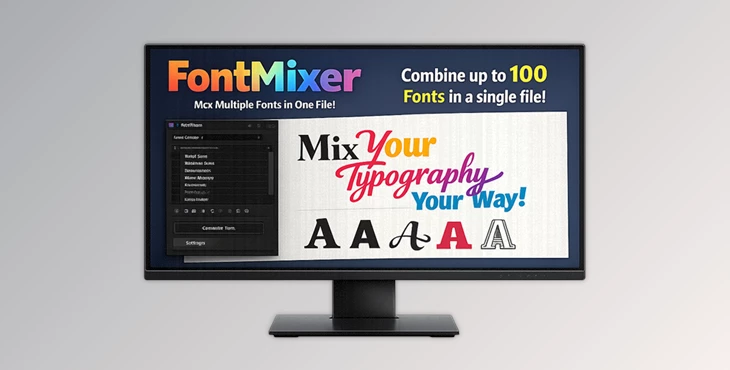
Downloadable Files
You can download FontMixer for free at the end of this page.
Tired of Font Chaos? Let’s Fix It.
If you work in After Effects, Photoshop, or Illustrator, you already know the struggle. Hundreds of installed fonts. Endless scrolling. Trying to remember the exact name of that “cool futuristic font” you used last month. Sound familiar? FontMixer changes that completely. Instead of installing dozens of fonts separately and cluttering your system, FontMixer lets you merge up to 100 fonts into a single file. One file. One install. Instant access. It’s a smarter, cleaner, and much faster way to manage typography inside Adobe Creative Suite. And once you try it, it’s hard to go back.
What Is FontMixer and Why Does It Matter?
At its core, FontMixer is an Adobe extension that combines multiple fonts into a single custom font file (fmx_yourname.ttf). But this isn’t just about merging files. It’s about simplifying your creative workflow.
What Problem Does It Solve?
- ❌ Cluttered font lists filled with unused fonts
- ❌ No way to group similar styles together
- ❌ Endless scrolling just to preview how text looks
- ❌ Wasted time switching between typefaces
With FontMixer:
- ✅ You install one merged file instead of 50+ fonts
- ✅ You preview styles directly inside the extension
- ✅ You apply fonts in just a few clicks
- ✅ You keep your workflow clean and organized
Real-World Example
Imagine you’re designing a cyberpunk poster. Normally, you would:
- Install 15 futuristic fonts
- Scroll through your entire font library
- Test each one manually
With FontMixer, you create a “Cyberpunk Pack” containing all selected fonts in one file. Inside After Effects or Photoshop, you simply adjust a slider or click through styles. Instant preview. Instant results. That means more time designing. Less time searching.
Meet FontMixer – A Professional Typography Workflow Tool
FontMixer is an extension for:
- Adobe After Effects
- Adobe Photoshop
- Adobe Illustrator
It transforms how you manage and apply fonts across your projects. Instead of treating fonts as scattered files, FontMixer turns them into structured style collections.
Features
Merge Up to 100 Fonts in One File
- Supports TTF, OTF, WOFF, and WOFF2
- Generate a custom file: fmx_yourname.ttf
- Install once and access all styles inside
Perfect for creating themed collections like:
- Gothic
- Cyberpunk & Y2K
- Brush
- Script
- Cartoon
- Vintage
- 100+ Font mega packs
Live Preview Inside the Extension
- View installed fmx_ fonts in the Text tab
- Edit preview text and see changes instantly
- No more guessing how it looks
This dramatically speeds up creative decision-making. You see results in real time, not after endless menu clicks.
Seamless Adobe Integration
After Effects
- Create a new text layer with the selected font
- Inject expressions into existing layers
- Use a slider in Layer Effects to switch typefaces dynamically
This is especially powerful for motion designers who need flexible typography control inside animations. Photoshop & Illustrator
- Select a text layer in your document
- Click a font inside the extension
- Apply instantly
Photoshop also includes a “Create Text Layer” function (note: not supported in Artboards).
How It Works (Simple 4-Step Process)
1. Create
- Drop or select your font files
- Enter a custom name
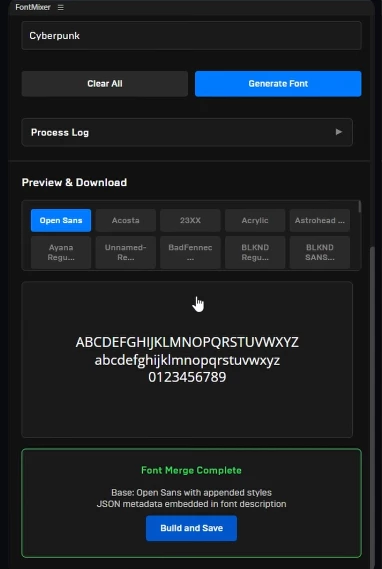
- Generate your fmx_ file
- Build, save, and install
2. Preview
- Open the Text tab
- Edit preview text
- Watch styles update live
3. Create Text Layer
- Instantly create a new text layer with your selected style
4. Apply
- Inject or apply fonts to existing layers
- Preserve workflow context where supported
Clean. Fast. Professional.
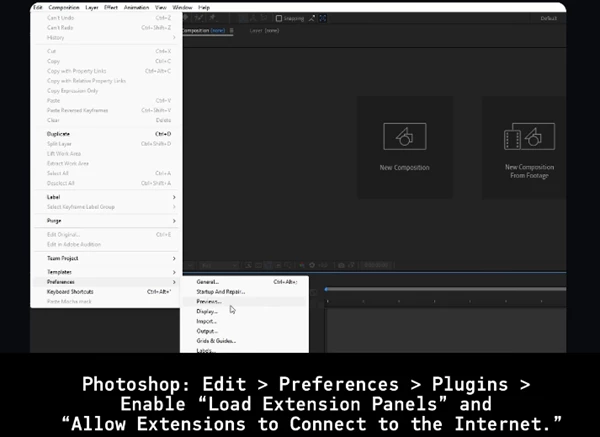
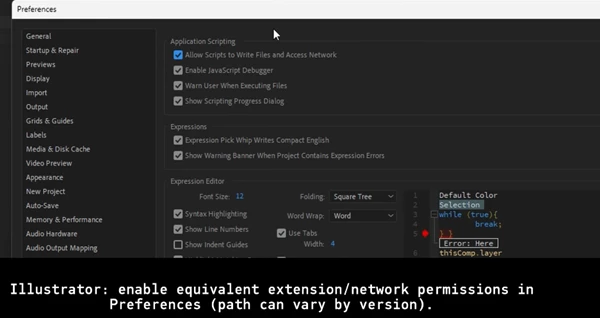
Pro Tips for Better Results
Create Themed Font Packs
Instead of random collections, organize fonts by purpose:
- Logo Pack
- Social Media Headlines
- Horror Titles
- Minimal Branding Set
This makes it easier to stay consistent across projects.
Use It for Motion Graphics
In After Effects, combining FontMixer with expression sliders lets you:
- Animate font changes
- Quickly test typography variations
- Keep projects flexible for client revisions
Clients love options. FontMixer makes options easy.
Keep Packs Under Control
Although you can merge up to 100 fonts:
- Large packs increase file size
- Older Adobe versions may crash
For better performance, create smaller, purpose-based collections instead of giant packs.
Important Notes & Limitations
- Fonts are NOT included in the extension package
- Only numbers and Latin letters are supported
- Extra characters and other languages are not supported
- fmx_ fonts are not directly usable in other applications
- Photoshop “Create Text Layer” doesn’t work with Artboards
Understanding these limits helps you use the tool more efficiently.
Final Thoughts – Why FontMixer Is Worth Trying
FontMixer can genuinely help improve your workflow if you work with fonts regularly within After Effects, Photoshop, or Illustrator. Beyond just merging fonts, FontMixer is designed to help keep your font list clean, speed up your font previewing process, and give you flexible control over how you utilize fonts inside your Adobe applications. Give FontMixer a try and experience a cleaner, faster, and more organized way to work with fonts!

Files Password : gfxplugin.com OR 123456