Downloadable Files
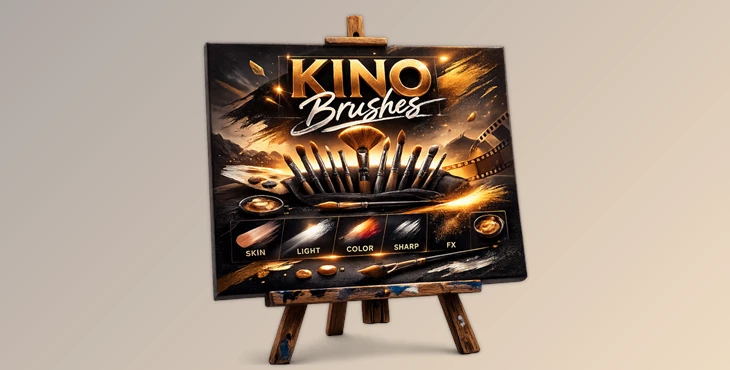
You can download KINO BRUSHES for free at the end of this page.
Give Your Photos That Cinematic Finish
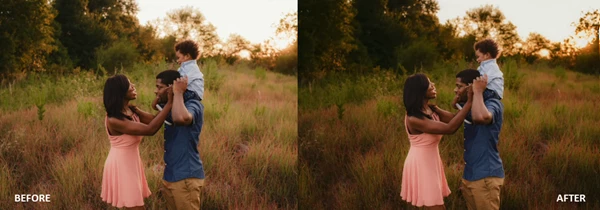
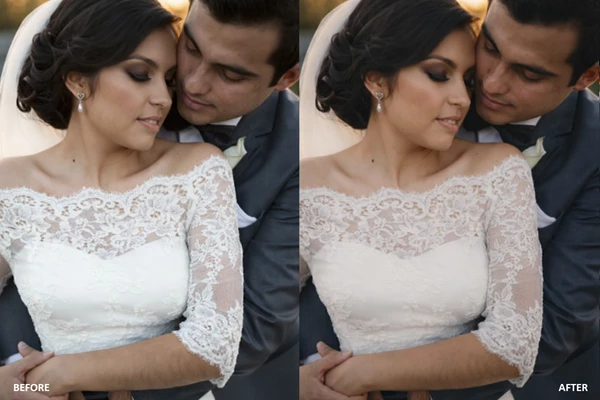
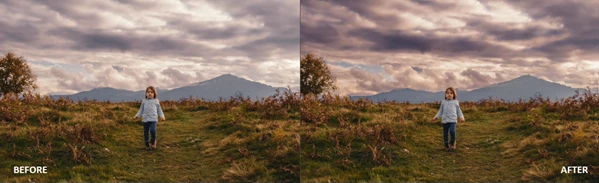
Have you ever felt that your photo looks good… but not quite finished? Sometimes all an image needs is subtle light shaping, smoother skin, a bit more depth in the sky, or a soft cinematic glow. That’s exactly where KINO BRUSHES step in. These local adjustment brushes for Lightroom Classic and Adobe Camera Raw help you guide the viewer’s eye, enhance details, and create atmosphere — all without leaving your editing workflow. With just a few clicks, you can dodge, burn, soften skin, add mist, or shape the light like a professional retoucher. Simple. Fast. Powerful.
What Are Local Adjustment Brushes — and Why Do They Matter?
Local adjustment brushes in Lightroom and ACR let you edit specific areas of your image instead of making global edits. You can do this instead of brightening the entire image:
- Brightening the subject’s face
- Darkening distracting elements
- Adding a glow effect to the sky
- Smoothing skin while keeping texture in other parts
Fine-tuning your edits with accuracy gives you control — and control makes your edits look professional.
Why This Improves Your Final Image
When you shape light and color selectively:
- The viewer’s eye naturally moves toward your subject.
- Skin looks refined but not artificial.
- Skies become dramatic without affecting foreground tones.
- Depth and mood feel intentional.
For example:
- A slight DODGE on the face + subtle BURN around the edges = instant depth.
- A touch of MIST & BLOOM in backlit portraits = dreamy cinematic atmosphere.
- TEETH WHITENING and RED SKIN FIX = clean, natural portrait enhancement.
These small adjustments make a big difference.
Meet the Tool: KINO BRUSHES by Soulmate Presets
KINO BRUSHES is a professional collection of 15 local adjustment presets designed specifically for Lightroom Classic and ACR. They’re built to speed up your workflow while maintaining full creative control. Whether you shoot portraits, landscapes, lifestyle, or cinematic photography, these brushes help you finish your images like a pro.
Features
🎨 Light & Exposure Control
- DODGE
- BURN
- VIGNETTE
- SUN LIGHT / FLARE
- TILT SHIFT
These tools help you sculpt light and control focus.
Use Dodge & Burn to create dimension. Add a vignette to frame your subject. Simulate lens effects like sunlight or tilt-shift blur for artistic impact.
🌤 Sky & Atmosphere Enhancement
- SKY
- SUNSET SKY GLOW
- COOL SKY – KINO BRUSHES
- MIST & BLOOM
- WARM MIST
Enhance skies dramatically without touching the rest of the image.
Add golden sunset warmth, cinematic cool tones, or dreamy atmospheric mist for storytelling depth.
👤 Portrait Perfection Tools
- SKIN SMOOTHING
- RED SKIN FIX
- TEETH WHITENING
- DETAILER
- RED COLOR ADJ
These brushes are ideal for portraits. Smooth skin gently, correct redness, whiten teeth naturally, or bring out fine details like eyes and hair. Because adjustments are local, skin stays realistic — never plastic.
Compatibility
- Lightroom 4, 5, 6
- Lightroom Classic
- Adobe Camera Raw 7 or later (Photoshop CS6 or later)
⚠ Not compatible with the new cloud-based Lightroom CC.
Pro Tips for Better Results
Keep It Subtle
The secret to professional editing is restraint.
Start with low intensity and build gradually.
Combine Brushes Smartly
- Use BURN around the edges + DODGE on highlights.
- Add DETAILER only to key areas (eyes, texture, fabric).
- Pair SUNSET SKY GLOW with WARM MIST for golden hour magic.
Zoom In and Out
Edit zoomed in for precision — then zoom out to check the overall balance. This keeps the image natural and cohesive.
Final Thoughts: Small Adjustments, Big Impact
KINO BRUSHES give you the power to refine, enhance, and shape your images directly inside Lightroom Classic and ACR. No complicated layers. No external plugins. Just efficient, professional local adjustments. If you want your photos to feel more cinematic, more polished, and more intentional, this tool can become a valuable part of your workflow. Sometimes, the difference between a good photo and a stunning one is just a few carefully placed brush strokes.

Files Password : gfxplugin.com OR 123456