Downloadable Files
You can download Dropletee for free at the end of this page.
Dive Into Fluid Motion 🎬
Sometimes a project just feels too clean… too digital… too static.
What if your visuals could flow, bend, shimmer, and evolve like liquid?
That’s exactly what Dropletee brings to After Effects.
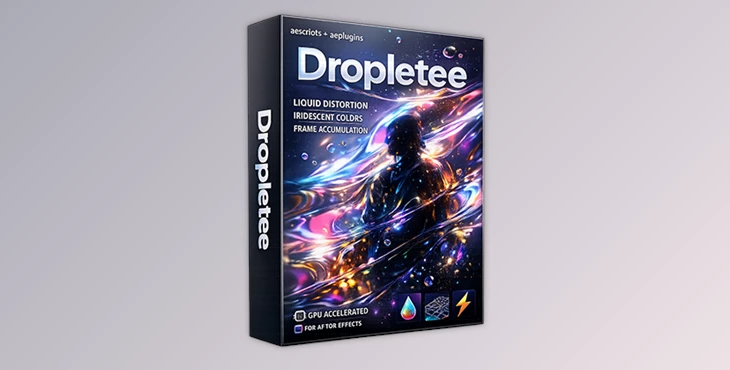
Dropletee is a liquid-style distortion effect that accumulates frames over time, pushes pixels along surface normals, and enhances everything with iridescent colors and lighting. The result feels organic, dynamic, and full of movement — not just another basic distortion layer.
And thanks to GPU acceleration via WebGPU, it runs smoothly while you experiment.
What Is Dropletee and Why Does It Matter?
Dropletee is a time-based liquid distortion effect for After Effects (2023–2026).
The main feature of Dropletee is that it:
- accumulates frames over time,
- distorts based on surface normal data,
- adds a beautiful iridescent color
- and lighting on top of it all
- all while running on your GPU with WebGPU
Why should you include Dropletee in your workflow?
Dropletee adds depth, movement, and light interaction with the right level of distortion to make it feel natural.
Your final results with Dropletee won’t feel like flat distortion; they will feel as if they are layered with depth and the right types of effects to make it look natural.
Meet the Tool: Professional Liquid Distortion Made Easy
Dropletee is developed for After Effects and supports:
After Effects 2023, 2024, 2025, 2026
macOS 10.15+ (Intel & Apple Silicon)
Windows 10+
It transforms complex visual calculations into a creative, tweakable workflow.
Instead of fighting technical setups, you focus on shaping the look.
Features
💧 Frame Accumulation Over Time
Dropletee builds motion progressively by accumulating previous frames. This creates trails, liquid textures, and evolving distortion patterns.
Example:
Turn fast-moving footage into painterly liquid streaks that feel like fluid glass.
🌈 Iridescent Colors & Lighting
Adds shimmering, chromatic color effects and lighting on top of the distortion.
Example:
Create soap-bubble reflections on text or holographic surfaces on graphics.
🧭 Surface Normal Pixel Pushing
Pixels move along surface normals, giving the distortion a more dimensional and directional feel.
Example:
Make flat graphics appear like they are bending around invisible 3D shapes.
⚡ GPU Acceleration (WebGPU)
All heavy processing runs on your GPU.
Benefits:
Faster previews
Smooth parameter adjustments
More responsive workflow
🎛 Built-In Presets
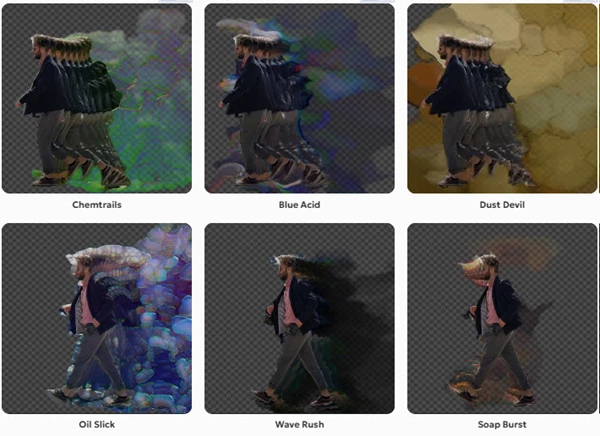
Jumpstart your design with presets like:
Chemtrails
Blue Acid
Dust Devil
Oil Slick
Wave Rush
Soap Burst
Pick one, tweak the parameters, and make it your own.
👁 Advanced View Modes
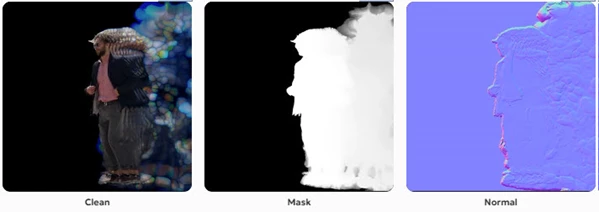
Besides the final stylized result, you can output:
Clean accumulation
Alpha mask
Normal map
Noise mode
Palette mode
Light mode
These are extremely useful for debugging and fine-tuning complex visuals.
💾 Flexible Caching System
Three modes depending on your workflow:
Live Preview → Instant feedback (up to 120 frames).
Compute → Cache the full sequence with a visible progress bar.
Auto Cache → Automatically caches while you play the timeline.
This makes Dropletee suitable for both experimentation and final production work.
Pro Tips for Better Results
Start Subtle
Begin with low distortion intensity and increase gradually to maintain control and realism.Combine With Light Effects
Pair Dropletee with glow layers or soft lighting to enhance the iridescent reflections.Match Motion to Mood
Fast motion + accumulation creates energetic, aggressive visuals.
Slow motion + accumulation creates dreamy, cinematic flow.Use View Modes Frequently
Switch to Normal or Mask modes to better understand how pixels are being pushed.Experiment With Presets First
Start from presets like Oil Slick or Soap Burst before diving into detailed adjustments.Keep Backgrounds Clean
Liquid distortion stands out more when the composition isn’t overly busy.Plan Your Caching Strategy
Use Live Preview for testing and Compute or Auto Cache before final rendering.
Liquid Energy Inside After Effects
Dropletee isn’t just another distortion plugin. It introduces evolving motion, surface-driven deformation, and iridescent lighting into your workflow — all GPU-accelerated for performance.
If you work in motion design, music visuals, stylized transitions, or experimental graphics, this tool can completely change how your distortion effects feel.
It’s fluid. It’s dynamic. It’s creative.
And if liquid-style motion and shimmering surfaces excite you, Dropletee is definitely worth exploring.
 Dropletee Liquid style distortion effect for AE by aescripts (Win-v1.0.11).rar (Size: 49.1 MB - Date: 3/31/2026 1:12:30 PM)
- Dropletee Liquid style distortion effect for AE by aescripts (Win-v1.0.9).rar (Size: 49.1 MB - Date: 3/14/2026 12:13:13 PM)
- Aescripts - Dropletee v1.0.1 (Win).rar (Size: 3.4 MB - Date: 2/19/2026 1:08:27 PM)
Files Password : gfxplugin.com OR 123456