Downloadable Files
You can download Moving Parents for free at the end of this page.
Tired of Parenting Layers the Hard Way?
If you work in After Effects, you already know that parenting layers can either be super powerful… or super frustrating. Re-parenting, creating nulls, fixing broken hierarchies, adjusting animation after everything is linked — it can quickly turn into a time-consuming mess.
Moving Parents changes that.
Instead of wrestling with parenting setups and keyframes, this smart script lets you parent, un-parent, re-parent, and even animate entire layer groups — all in just a few clicks. No keyframes required. No chaos in your timeline. Just clean, controlled motion.
Curious? You should be.
What Is Moving Parents and Why Does It Matter?
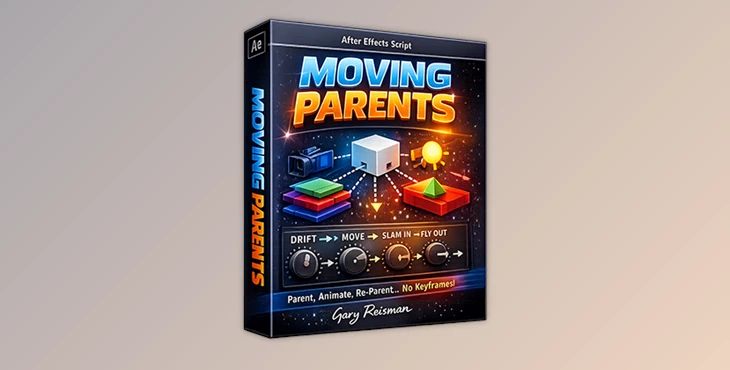
At its core, Moving Parents is a workflow-enhancing tool for managing layer hierarchies in After Effects — including 3D layers, cameras, lights, OBJs, and even AE 2026’s new 3D Shapes.
But it’s more than just a parenting helper.
Moving Parents allows you to:
Instantly parent selected layers to a null or another layer
Temporarily un-parent layers to reposition them
Restore parenting links with one click
Apply animation behaviors (without keyframes) using adjustable expressions
In short, it turns technical layer management into something flexible and creative.
Real-World Use Cases
Imagine these scenarios:
🎬 You’re animating a logo reveal with multiple 3D elements that need to move together.
📦 You’re building a UI animation with dozens of grouped layers.
🎥 You’re working with cameras and lights and want to quickly restructure your scene.
🚀 You need a dramatic slam-in intro without manually animating scale curves.
Instead of manually setting keyframes, tweaking graph editor curves, and fixing broken hierarchies, Moving Parents lets you automate and control it all with sliders and expressions.
That means:
Faster setup
Cleaner timelines
More flexibility during revisions
Less technical friction
And that directly improves your final animation quality — because you spend more time designing motion, not managing structure.
Meet the Tool: Moving Parents by Gary Reisman
Developed by Gary Reisman and released on Aescripts, Moving Parents is compatible with After Effects 2020–2026 (Win & Mac).
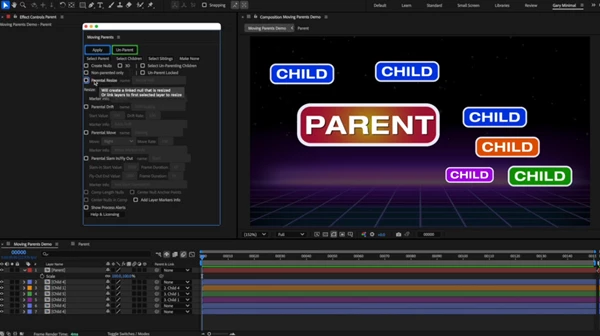
It comes with a fully dockable UI that can be simplified when needed, keeping your workspace clean and efficient.
What makes it powerful isn’t just parenting — it’s what happens after parenting.
Features
1️⃣ Smart Parenting & Null Creation
Parent layers to the first selected layer or a newly created null
Option to parent only layers currently set to “None”
Auto-place null at:
The calculated center of selected layers
Or the center of the comp
Match null duration to child layers
This means your scene stays organized and logically structured — especially useful in large motion graphics projects.
2️⃣ Un-Parent & Re-Parent (Without Breaking Everything)
This is one of the most practical features.
Select a parent → click Un-Parent → all child layers detach
Adjust positions freely
Click Re-Parent → original parenting restored instantly
You can also:
Automatically select child layers
Include locked layers
This saves you from rebuilding hierarchies or manually tracking layer relationships — a huge time-saver during revisions.
3️⃣ Resize with Intelligence
When Resize is enabled:
The newly created parent/null scales by a defined percentage
Or selected layers scale individually
Even existing keyframes are proportionally resized
Perfect for:
Adjusting motion intensity
Scaling animation systems
Making quick client-request changes without redoing animation
4️⃣ Drift (Subtle Motion Without Keyframes)
Drift applies a scaling expression (2D) or Z-position drift (3D) to the parent/null.
With sliders to control:
Start value
Drift rate
Reverse drift
This is excellent for:
Floating UI elements
Background depth motion
Subtle cinematic camera feel
No keyframes. Just smart expressions.
5️⃣ Move (Controlled Motion in 2D & 3D)
The Move feature applies position-based expressions in:
X
Y
Z (for 3D layers)
With controls for:
Speed
Direction
Reverse direction
Duration
Instead of “fudging” keyframes and adjusting timing manually, you simply tweak sliders. Clean, flexible, and revision-friendly.
6️⃣ Slam-In / Fly-Out (Dynamic Entrances & Exits)
This feature simulates:
A layer slamming in at the start
Flying out at the end
You get controls for:
Start and end size
Slam duration
Fly-out direction
Exponential scale curves
Ease-in / ease-out amounts
Option to disable either effect
It’s ideal for:
Titles
Product promos
Social media animations
Energetic motion graphics sequences
And yes — multiple behaviors can be combined on nested nulls for layered animation systems.
Professional Tips for Better Results
Want to get the most out of Moving Parents? Here are a few practical ideas:
🔹 Use Null Chains for Complex Systems
Create parent nulls, then parent those nulls to other nulls. Combine Move + Drift + Slam for dynamic layered motion setups.
🔹 Keep Cameras & Lights on Nulls
Since cameras and lights cannot directly accept effect control sliders, always apply expressions to null parents. This keeps your 3D scene flexible and editable.
🔹 Use Drift Subtly
Small Z-position drift values create cinematic depth without looking artificial.
🔹 Resize for Iteration
Instead of re-animating, use Resize to quickly adjust the overall energy of a motion system.
🔹 Keep UI Minimal
Reduce the dockable UI to basics when needed — this helps keep your workspace clean and distraction-free.
Final Thoughts – Why Moving Parents Is Worth It
At first glance, Moving Parents looks like a parenting utility. But in practice, it’s a workflow accelerator. It removes repetitive technical steps, reduces keyframe clutter, keeps your hierarchy flexible and gives you motion control through simple sliders instead of complex graphs.Whether you’re building UI animations, 3D scenes, logo reveals, or social content — this tool helps you move faster while staying organized.
If you care about clean timelines, flexible animation systems, and smarter workflows inside After Effects, Moving Parents is definitely worth exploring.
And once you integrate it into your projects, you’ll wonder how you managed parenting without it.

Files Password : gfxplugin.com OR 123456