Downloadable Files
You can download Feedback Studio for free at the bottom of this page.
Turn Simple Footage into Infinite Fractals, Trails, and Tunnels
Have you ever seen those hypnotic visuals where the image seems to repeat forever — forming glowing trails, endless tunnels, or kaleidoscopic fractals? That’s exactly what Feedback Studio helps you create inside After Effects. This plugin is built to simulate video feedback loops in a clean, controllable way, letting you generate mesmerizing results just by tweaking small parameters like motion, rotation, color, and mirroring. And because it’s GPU-accelerated, you can preview and work in real time (even at full resolution on capable machines).
What Is Video Feedback (and Why Is It So Powerful)?
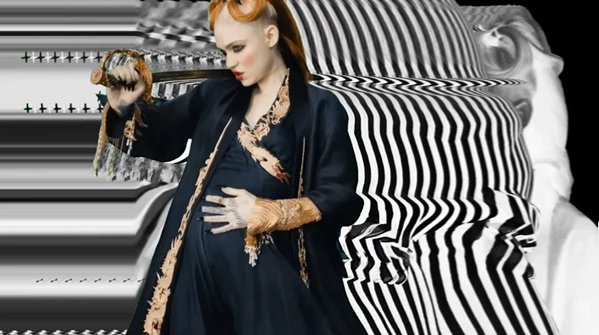
A feedback loop in video is basically the visual version of an audio delay or echo effect. Instead of repeating sound samples, the effect repeats previous frames. Each frame is fed back into the loop again — but slightly modified. Those repeated frames stack over time, creating:
- Motion trails
- Infinite zoom tunnels
- Fractal-like patterns
- Abstract kaleidoscopic visuals
Why It Improves Your Results
The reason video feedback looks so rich is that it builds complexity automatically. Even small changes — like moving the frame 1 pixel or rotating it by 0.2 degrees — can create completely new visuals. This means you can create highly advanced motion graphics without manually animating every detail.
Introducing Feedback Studio (Professional Plugin)
Feedback Studio is a professional After Effects plugin that models video feedback loops and gives you full control over every part of the recursion. Instead of relying on messy precomps or complicated tricks, it lets you create feedback effects cleanly — and keyframe every parameter for smooth, professional animation.
Features
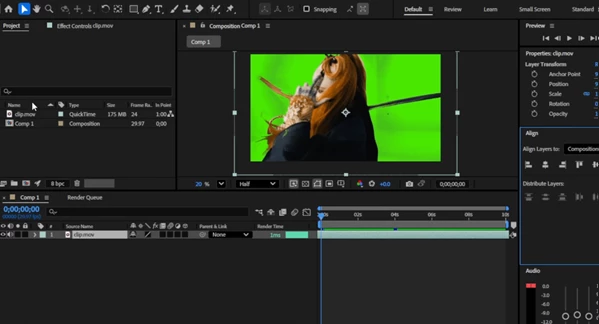
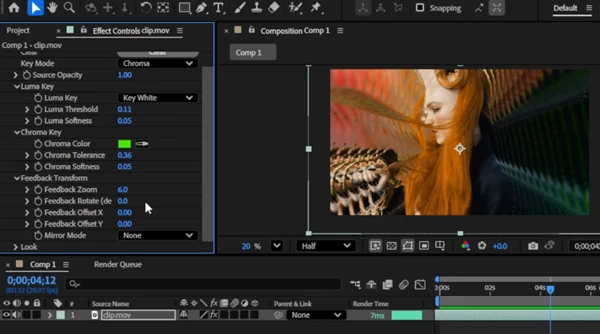
1) Integrated Luma and Chroma Key This lets you isolate elements inside the feedback loop. For example:
- Keep a subject clean while the background melts into feedback trails.
- Create feedback only in bright areas using the luma key.
- Use chroma key for stylized green-screen recursion.
2) Feedback Translation (X/Y), Zoom, and Rotation This is the core of the effect. By slightly shifting each returning frame, you can create:
- Smooth motion trails
- Spiral tunnels
- Infinite zoom effects
- Rotating vortex-style feedback
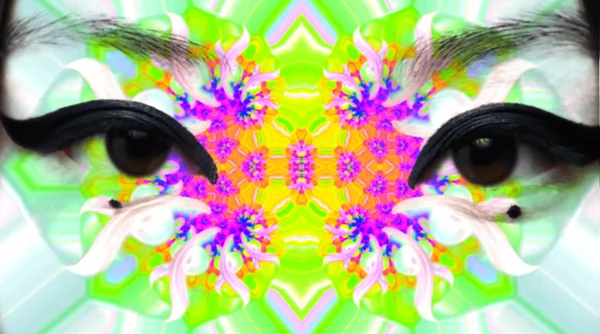
Even tiny values can create dramatic results. 3) Three Mirror Modes (Fractal + Kaleidoscope) Mirroring is where the “magic” happens. Mirror modes instantly generate:
- Fractal feedback patterns
- Kaleidoscopic symmetry
- Geometric motion visuals
This is perfect for:
- Music video visuals
- VJ loops
- Abstract motion backgrounds
4) Hue, Saturation, and Brightness Controls These controls let you shape the color evolution of the feedback. Examples:
- Slowly shift hue over time for psychedelic loops.
- Increase saturation for neon trails.
- Lower brightness to prevent blown-out recursion.
This makes your feedback look more cinematic and intentional. 5) Negative Filter with Recursion A negative filter inside a feedback loop creates bold, high-contrast results. It’s especially useful for:
- Glitch-inspired visuals
- Sci-fi motion graphics
- Experimental abstract projects
6) Blur and Sharpen Feedback can get harsh or noisy over time. Blur and sharpen controls help you shape the final look.
- Blur = smooth, dreamy trails.
- Sharpen = crisp geometric fractals.
7) GPU-Accelerated Real-Time Performance Feedback effects can be heavy, but Feedback Studio is GPU-accelerated, so it can run smoothly with real-time playback on capable workstations. This matters a lot because feedback work is all about experimentation. The faster you preview, the more creative you can be.
Pro Techniques and Practical Tips
Use Micro-Movements for Better Results Start with tiny values like:
- Translation: 1–5 pixels
- Rotation: 0.1–0.5 degrees
- Zoom: 100.2% to 101%
Small movement = smooth trails and clean recursion.
Animate Parameters Slowly
Feedback looks best when it evolves over time. Try keyframing:
- Rotation slowly increasing
- Hue shifting gradually
- Zoom is building into a tunnel
This creates motion that feels alive, not random.
Combine Mirror Modes with Rotation
One of the strongest combos is:
Mirror mode + slow rotation + slight zoom This often creates instant fractal tunnels and kaleidoscopic motion backgrounds.
Control Brightness to Avoid Overexposure
Feedback can easily get too bright as frames stack. Use brightness control to keep the loop clean and balanced.
Add Blur for a Cinematic Look
A small blur makes trails smoother and more professional, especially when working with fast motion.
Final Thoughts: A Plugin That Creates Infinite Possibilities
Feedback Studio is not just another After Effects effect — it’s a creative engine for building fractals, tunnels, trails, and endless visual echoes. With full keyframe control, mirror modes, color adjustment, and GPU acceleration, it gives you the ability to create complex feedback visuals in a fast, clean, and highly controllable way. If you enjoy experimental motion design, abstract visuals, or music-video style effects, this plugin can easily become one of your favorite tools. Try it, tweak it, and watch your footage turn into an infinite visual universe.

Files Password : gfxplugin.com OR 123456