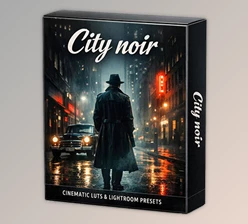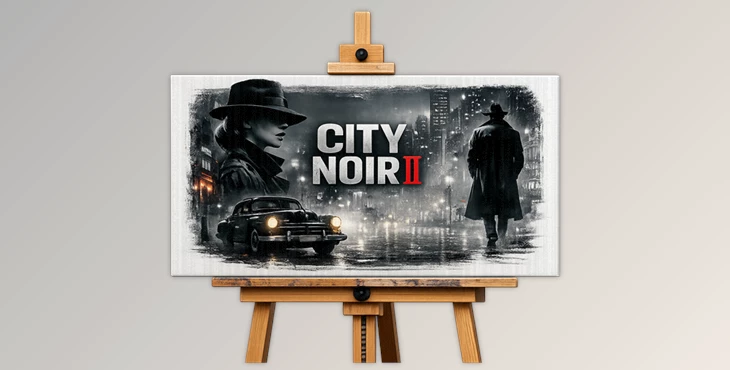
Downloadable Files
You can download the product City Noir II for free at the bottom of this page.
Step Into the Shadows – A New Urban Mood
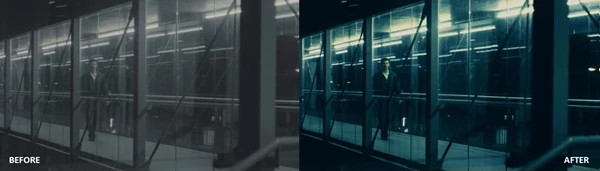
Have you ever seen images and videos of cities and felt like something was missing? Something that would add depth, darkness, or perhaps a cinematic vibe to them? City Noir II does just that. It adds a cinematic, bold feel to your images and videos, giving your work the depth and emotion that really tells a story. If you are a fan of moody imagery, cities at night, contrast, and modern noir vibes, then you will love what City Noir II has to offer!
What Is City Noir II and Why Does It Matter?
At its core, City Noir II is a professional collection of LUTs and Lightroom presets built to enhance photos and videos with deep contrasts, dramatic shadows, and modern cinematic tones.
What Does That Actually Mean?
A LUT (Look-Up Table) or preset is essentially a ready-made color formula. Instead of spending hours adjusting contrast, curves, saturation, shadows, and highlights manually, you can apply a carefully crafted look instantly.
Real-World Uses
- Turning a daytime street photo into a dramatic editorial-style image
- Giving night footage rich blacks and glowing highlights
- Enhancing urban portraits with modern, high-end tones
- Creating a consistent cinematic look across an entire short film
- Upgrading social media reels with bold, scroll-stopping color
These features improve your results because they:
- Preserve dynamic range
- Add professional contrast balance
- Create visual cohesion across projects
- Save massive editing time
Instead of guessing color settings, you apply a look that’s already optimized for storytelling.
Meet City Noir II – The Professional Toolkit
City Noir II includes 13 different and versatile looks designed for creators who want cinematic urban aesthetics without complicated workflows. This pack works across both mobile and desktop platforms, making it incredibly flexible for modern creators.
Features
13 Unique Noir-Inspired Looks
Each look is carefully crafted to provide a different mood — from intense high-contrast drama to subtle modern editorial tones. You can switch styles instantly depending on the project’s vibe.
Multiple Professional Formats
Available in:
- .cube
- .drx
- .dng
This ensures compatibility with a wide range of professional tools.
Works on Any Major Editing Software
Compatible with:
- Lightroom (Desktop & Mobile)
- Adobe Premiere Pro
- DaVinci Resolve
- Final Cut Pro X
- CapCut
- VEGAS Pro
- AVID Media Composer
- LumaFusion
- After Effects
- Photoshop
No matter your workflow, you can drag, drop, and apply.
Mobile & Desktop Ready
Whether you’re editing on a Mac, Windows PC, iOS device, or Android phone — City Noir II fits seamlessly into your setup.
Optimized for Professional Camera Profiles
If you’re shooting in:
- S-Log
- V-Log
- C-Log
- or other flat profiles
These LUTs are crafted to maintain dynamic range and deliver clean, cinematic grading without crushing details.
Real Impact on Projects
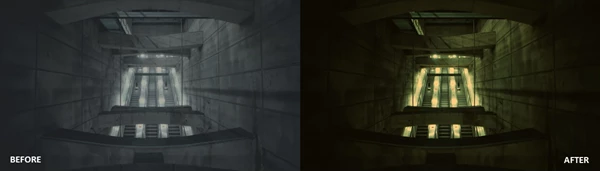
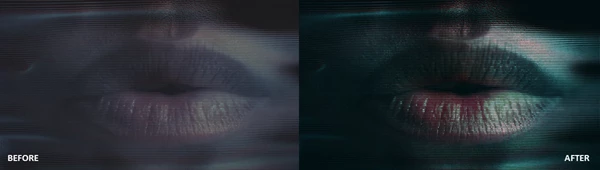
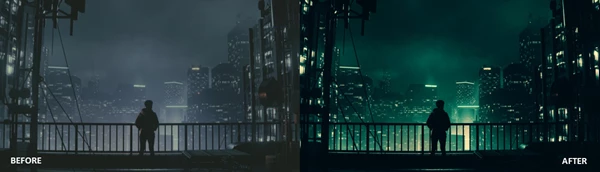
Imagine shooting a short urban film at night. Instead of adjusting color wheels for hours in DaVinci Resolve, you drag a LUT into a node — instantly, shadows deepen, highlights glow, and the city feels alive. Or maybe you’re editing Instagram reels in CapCut. With one preset, your content gains a premium, film-like aesthetic that stands out in crowded feeds. For photographers using Lightroom Mobile, a simple preset tap can turn a flat RAW image into a magazine-worthy urban portrait.
Pro Tips for Getting the Best Results
1. Start with a Clean Base
Always correct exposure and white balance before applying the LUT. This ensures the look performs exactly as intended.
2. Adjust Intensity
Most software allows you to reduce LUT opacity or preset strength. Lowering the intensity slightly can create a more natural finish.
3. Pair with Lighting
City Noir II shines when combined with:
- Neon lights
- Street lamps
- Wet streets
- Architectural lines
Think contrast, reflections, and depth.
4. Use Consistency for Storytelling
Apply the same look across a full project to maintain cinematic continuity. This is especially powerful for short films, YouTube videos, and portfolio projects.
5. Don’t Overcorrect
The beauty of professional LUTs is subtle control. Avoid stacking heavy effects on top — let the tones breathe.
Final Thoughts – Color Made Simple
At the end of the day, City Noir II isn’t just about darker shadows or higher contrast. It’s about storytelling. It’s about giving your urban visuals mood, character, and cinematic identity. It saves time.
It simplifies complex color grading.
It elevates your visuals instantly. Whether you’re a photographer, filmmaker, content creator, or mobile editor, this collection gives you the power to create bold, modern noir aesthetics without technical overwhelm. If you’re ready to transform your city visuals into something dramatic, stylish, and unforgettable — City Noir II is worth exploring.

Files Password : gfxplugin.com OR 123456