Downloadable Files
You can download Zeta Lightroom Presets and Profiles for free at the bottom of this page.
Zeta Lightroom Presets and Profiles — One Click, A Whole New Mood
Have you ever taken a great photo, but it still feels like something is missing? Maybe the colors look flat.
Maybe the mood isn’t strong enough.
Or maybe the photo is good… but not client-ready yet. That’s exactly why Zeta Lightroom Presets and Profiles exist. With one quick click inside Adobe Lightroom Desktop (Mac/Windows), you can instantly transform your photos with bold colors, sharp contrast, and a timeless style that never goes out of fashion. And the best part?
You don’t need professional Lightroom knowledge to use them.
What Are Presets & Profiles (In Simple Words)?
Let’s make it super clear:
Presets
A preset is a ready-made edit that changes your photo’s:
- Colors
- Contrast
- Brightness and shadows
- Tone and overall mood
Profiles
A profile shapes the overall color “character” of the photo in a more natural way—perfect for consistent results across a full shoot. So when you use Zeta Lightroom Presets and Profiles, you’re basically applying a professional editing style instantly—without spending hours adjusting sliders.
Where You Can Use Zeta (Real-Life Examples)
Here are a few practical ways these presets can improve your work:
1) Portrait Photography
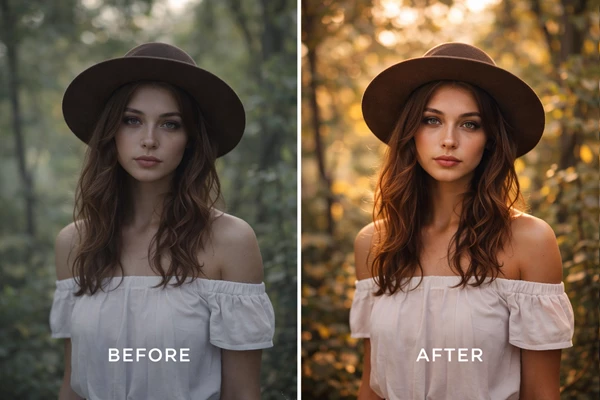
Zeta’s bold contrast helps portraits look sharper and more premium.
Your subject stands out more, and the overall image feels cleaner and more professional.
2) Lifestyle & Travel Photography
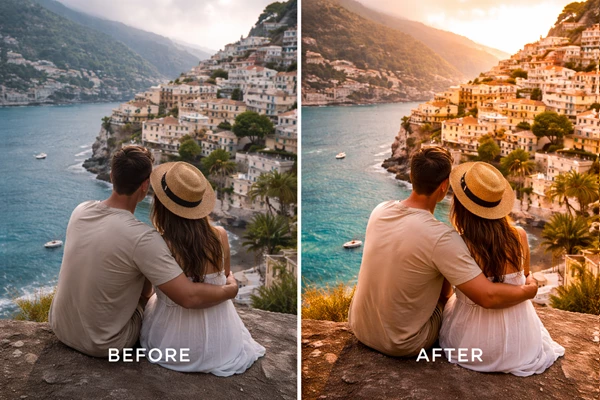
Want your travel photos to feel alive and cinematic?
Zeta boosts colors in a way that feels exciting—without looking trendy or over-edited.
3) Product & Branding Photos
If you shoot for businesses, content creators, or online shops, these presets help you create:
- Consistent colors
- A recognizable style
- A polished “brand look.”
Why These Features Improve Your Results
Because instead of guessing which sliders to move, you’re starting from a tested editing formula. That means:
- Less trial and error
- Faster workflow
- More consistent results
- Stronger, more professional final images
Introducing the Tool: Zeta Lightroom Presets and Profiles
Zeta Lightroom Presets and Profiles are made for Lightroom Desktop users on Mac and Windows. They are designed to deliver:
- Bold colors
- Sharp contrasts
- A powerful, modern look
…with just one click.
These presets were created over the years to reflect the world as photographers see it—strong, rich, and full of mood.
Features
Here’s what makes Zeta Lightroom Presets and Profiles special:
✔ Works with Lightroom Desktop (Mac/Windows)
These presets are compatible with the desktop version of Adobe Lightroom.
✔ One-Click Mood Boost
Apply a preset instantly, and your photo becomes more dramatic, vibrant, and polished.
✔ Fully Customizable
Every preset is adjustable. You can fine-tune:
- Exposure
- Contrast
- Color intensity
- Highlights and shadows
- Sharpness
✔ Beginner-Friendly
You don’t need professional Lightroom knowledge.
Even if you’re new, you can get beautiful results right away.
✔ Bold Colors + Sharp Contrast
This is Zeta’s signature style:
- Strong contrast
- Rich colors
- Clean, modern tones
- Timeless results
✔ Installation Manual + The Most Complete User Guide
Zeta includes:
- A detailed PDF installation guide
- Real-life examples
- Suggestions for every preset
- Instructions for each color combination
So you’re not just downloading presets—you’re getting a full editing toolkit with guidance.
What You’ll Notice After Using Zeta
Once applied, your photos will often look:
- More vibrant without looking fake
- More professional without heavy editing
- More consistent across a photoshoot
- More “finished” in seconds
These presets are designed to surprise and delight your clients—because they look intentional, stylish, and clean.
Pro Tips for More Natural & Professional Results
Even though Zeta is one click, these tips will make your results even better:
1) Fix Exposure First
Before applying a preset, quickly adjust:
- Exposure
- White balance
This gives the preset the best base.
2) Reduce the Strength When Needed
Sometimes 100% looks perfect.
Sometimes 70% looks more natural. Small changes make a big difference.
3) Match the Preset to the Lighting
Bold presets work best when your photo already has:
- Clean lighting
- Clear shadows
- Good highlights
4) Keep Consistency for Client Albums
For a full shoot, choose:
- 1–2 main presets
…and stick to them.
This instantly makes your work look more professional.
5) Use the PDF Guide Like a Shortcut
The guide doesn’t just show how to install.
It explains how each preset behaves, with examples—so you always know which one fits your scene.
Final Thoughts
If you want faster editing, stronger mood, and more consistent results—without needing Lightroom expertise—Zeta Lightroom Presets and Profiles are a powerful solution. They don’t replace your creativity.
They simply give you a professional starting point—so you can get better results in less time. Try them once, and you’ll see how quickly a single click can transform the entire mood of a photo.

Files Password : gfxplugin.com OR 123456