Downloadable Files
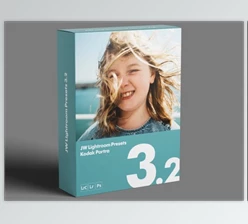
You can download Elite Portra for Adobe for free at the bottom of this page.
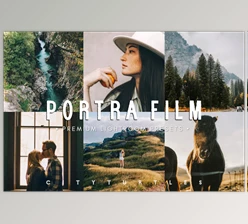
Elite Portra for Adobe: The Film Look Your Digital Photos Have Been Missing
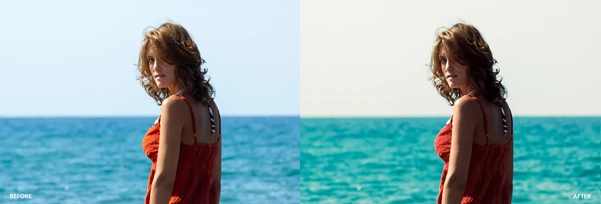
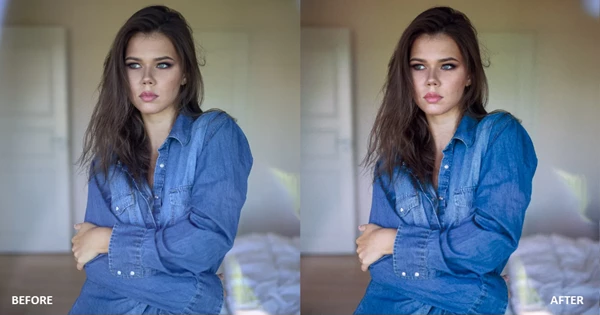
Have you ever edited a photo for a while, but it still felt… too digital? Not ugly — just overly clean, overly sharp, and missing that soft, organic “film magic.” That’s exactly what Elite Portra for Adobe is made for: transforming your digital photos into a true Portra-style film look, with natural color, smooth contrast, and realistic texture. It doesn’t feel like a random filter.
It feels like a real film.
What Is Portra Film Emulation (And Why Do People Love It)?
A Portra emulation is a film simulation that recreates the look of classic Kodak Portra film stocks — not only the colors, but also the way film behaves in real scenes. Unlike many digital presets that just boost saturation or contrast, Portra emulation focuses on:
- smoother transitions between highlights and shadows
- realistic skin tones
- softer contrast curves
- a balanced, timeless color palette
Why this improves your results
Because digital photos often look too perfect. Film emulation adds:
- depth
- softness
- natural warmth
- and a more “alive” image character
Especially in portraits, weddings, fashion, and lifestyle photography.
Introducing Elite Portra for Adobe
Elite Portra for Adobe is a professional film simulation preset pack designed to recreate the signature look of:
- Kodak Portra 160
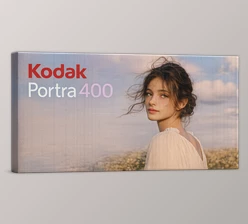
- Kodak Portra 400
These emulations are carefully crafted to match real film behavior, including true-to-life colorimetry and contrast curves — so your edits look natural, consistent, and cinematic. Instead of spending hours trying to “fake film,” you can get the look in seconds.
Features
1) Kodak Portra 160 Preset
Kodak Portra 160 is famous for its clean, soft, and natural look. Elite Portra for Adobe delivers:
- Lower contrast than most film presets
- Wide exposure latitude (handles over/underexposure beautifully)
- Smooth tonal transitions from shadows to highlights
- Natural color reproduction, especially skin tones
- High color accuracy, great for fashion and product work
- Subtle warmth for a timeless feel
Real-world examples:
- soft portrait sessions
- wedding photography
- studio and fashion work
- fine-art edits with a modern film vibe
2) Kodak Portra 400 Preset
Portra 400 is one of the most versatile film stocks ever made. Elite Portra for Adobe offers:
- Moderate contrast (more depth than Portra 160)
- Warm, natural skin tones
- Vivid but realistic colors
- Great dynamic range for high-contrast scenes
- Excellent performance in mixed lighting
Real-world examples:
- street photography
- travel photos
- events and weddings
- lifestyle shoots in changing light
3) Grain Emulation Presets
Film grain is not just noise — it’s texture. This pack includes grain presets designed to replicate the organic, non-linear look of real film grain, helping digital photos feel less sterile.
4) The Cobalt Editing Preset Menu (Analog Workflow Tools)
This is where Elite Portra becomes more than just “two presets.” You also get a curated menu of professional film-style editing tools, built like a real analog development workflow. Included tools:
- Low Key & High Key
For extended or reduced development looks (moody vs bright). - Orton Effect
Adds gentle softness to digital sharpness.
Best results: set the amount slider between 20 and 50. - Washed Black Point
Lifts blacks slightly to mimic classic photographic prints. - Vignette
Adds a traditional film vignette to draw focus. - Vignette with Mask
Advanced control over the vignette using masking. - Grain Mask
Enhances grain, especially in darker areas, for a true film feel.


Pro Techniques & Practical Tips
You don’t need to be a professional editor to get professional results. These tips make a big difference:
Use Portra 160 for soft, premium edits
If you want a clean, luxurious, and subtle look, Portra 160 is perfect.
Use Portra 400 when you want warmth and energy
For more punch, slightly richer color, and better flexibility in mixed light, Portra 400 is the go-to.
Slightly brighten your exposure
Portra film is famous for handling bright tones beautifully.
A slightly brighter image often looks more “real film.”
Don’t overdo grain
Grain is most convincing when it’s subtle.
Too much grain quickly makes the photo look fake.
Use the Orton Effect carefully
A small amount creates that dreamy film softness.
Too much can make the image look blurry.
Final Thoughts
If you want your digital photos to feel more natural, timeless, and cinematic, Elite Portra for Adobe is a powerful upgrade. It gives you:
- authentic Portra-inspired color
- true film-style contrast curves
- beautiful skin tones
- organic grain and analog texture
- a full editing workflow, not just a single preset
And since you can download it for free at the bottom of this page, you can try it immediately and see the difference on your own photos.

Files Password : gfxplugin.com OR 123456