Downloadable Files
You can download LingoFlip for free at the bottom of this page.
When Your After Effects Project Suddenly Needs 5 Languages
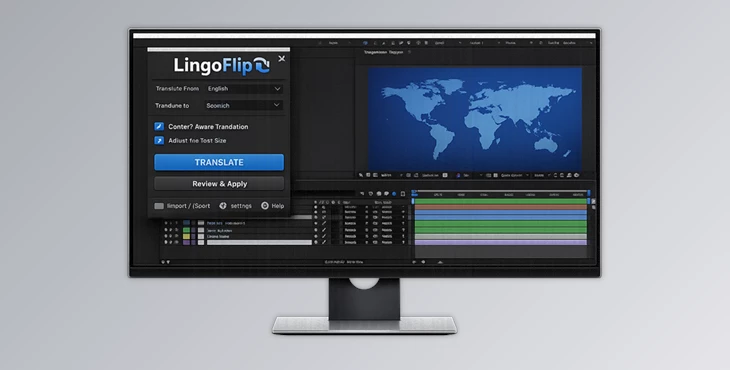
If you’ve ever opened an After Effects project full of subtitles, UI labels, titles, lower-thirds, callouts, and mixed text styles all at once… You already know how chaotic localization can get. Now imagine translating all of those text layers into another language—without breaking your comp structure, without manually copying text layer by layer, and without ending up with robotic, unnatural translations. That’s exactly what LingoFlip is made for. LingoFlip is a translation plugin for Adobe After Effects designed for real motion design workflows, where a single composition can include multiple text types—and all of them need clean, consistent translation.
What Is LingoFlip?
This tools is a smart translation tool for After Effects text layers.
But unlike basic translators, it doesn’t treat every line of text the same. It’s built for real projects where your timeline includes:
- Subtitles (long sentences and natural speech)
- UI labels (short, space-limited text)
- Headlines and titles (strong tone and readability)
- Lower-thirds (names, roles, short phrases)
- Callouts and micro text (tiny but important labels)
Why does this improve your final result
Most translation tools work like this:
“Here’s the text. Translate it.”
But motion design text is not just text—it’s design + meaning + purpose. this product improves the final output because it can:
- understand meaning across multiple layers
- Keep the tone consistent across the comp
- translate subtitles naturally (not like a machine)
- avoid weird UI translations that feel too long or too formal
So your final localized version looks and feels like it was made by a professional, not auto-generated.
Introducing LingoFlip: A Professional AE Translation Workflow
LingoFlip is designed to make multilingual workflows inside After Effects faster, cleaner, and way more realistic. Instead of exporting text, translating externally, and rebuilding your comp, LingoFlip keeps everything inside After Effects.
Features
Below are the key features that make this tools powerful for real localization projects:
🧠 Context-aware Translation
LingoFlip understands the meaning of text across multiple layers, which helps keep phrases natural and connected. This is especially useful when:
- Subtitles continue across lines
- Multiple layers form one sentence
- title + supporting text need the same tone
🎯 Text-type Detection
It recognizes whether your layer is:
- a subtitle line
- a UI element
- a headline
- a short label
That means the translation style adapts automatically instead of giving everything the same tone.
✨ Consistent Results
One of the biggest problems in multilingual motion design is inconsistency. LingoFlip keeps grammar and phrasing consistent across the comp—so your subtitles, UI labels, and titles feel like they belong in the same project.
🎬 Built for After Effects Workflows
It translates what you need without breaking your code structure. So you can keep:
- Your layer setup
- timing
- animation
- hierarchy
- design system
…exactly the way it is.
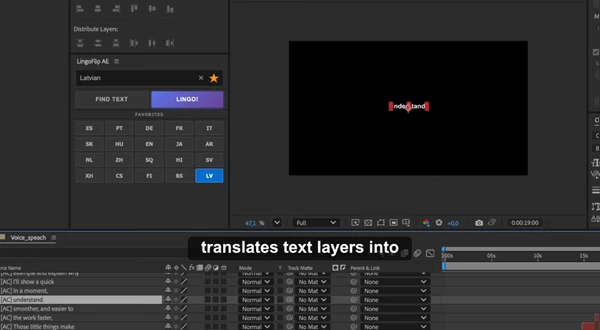
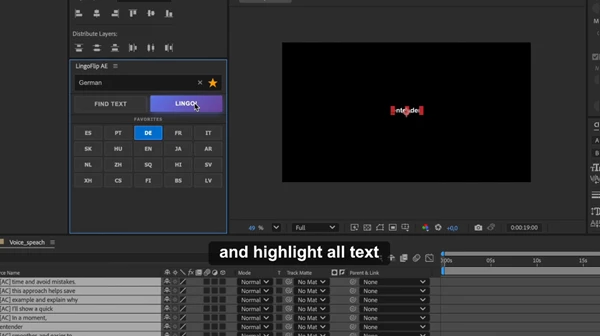
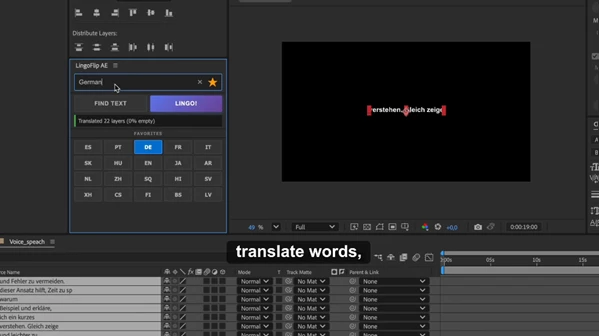
🔍 One-click Text Detection (Find Text)
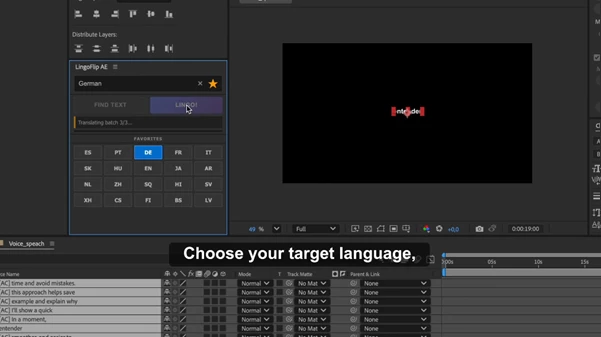
The Find Text button scans your comp, finds text layers, and selects them automatically. So instead of manually searching through your timeline, you can instantly target the layers you want to translate.
🤖 Smart AI Translation (Gemini Powered)
This uses Gemini, with prompt engineering built specifically for AE text workflows. That means it’s optimized for:
- subtitles
- UI strings
- motion design language
- short, design-sensitive text
⭐ Favorites System
You can save up to 10 frequently used languages, which makes repeated client work much faster. Perfect if you frequently deliver multiple versions, like:
- English → Spanish
- English → French
- English → Arabic
- English → Turkish
- English → German
🌍 100 Languages
LingoFlip supports 100 languages, making it a strong tool for international clients and global video projects.
Professional Tips for Cleaner, More Natural Translations
Even with a smart plugin, a few simple habits can make your translations look even more professional.
✅ Tip 1: Translate in Sections
If your comp has different parts (intro titles, lower-thirds, subtitles), translate each section separately. This helps maintain a consistent tone inside each part of the video.
✅ Tip 2: Keep UI Text Short Before Translating
UI labels should be simple and clear. If your source text is messy or too long, translations will be messy too.
Clean text gives cleaner results.
✅ Tip 3: Expect Text Expansion
Some languages naturally become longer (like German or French). After translating, quickly check:
- buttons
- lower-thirds
- callouts
You might need small layout adjustments—but the translation itself will be accurate and natural.
✅ Tip 4: Use Favorites for Speed
Set your top 5–10 languages in Favorites immediately. It makes the workflow much faster, especially for recurring clients.
✅ Tip 5: Translate Subtitle Timelines Together
LingoFlip works best when it sees multiple subtitle layers together. So instead of translating one subtitle line at a time, let it process a full subtitle sequence for smoother phrasing and better flow.
Final Thoughts: Faster Localization Without Breaking Your Comp
LingoFlip is the kind of After Effects plugin that feels small—but saves huge amounts of time. If you work with subtitles, UI animations, motion graphics templates, or any project that needs multilingual delivery, LingoFlip makes the workflow smoother and far more professional. Because instead of wasting hours exporting, translating, and rebuilding layers, you can translate directly inside After Effects—with better consistency, more natural phrasing, and less manual work. If you want a clean, fast, and context-aware translation workflow inside After Effects, LingoFlip is worth trying.
 LingoFlip Smart Text Translation for AE by Aescripts (v5.8.0).rar (Size: 989.2 KB - Date: 5/9/2026 12:37:25 PM)
- LingoFlip Smart Text Translation for AE by Aescripts (v5.7.0).rar (Size: 1.1 MB - Date: 4/23/2026 1:20:52 PM)
- LingoFlip Smart Text Translation for AE by Aescripts (v5.6.0).rar (Size: 1.1 MB - Date: 3/7/2026 2:11:53 PM)
- LingoFlip Smart Text Translation for AE by Aescripts (v5.3.0).rar (Size: 976.7 KB - Date: 2/15/2026 1:30:16 PM)
- Aescripts - LingoFlip v5.2.0.rar (Size: 1.0 MB - Date: 2/8/2026 1:01:47 PM)
Files Password : gfxplugin.com OR 123456