Downloadable Files
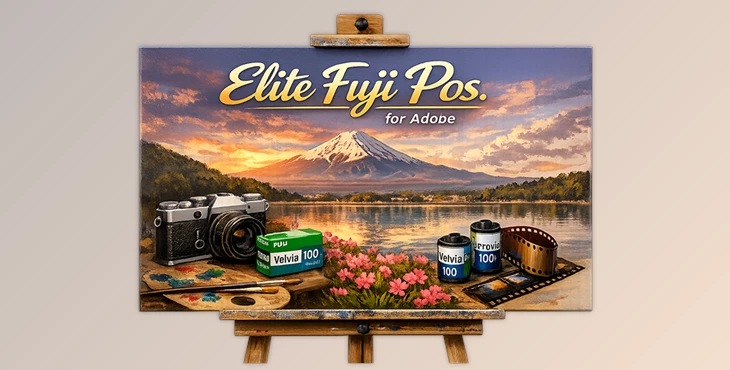
You can download Elite Fuji Pos. for Adobe for free from the bottom of this product page.
A Classic Film Look, Reimagined for Digital
If you’ve ever admired the bold colors, deep contrast, and unmistakable character of Fujifilm slide films, you already know how powerful color can be in storytelling. Elite Fuji Pos. for Adobe is designed for photographers who want that iconic Fuji positive film look—without the limitations of shooting real film.
This tool brings legendary emulsions like Velvia and Provia into your digital workflow, carefully translated to work seamlessly inside Adobe Lightroom and Camera Raw. The result? Images that feel vibrant, emotional, and organic—right from the start.
What Is Elite Fuji Pos. for Adobe and Why It Matters
Elite Fuji Pos. for Adobe was created with photographers like you in mind. It offers highly accurate color profiles that emulate classic Fuji film stocks, making it possible to achieve that stunning positive film look with your digital photos. These profiles work seamlessly with Adobe Lightroom and Camera Raw, giving your images a vibrant, emotional, and organic feel.
How It Improves Your Results
More accurate colors straight out of RAW
Film-like contrast that adds depth without crushing details
Consistent rendering across different lighting conditions
Less time fixing colors, more time focusing on the image
For example, landscape photographers benefit from Velvia’s saturated greens and blues, while portrait shooters can rely on Provia’s balanced tones and pleasing skin color. These characteristics help your photos feel intentional rather than over-edited.
Meet the Tool: Elite Fuji Pos. for Adobe
Elite Fuji Pos. for Adobe is part of Cobalt Image’s high-end Elite series, built for photographers who care deeply about color accuracy and film authenticity.
Features
Authentic Film Emulations
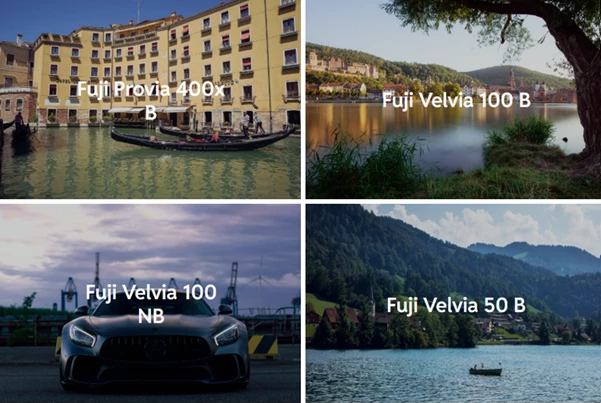
Velvia 50 (120): ultra-saturated, dramatic, and bold
Velvia 100 (35mm): vivid but slightly more controlled
Provia 100F (120): balanced, realistic, and versatile
Provia 400X (35mm): vibrant with higher contrast and flexibility
Balanced (B) & Non-Balanced (NB) Profiles
Balanced versions simulate a perfectly calibrated scan
Non-Balanced versions preserve the raw, emotional character of film
Linear Profile Options
Designed for advanced users who want maximum editing flexibility
Film-Inspired Editing Presets
Grain emulation
Low/High Key looks
Washed black point
Orton effect
Classic vignettes and grain masking
In real projects, these profiles help photographers match images from different cameras, recreate an analog look for digital archives, or maintain a consistent color style across entire photo series.
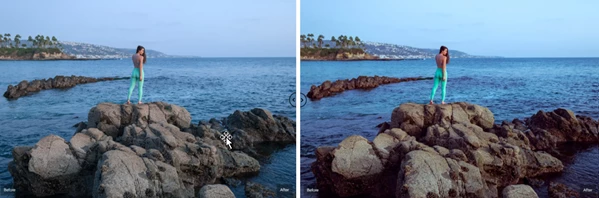
Pro Tips for Natural and Professional Results
To get the best out of Elite Fuji Pos. for Adobe, keep these tips in mind:
Start with exposure first
Fuji slide films are contrast-rich—balanced exposure gives the best results.Use Balanced profiles for consistency
Ideal for commercial work, portraits, and mixed lighting.Experiment with Non-Balanced profiles
Great for personal projects, mood-driven edits, and cinematic color.Dial back intensity when needed
Reducing profile amount slightly can create a more natural, refined look.Combine with subtle grain
Grain presets add realism, especially in shadows and midtones.
These techniques are simple, practical, and easy to apply—even if you’re not an advanced color editor.
Film Character Without the Film Hassle
If you’ve always wanted to create images with the strong colors and character of classic Fuji films without the hassle of shooting real film, you should try this tool.
Even if you already have other film emulation presets, Elite Fuji Pos. for Adobe offers unique and faithful profiles that will enhance your editing workflow. Download it now, experiment with different film profiles, and explore new possibilities in your photography!

Files Password : gfxplugin.com OR 123456