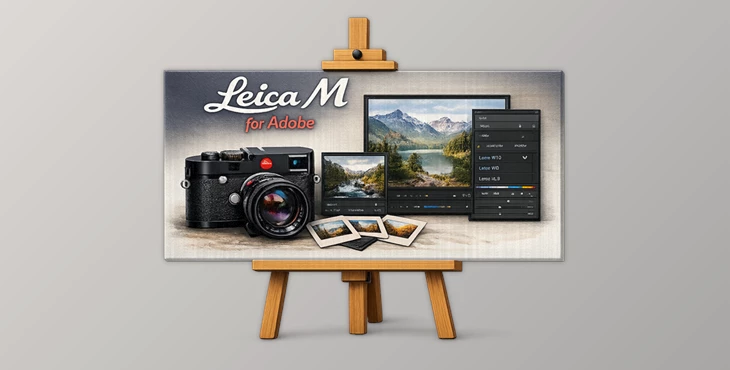
Downloadable Files
You can download Leica M for Adobe for free at the bottom of this page.
The Leica Look… Without Owning a Leica
Have you ever looked at a Leica photo and thought:
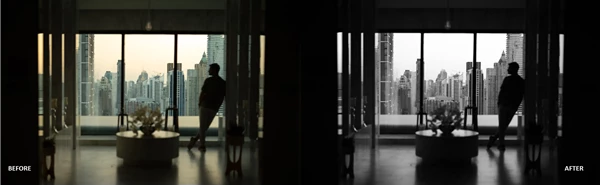
“Why does this look so clean, deep, and naturally beautiful?” That “Leica magic” isn’t just about sharp lenses. A huge part of it comes from Leica’s legendary digital color reproduction—a look that feels balanced, intentional, and real. Leica M for Adobe is built to bring that exact character into your Adobe workflow, so you can apply Leica-style color rendering to photos from any camera—without fighting your RAW files.
What Is Leica M for Adobe and What Does It Do?
Leica M for Adobe is a professional color emulation pack designed for Adobe software (Lightroom / Adobe Camera Raw). It includes carefully engineered color profiles that replicate Leica’s iconic digital color fingerprint with:
- True-to-life colorimetry
- Scientifically crafted Leica-style color signatures
- Emulations for both JPEG and DNG outputs
Why does this improve your results
Most RAW files need a lot of work before they look “right.”
This pack gives you a starting point that already feels finished:
- Skin tones look more natural.
- Colors feel balanced instead of oversaturated.
- Shadows stay deep without becoming muddy.
- The overall image feels “intentional” instead of random.
Real-world examples
- Portraits with cleaner, more realistic skin tones
- Street photos with rich shadows and controlled highlights
- Travel images where blues and greens look vivid but not fake
- Black & white photos with classic Leica depth and contrast
The Professional Tool: Leica M for Adobe
Leica M for Adobe is a complete Leica color emulation collection built around three legendary Leica models:
- Leica M9
- Leica M10R
- Leica SL3
The goal is simple:
- Make your photos look like they came out of a Leica—no matter what camera you used.
Features
Leica M9 — Classic CCD Character
The Leica M9 is famous for its iconic CCD color palette. This pack revives that nostalgic rendering by emulating both its JPEG and DNG outputs.
JPG Emulations:
- M9 Standard
- M9 BW Low
- M9 BW Medium
- M9 BW High
DNG Emulations:
- M9 Embedded
- M9 Adobe Standard
Real effect:
- Perfect for warm daylight, street photography, and anyone chasing that classic Leica digital nostalgia.
Leica M10R — Modern Leica Color Balance
The M10R delivers a cleaner, more refined Leica look—modern but still unmistakably Leica. JPG Emulations:
- M10R Standard
- M10R Black & White
DNG Emulations:
- M10R Embedded
- M10R Adobe Standard
Real effect:
- Ideal for portraits, editorial work, and photographers who want natural colors with premium tonal balance.
Leica SL3 — Full Leica Looks Collection
This is the most advanced part of the pack. The SL3 collection recreates the modern Leica SL3 color rendering, including the updated Leica Looks signatures—currently available officially only on a limited selection of Leica cameras. Included looks:
- SL3 Standard
- SL3 Vivid
- SL3 Natural
- SL3 BW Natural
- SL3 BW High Contrast
- SL3 Bleach
- SL3 Blue
- SL3 Brass
- SL3 Chrome
- SL3 Classic
- SL3 Contemporary
- SL3 Eternal
- SL3 Greg Williams
- SL3 Selenium
- SL3 Sepia
- SL3 Teal
Real effect:
- You get a full set of Leica personalities—from clean and natural to cinematic and stylized—while still staying realistic and professional.


Pro Techniques and Practical Tips
Even though the Leica M for Adobe is designed to be effortless, these tips will make your results feel much more authentic.
Tip 1: Apply the Leica profile first
- Always apply the Leica profile before making heavy edits.
- It gives your file the correct base color response.
Tip 2: Don’t push saturation too hard
- Leica color is powerful because it’s controlled.
- Over-saturating can ruin the natural Leica signature.
Tip 3: Choose the right Leica model for the scene
- Use M9 Standard for nostalgic warmth.
- Use M10R Standard for clean modern realism.
- Use SL3 Natural for everyday professional work.
- Use SL3 Chrome / Brass / Teal for storytelling looks.
Tip 4: Black & White works best with subtle adjustments
Leica-style B&W looks best when it stays deep, not harsh.
Try:
- Slight highlight reduction
- Gentle shadow lift
- Minimal clarity
Tip 5: Use it for consistent color across different cameras
- One of the biggest advantages of this pack is consistency.
- You can make files from multiple camera bodies feel like they came from the same Leica system.
Final Summary: A Leica Look Without Fighting Your Files
Leica M for Adobe is for photographers who want their images to look right faster—without endless color correction or random presets.
With this pack, you get:
- True Leica color signatures
- Profiles crafted through real color science
- JPEG + DNG emulation options
- Advanced Leica Looks-inspired rendering
- A smoother workflow inside Adobe
If you love Leica’s legendary character—whether it’s the classic M9 CCD charm, the refined M10R palette, or the modern SL3 Looks—this pack brings that signature into every RAW file you edit.

Files Password : gfxplugin.com OR 123456

4/28/2026 10:55:35 AM
After downloading, extract the RAR file to a folder. Use "Cobalt Leica M modular package.pdf" in the folder to install.