Downloadable Files
You can download Anti-Tile for free from the bottom of this page.
Say Goodbye to Repeating Textures 👋
If you’ve ever scaled up a “seamless” texture in Blender, you know the pain:
everything looks great… until the pattern starts screaming “I’m repeating!” 😅
That’s exactly where Anti-Tile comes in.
This smart Blender addon removes visible tiling patterns from textures with just one click, helping your materials look natural, random, and professional—without complicated setups or manual fixes.
Whether you’re working on environments, props, or detailed assets, Anti-Tile instantly upgrades the realism of your textures and saves you tons of time.
What Is Anti-Tile and Why Does It Matter?
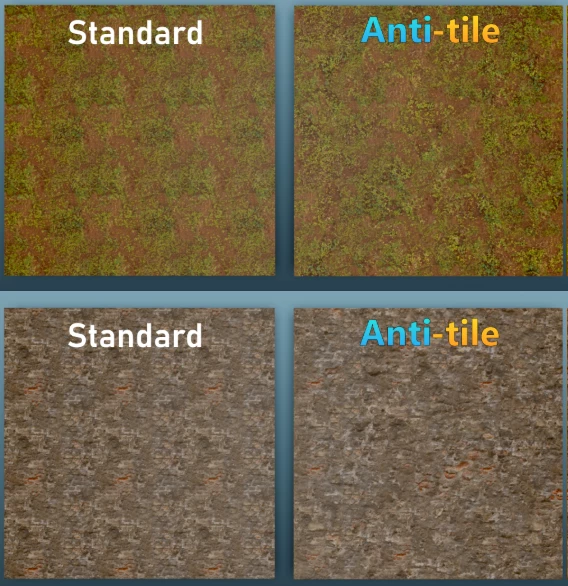
Anti-Tile is a Blender addon designed to break up visible repetition in tiled textures by using per-object randomization and advanced triple-layer procedural blending.
Why this improves your results:
No more obvious patterns when textures are scaled up
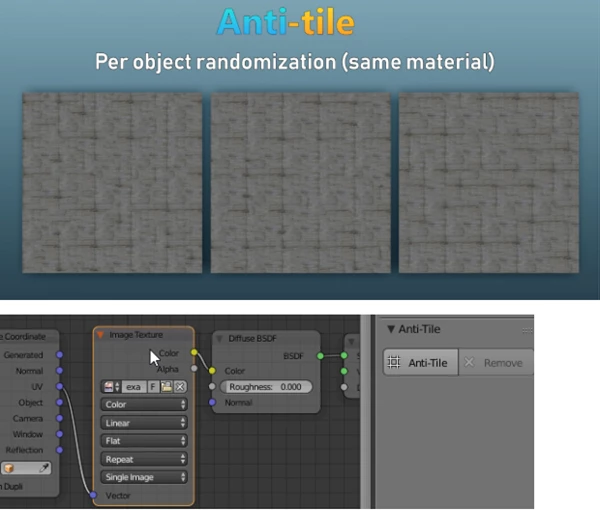
Natural variation across surfaces, even when using the same material
Consistent PBR workflow, so all your maps stay perfectly aligned
Real-world use cases:
Large walls, floors, and terrains
Game assets that reuse the same materials
Architectural visualization where realism matters
Any project where seamless textures stop looking seamless
By blending multiple texture layers with controlled noise and offsets, Anti-Tile creates variation that feels organic—exactly how real-world surfaces behave.
Meet the Tool: Anti-Tile
Anti-Tile is a professional-grade Blender addon that makes texture de-tiling effortless, fast, and reliable.
Features
Triple Layer Procedural Blending
Breaks repetition by blending multiple texture layers in a smart, controlled way.Per-Object Randomisation
Same material, different objects—each one gets a unique result automatically.Same Object, Same Mapping Policy
Diffuse, normal, roughness, and other maps always stay perfectly aligned.Individual Layer Control
Adjust scale and offset for each layer independently for fine-tuning.One-Click Apply & Remove
No generated files, no dependencies, no mess—just apply or remove instantly.PBR Workflow Support
Apply Anti-Tile to multiple PBR textures at once and keep everything consistent.Debug Mode & Anti-Seam Support
Advanced control for technical users and clean seam handling.Blender 4.2 Extensions Support
Fully compatible with modern Blender versions.
Real impact in projects:
Large tiled floors stop looking artificial
Reused assets feel unique without extra textures
Materials stay clean, organized, and easy to manage
Pro Tips for Best Results 🎯
Don’t overdo the noise
Subtle variation often looks more realistic than extreme distortion.Adjust layer offsets first
Small offset changes can dramatically reduce visible repetition.Match the noise scale to object size
Larger objects usually need larger noise scales to feel natural.Use the same settings across PBR maps
Anti-Tile already handles this—but staying consistent gives the best realism.
These tips work great for both beginners and experienced Blender users, and you’ll see better results almost immediately.
Small Tool, Big Difference
Anti-Tile is one of those addons that quietly transforms your workflow.
It doesn’t change how you think about materials—it just removes a major problem you’ve probably learned to live with.
If you care about achieving realistic results and saving time on your materials, then I truly believe Anti-Tile is worth trying out — if not for your current project, then definitely for the next one.✨

Files Password : gfxplugin.com OR 123456