Downloadable Files
You can download ProximityPro for free from the bottom of this page.
Bring Your Animations to Life with ProximityPro
Want your After Effects layers to react to each other without complex expressions? ProximityPro is the perfect solution. This animation system automatically establishes all the logic, so you get to animate like never before — faster and easier than you thought possible.
What Is ProximityPro and Why Does It Matter?
At its core, ProximityPro is a proximity-driven animation system for Adobe After Effects. It measures the distance between each layer’s anchor point and a single effector null, then updates transforms, effects, and even time remapping automatically.
Real-World Uses You Can Imagine Instantly
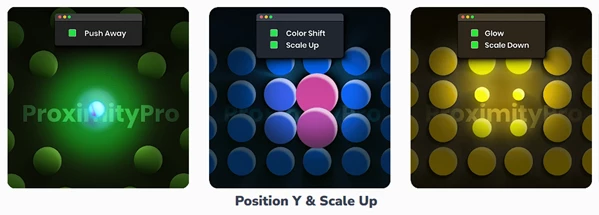
Icons that push away as a cursor or object gets closer
Text layers that scale up and shift color near a focal point
UI elements that glow or blur based on interaction distance
Motion graphics that feel reactive, dynamic, and alive
These features significantly improve workflow and final results because they remove repetitive manual animation and replace it with consistent, distance-based behavior that feels natural and professional.
Meet ProximityPro – A Professional After Effects Tool
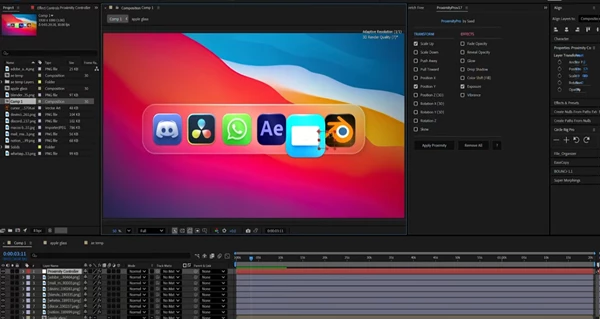
ProximityPro is a professional plugin available on Aescripts that simplifies complex proximity logic into a clean, user-friendly workflow. Everything is controlled directly from the Effect Controls panel, meaning no expression writing, no searching, and no guesswork.
Features
Scale control based on distance
Position (including Y-axis) control
Rotation control
Opacity adjustments
Color & Tint effects
Glow & Blur effects
3D transform support
Distance-based influence system
Forward & reverse time remapping
Works seamlessly across multiple layers
Single effector null for full control
Imagine a logo reveal where elements scale up and glow as they approach the center, or a kinetic typography project where letters subtly move and change color as an invisible controller passes by. ProximityPro makes these effects easy and fully adjustable.
Pro Tips & Creative Techniques
To get the most out of ProximityPro, keep these practical tips in mind:
Use subtle scale and opacity changes for more natural motion.
Combine glow witha slight blur to create soft, cinematic proximity effects.
Animate the effector null slowly for smooth, organic reactions.
Try reverse time remapping for experimental transitions.
These techniques are easy to apply and help even casual users achieve polished, professional-looking results.
Why ProximityPro Is Worth Trying
ProximityPro saves time and effort while opening creative possibilities. You typically need complex expressions for things like this, so why not use distance as a new focal point for efficiency with your motion graphics?
If you enjoy building reactive graphics, UIs, and comps in After Effects, it's well worth your time to experiment with ProximityPro. Download it and enjoy the full breadth of possibilities. Let proximity handle the heavy lifting!