Downloadable Files
You can download GraphKit for free from the end of this page.
Animation Made Faster and Smarter 🎬
If you’ve spent too much time adjusting F-Curves in Blender’s Graph Editor, GraphKit is going to make you a much happier animator. This professional animation add-on does the boring work for you, speeds up the polish process, and lets you make cleaner, more expressive motion with ease.
It’s a blast to use and has tons of smart features. GraphKit makes curvy tasks a breeze, so you can focus on polishing the fun parts of your animation.
What Is GraphKit and Why Does It Matter?
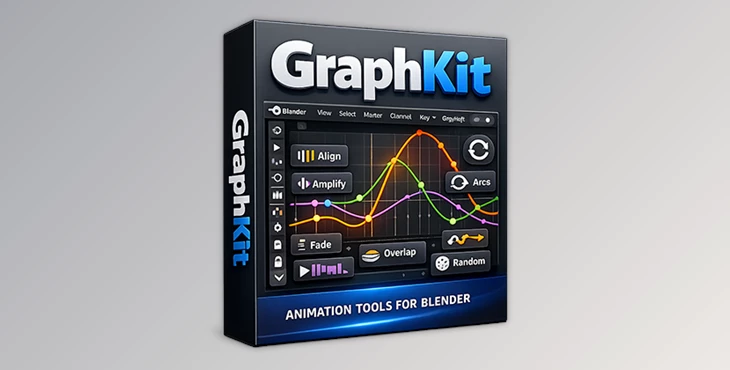
GraphKit is a professional F-Curve editor add-on for Blender that provides you smooth, elegant control over F-Curves (Function Curves) with significantly less effort. Instead of adjusting frame by frame, GraphKit gives you the ability to manipulate timing, spacing, overlap, and flow through intelligent automation.
Why these features improve your results
Cleaner motion: Consistent spacing and smooth arcs lead to more believable animation.
Faster iteration: Try ideas quickly without destroying your original curves.
Better polish: Subtle overshoots, overlaps, and fades add life and weight to motion.
For example, character animators can instantly add natural overlap to body parts, while motion designers can create perfect loops for UI or logo animations in seconds.
A Professional Animation Add-on You’ll Actually Use Daily
Developed by Blastframe, GraphKit is built for animators who work inside the Graph Editor every day. It simplifies complex tasks and adds creative flexibility without overwhelming the user.
Features
Curve & Timing Control
Align – Arrange selected F-Curves into a straight, readable line
Distribute – Create even timing between keyframes
Mirror – Flip keyframes horizontally around the playhead
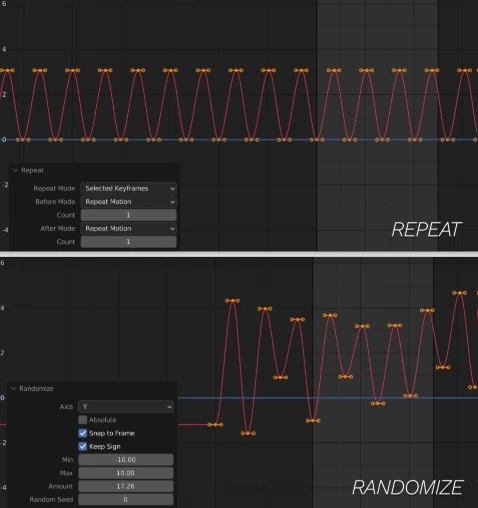
Repeat – Loop entire F-Curves or selected keys
Perfect Loop – Match start and end frames flawlessly
Motion Enhancement
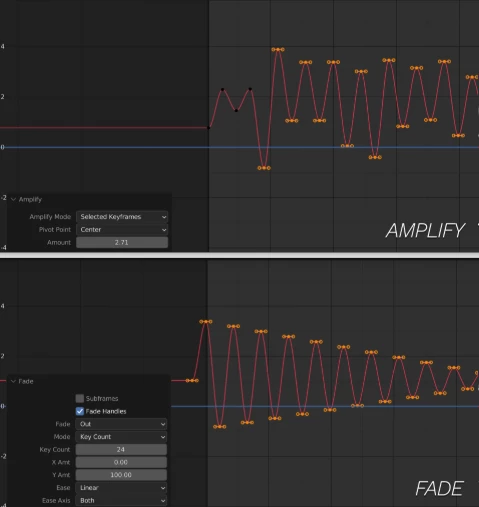
Amplify – Increase or reduce animation intensity
Arcs – Create smooth, coordinated arcing motion
Overlap – Add overlap without extending curve length
Overshoots – Automatically insert anticipation and overshoot keys
Randomize – Add subtle organic variation to loops
Keyframe Management
Hold – Apply hold frames to selected keys
Flatten Holds – Flatten only the hold keyframes
Divide – Subdivide curves and add hold frames
Fade – Fade animations in or out with ease functions
Tween System
Tween Slider – Create breakdowns, anticipation, and overshoots quickly
Tween Types – Breakdown, Blend to Neighbor, Blend to Default
Preset percentage dials for fast experimentation
Selection & Visibility Tools
Select or solo F-Curves by object type
Select Left/Right side F-Curves (great for characters)
Random F-Curve selection for creative exploration
Select objects or pose bones directly from F-Curves
One-click toggles for mute, lock, hide, modifiers, and pins
These features shine in real projects like character walk cycles, looping background animations, UI motion, and stylized motion graphics.
Pro Tips to Get the Most Out of GraphKit 💡
Combine Overlap + Overshoots for more natural, weighty motion
Use Randomize subtly—small values create realism without chaos
Apply Perfect Loop before rendering looping animations for social media
Lock finished F-Curves to avoid accidental changes during polish
Use Tween early to explore poses before committing to final keys
These techniques are easy to apply and make a noticeable difference, even for intermediate Blender users.
Why GraphKit Is Worth Your Time
GraphKit isn't just an add-on; it's a game-changing workflow feature. GraphKit handles all the technical work of curving F-Curves, but allows you the artistry to make sure your animation is fabulous. You'll save time on the curves for character animation cycles or even looping animations.
If you’re an animator of character-based motion, motion graphic animation, or looping animation sequences, you’ll emerge cleaner and less stressed using GraphKit. Try it. Let your animations be expressive!

Files Password : gfxplugin.com OR 123456


![Blender - Download Lazy Shapekeys [Shape Keys Folder & Utility] v1.072](https://dls4.gfxplugin.ir/Download_Files/27522/SearchSmall/banner.jpg)