Downloadable Files
You can download Import CorelDRAW for free from the bottom of this page
Bring Your CorelDRAW Designs to Life in Blender
If you’ve created vector graphics in CorelDRAW before, and you want to easily import them into Blender while keeping colors, gradients, and the design structure intact, then the Import CorelDRAW addon is exactly what you need!
Eliminate the hassle of the divide between 2D designs and 3D assets, and get back to the creativity of your original design, instead of wasting precious time on its import.
Whether you’re working on motion graphics, 3D typography, or stylized scenes, this addon makes the transition smooth and intuitive.
What Is Import CorelDRAW and Why It Matters
Import CorelDRAW is a Blender addon that allows you to import .cdr files directly into Blender while preserving visual accuracy and layer structure.
Why this improves your workflow
- You don’t have to convert it manually.
- Colors, gradients, and images maintain visual integrity.
- Layers are separated intelligently in the 3D scene.
Real-world use cases
Turning CorelDRAW logos into 3D objects
Importing vector illustrations for animation
Preparing precise graphics for architectural or motion design projects
These features save time and reduce errors, especially in professional pipelines.
A Professional Tool for Seamless CDR Import
Import CorelDRAW is designed for artists and designers who want reliability and precision when working with CorelDRAW files inside Blender.
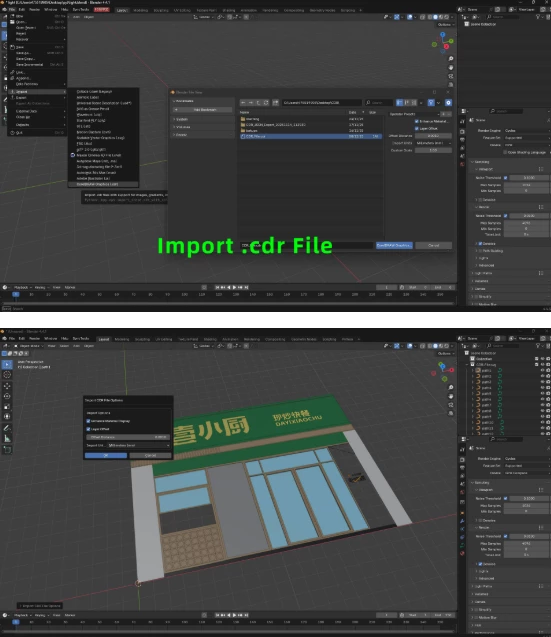
Features
Complete CDR Support
Import CorelDRAW files with full fidelity, keeping colors, gradients, images, and layers intact.Color & Gradient Preservation
Automatically enhances colors and gradients for accurate viewport and render results.Embedded Image Import
Extracts images from CDR files and imports them as separate image assets.Layer Offset Management
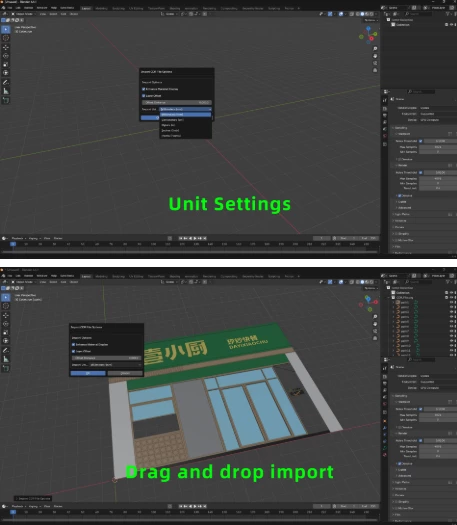
Applies smart Z-axis offsets to prevent overlapping layers in 3D space.Flexible Unit System
Supports millimeters, centimeters, meters, inches, and points for precision work.Drag & Drop Import
Drop your CDR file directly into Blender’s viewport for instant results.Material Enhancement
Automatically improves materials for better visual quality.Batch Import Support
Import multiple CDR files at once using consistent settings.
Technical backbone
The addon uses Inkscape’s conversion engine (bundled) to convert CDR files to SVG, then imports them using Blender’s built-in SVG importer—ensuring maximum compatibility and quality.
Pro Tips for Better Results in Blender
- Activate io_curve_svg before importing any files.
- Use layer offsets creatively to create motion graphics with depth.
- Convert all curves to meshes after importing for the shader and modifier functions.
- Make sure to use Geometry Nodes for an added procedural animation bonus.
- Always check your unit management before import.
All of these will help you create a more polished look for your scenes.
Simple, Clean, and Powerful
Import CorelDRAW deserves a spot in your addons collection. Unlike other tools, it builds a bridge between CorelDRAW and Blender while prioritizing file integrity and design accuracy.
If you use vector graphics software often with Blender, this is an easy suggestion that will save you valuable time every time you enter the production phase for your projects.
Take a closer look at the addon features, play around with your CorelDRAW files, and watch how easy it becomes to transition from 2D to 3D🚀

Files Password : gfxplugin.com OR 123456