Downloadable Files
You can download Pixel Extender for free from the end of this page.
Extend Your Layers Beyond Limits
Have you ever wanted to stretch or extend only specific parts of a layer in After Effects—without messy workarounds or duplicated layers?
Pixel Extender is the answer! This effect gives you precise and intentional control and makes your layer extensions appear polished and professional. From motion graphics to title animations to even abstract designs, this effect will transform your approach to layer extensions as if they're always a part of your project.
What Is Pixel Extender and Why It Matters
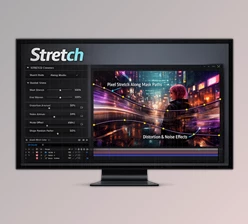
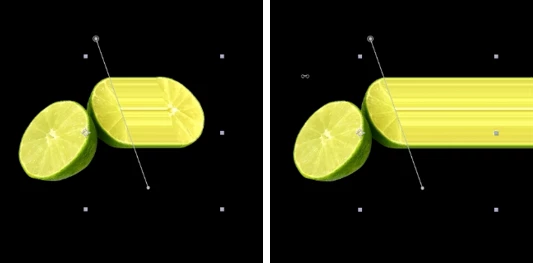
Pixel Extender is an After Effects effect that allows you to extend selected areas of a layer using a mask path. Instead of stretching the entire layer, you decide exactly which part should grow, flow, or continue.
Key Use Cases
Extending text strokes for kinetic typography
Creating motion lines or trails behind objects
Designing abstract graphic elements with controlled depth
Enhancing transitions with smooth, directional extensions
Because the extension follows a mask path, the result feels cleaner, more deliberate, and far more flexible than traditional scaling or duplication methods. This precision directly improves the final visual quality of your projects.
Meet Pixel Extender – A Professional After Effects Tool
Pixel Extender is developed for motion designers who want control without complexity. It works on any layer type, including text and shape layers, and integrates smoothly into existing After Effects workflows.

Features
Extend any layer, including text and shape layers
Use mask paths to define extension areas
Create multiple extension lines easily
Apply expressions to follow transforms of collapsed layers
Option to hide the extension line entirely
Apply custom fill color and line color
Target the layer before effects or render results behind the layer
Stack extensions cleanly without cluttering the timeline
Real-World Examples
Text animations where letters extend into dynamic graphic lines
Logo reveals with controlled pixel trails
Motion graphics where elements flow naturally into space
Layered visual effects that build depth without extra precomps
Pro Tips for Better Results
Use smooth mask paths for more natural extensions
Combine Pixel Extender with subtle motion blur for realism
Stack extensions behind the original layer to create depth
Keep extension lengths moderate for cleaner, more professional visuals
Test expressions when working with animated or collapsed layers
These optimizations aren’t mandatory to see great results—but they will improve the quality of the animations you create if you consider these minor adjustments.
Final Thoughts
Pixel Extender is not the latest Swiss Army knife tool that tries to do everything. Instead, it’s a tool that does one thing exceptionally well. It will upgrade your workflow!
If you’re a fan of clean motion design or layered text graphics where you want certain designs to flow, then you should check this tool out. Download it and test it. Use mask paths and let your layers extend where they need to!
 Pixel Extender Extend Your layer in AE by aescripts (v1.1 for Win, Mac).rar (Size: 5.6 MB - Date: 4/15/2026 11:20:14 AM)
- Pixel Extender Extend Your layer in AE by aescripts v1.0 (Mac).rar (Size: 2.5 MB - Date: 2/5/2026 1:10:43 PM)
- Aescripts - Pixel Extender v1.0 (Win).rar (Size: 180.8 KB - Date: 1/25/2026 4:01:45 PM)
Files Password : gfxplugin.com OR 123456