Downloadable Files
You can download ChronoKeys for free from the bottom of this product page.
Time Should Work for You, Not Against You
If you’ve ever had to adjust layer durations in After Effects and watched your beautiful keyframe work go out of whack, then you are not alone. Adjusting timing is perhaps the most painful part of motion design. ChronoKeys allows you to avoid the retiming cleanup and instead turn it into a confident design decision.
Adjust the timing of your animation, but keep every easing curve intact.
What Is ChronoKeys and Why It Matters
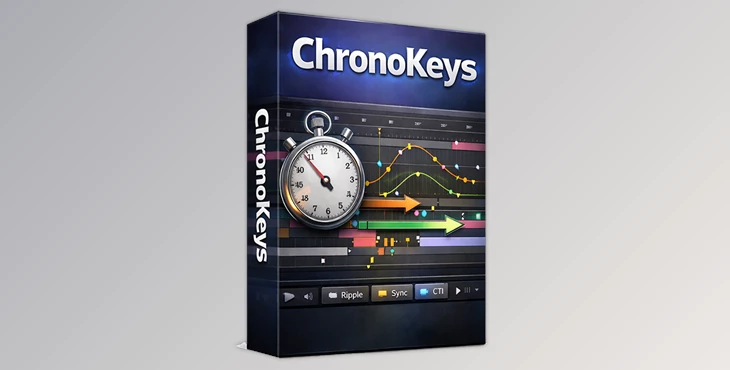
At its core, ChronoKeys is a timing control tool for Adobe After Effects that synchronizes keyframes with layer and precomp durations. Instead of having to nudge keyframes around or recreate an animation from scratch:
- Keyframes will respond to Layer In-points and Out-points.
- Your timing will be predictable.
- The cadence of your animation will remain intact.
- All easing curves are protected.
For example, when extending a scene by a few seconds, ChronoKeys ensures the animation stretches or shifts naturally—without destroying motion flow or spacing.
Meet ChronoKeys: Professional Timing Control
ChronoKeys is designed for animators, motion designers, and editors who care deeply about rhythm and precision. It simplifies complex retiming tasks and makes large timeline changes feel lightweight and reversible.
Features
Sync Keyframes to Layers
Lock keyframes to layer in-points or out-points
Stretch timing while preserving relative motion
Protect keyframe spacing while adapting to layer duration
Ripple Nudge
Automatically pushes neighboring layers when timing changes
Works even without synced keyframes for pure layer retiming
CTI Nudge
Extends layers intersecting the CTI
Nudges layers left or right based on playhead position
Works on selected layers or entire compositions
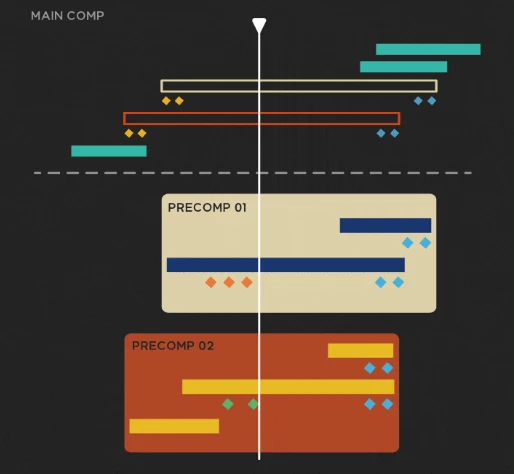
Precomp-Aware Retiming
Control how deeply changes affect nested precomps
Automatically extend precomp duration when needed
Retiming without diving into every precomp manually
Keyframe Alignment & Re-Time
Snap keyframes to in-point, out-point, or CTI
Re-time by frames or percentage
Choose first, center, last keyframe, or CTI as anchor
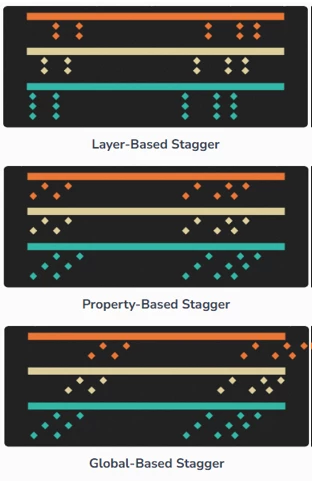
Advanced Stagger
Layer-based, property-based, or global staggering
Ascending or descending timing offsets with precision
Imagine retiming a complex explainer animation or UI sequence—ChronoKeys keeps everything coherent, even across deeply nested structures.
Pro Tips for Better Results
- For character animations, use Protect mode to preserve the spacing of motion.
- Use Ripple Nudge while syncing keyframes to reimagine the shape of an animation.
- Enable auto-precomp extension when retiming precomps so they don’t get cut off.
- Use Stagger with shorter offsets to create more organic motions.
Simple yet effective techniques can improve your work without burdening you with more tasks.
Why ChronoKeys Belongs in Your Workflow
This tool is not about glitz and glamor. ChronoKeys is about control. You can afford to get playful and experiment with timing and spacing, and have complete confidence that your animations won't be falling apart on you.
This tool is key if you are a motion designer looking to add a few frames to an animation or improve the timing of the entire project.
If timing is important to you as a motion designer, ChronoKeys helps make the chore of retiming less like a trip to the dentist!
 ChronoKeys Fine-Tune Timing Across Your Entire Animation (v1.0.2).rar (Size: 892.4 KB - Date: 2/26/2026 10:21:13 AM)
- ChronoKeys Fine-Tune Timing Across Your Entire Animation (v1.0.1).rar (Size: 813.8 KB - Date: 1/31/2026 11:56:58 AM)
- Aescripts - ChronoKeys v1.0.rar (Size: 80.7 MB - Date: 1/25/2026 4:00:47 PM)
Files Password : gfxplugin.com OR 123456