Downloadable Files
You can download PiXimperfect Compositing for free directly from the end of this page.
PiXimperfect Compositing: Make Complex Photoshop Compositing Feel Effortless
Compositing is the most useful—and challenging—of all the tools in Photoshop. It can feel overwhelming, at first, to create a believable composite with so many tools, layers, and adjustments to work through. PiXimperfect Compositing completely changes that and turns what’s usually a complicated process into an experience that guides you and teaches you every time you use it. Whether you’re a beginner or a pro on a job site, this plugin saves time, hassle and provides you with inspiration from the very first image.What Is PiXimperfect Compositing and Why It Matters
PiXimperfect Compositing is a pixel-perfect, pro-level Photoshop (UXP) plugin that allows you to create high-quality composites with trusted techniques. There is no need to memorize tools or values. Rather than searching through menus to find the correct color to make your layers work, the plugin takes you through the essential steps of compositing:
- Placing and aligning subjects into backgrounds
- Correcting perspective for realism
- Removing backgrounds and refining masks
- Matching colors, light, and contrast
- Adding depth of field, textures, and lighting effects
These features dramatically improve results because they’re based on repeatable, real-world compositing methods—the same ones professionals use again and again. The plugin calculates optimal values where needed, helping your images look cohesive, natural, and believable.
Meet the Tool: A Professional Compositing Powerhouse
Developed by Picture Instruments in collaboration with Unmesh Dinda (PiXimperfect), this plugin packs years of professional compositing knowledge into a clean, beginner-friendly interface. It doesn’t just make things faster—it makes them clearer, smarter, and more enjoyable.
Features
- Guided Compositing Workflow
Step-by-step assistance for every major compositing task, reducing trial and error. - High-Resolution Generative Fill
Seamlessly extend backgrounds and fill missing areas with impressive detail. - Advanced Masking & Background Removal
Clean, precise selections made simple—even with complex edges. - Perspective & Alignment Tools
Instantly match subjects to scenes for realistic placement. - Color, Light, and Shadow Matching
Automatically balance tones, highlights, and shadows across multiple images. - Depth of Field Control
Create cinematic focus and separation with realistic blur. - Unlimited Looks, Textures & Light Effects
Access a built-in library of high-quality looks, overlays, textures, and lighting effects. - Non-Destructive Editing
Every effect remains editable, keeping your workflow flexible and safe. - Random Look Generator
Instantly explore endless visual styles with one click for creative inspiration.
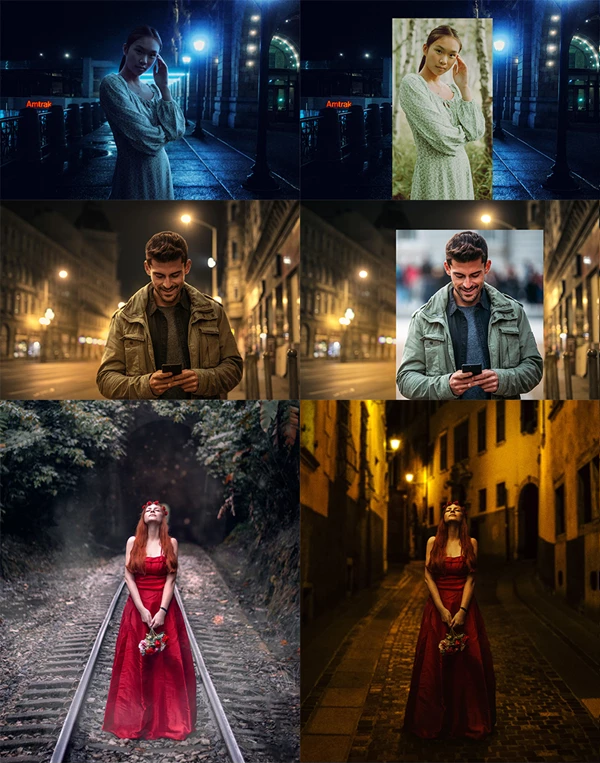
From cinematic portraits to fantasy scenes and commercial composites, the plugin adapts effortlessly to real-world projects.
Pro Tips for Better, More Realistic Composites
- Start with perspective first
Matching perspective early makes every later adjustment feel more natural. - Use subtle lighting effects
Small light overlays often look more realistic than dramatic ones. - Let color unify the scene
Apply looks gently and adjust opacity to blend elements together smoothly. - Build depth gradually
Combine depth of field with shadows and textures for a layered, cinematic feel. - Experiment with random looks
Unexpected combinations can lead to unique, professional-grade results.
These techniques are easy to apply and help your composites feel cohesive rather than over-processed.
Final Thoughts: Why This Plugin Is Worth Your Time
Whether you want to render results quicker whilst still obtaining a professional standard, or if you want an easier route into the world of composite art without having to watch hundreds of YouTube videos, this plugin is worth exploring. Download it, check it out, and your composites will never be the same again!



![Download Realistic Live-Action VFX Compositing Using Blender by Wakui Rey [ ENGLISH SUB ]](https://dls4.gfxplugin.ir/Download_Files/24773/SearchSmall/banner.png)
![Download Neo-Stock – Hollywood Processing [Photoshop Training Bundle]](https://dlsb.gfxplugin.ir/Download_Files/11557/SearchSmall/banner.jpg)