Space Worlds in the Blink of an Eye
Have you used the SOL Space VFX Elements Pack? Imagine the scene for an epic space film, teaser, or animation. The stars are twinkling, planets are rotating, meteors zip through at lightning speed, and the sun glistens as it reflects off the rings of the planet.
It sounds amazing – but it’s not that simple. Crafting a realistic, cinematic space scene with effects like these can take hours or even days with software like After Effects, Premiere Pro, or DaVinci Resolve. Every light movement, every star, and every planetary feature has to be rendered. Adding depth, camera movements, and light effects normally makes these projects complex and time-consuming.
Now imagine having everything done for you and crafting a realistic, cinematic scene with a single click. No complexity, no hassle – just room for creativity and story. It’s this vision for a quick professional solution for space scenes that underpins the SOL Space VFX Elements Pack.
When Space is Ready with One Click
In motion graphics and VFX, an asset library is a collection of images, videos, and effects that you can use to save time and avoid creating everything yourself.
Use cases:
- Create stunning space scenes quickly for films, teasers, or motion graphics without hours of modeling and design.
- Add precise details like twinkling stars, planets with rings, diverse moons, or meteors—all ready to use.
- Generate cinematic and realistic effects with simple drag & drop, without complex software processes.
This means instead of spending your energy and time creating base elements, you can focus on storytelling, camera movement, lighting, and animation—making scenes truly alive and engaging.
💡 Tip: Even beginners can create professional-looking, eye-catching scenes using a high-quality asset library, without being a VFX expert.
When You Have to Build Everything Yourself…
Before ready-made libraries like SOL Space VFX Elements were available, designers and animators had to create every space element from scratch:
- Create stars and cosmic fog with particle effects, which could take hours even for a simple scene.
- Model planets, moons, and their rings in 3D software and apply textures, requiring precision and skill.
- Animate meteors, sunlight, and other cosmic effects manually to bring the scene to life.
Challenges and limitations:
All of this is time-consuming and exhausting. Even with enough experience, building every star, planet, or meteor from scratch can take hours. Managing numerous details, especially in large or complex projects, can be confusing and frustrating. The final result doesn’t always look as realistic or cinematic as expected, and even a small mistake in lighting, movement, or element composition can ruin the natural feel of the scene.
In short, without a ready-made resource, achieving a professional, eye-catching scene is difficult and time-consuming.
SOL Space VFX Elements: Everything Ready, Just Drag onto the Scene
Imagine you want to create a space scene but are tired of building every star, planet, or meteor from scratch. SOL Space VFX Elements is a professional toolbox with everything prepared—you just decide what goes where.
What’s inside?
- Stars & Galactic Backgrounds: Twinkling stars and various galaxies to give your scene depth and realism.
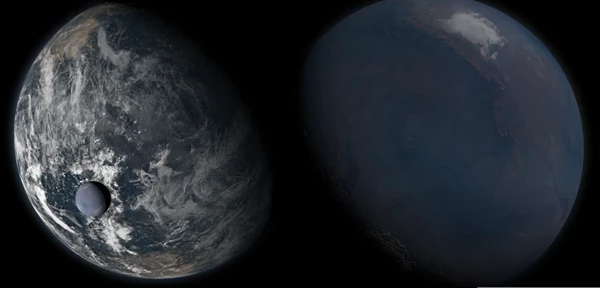
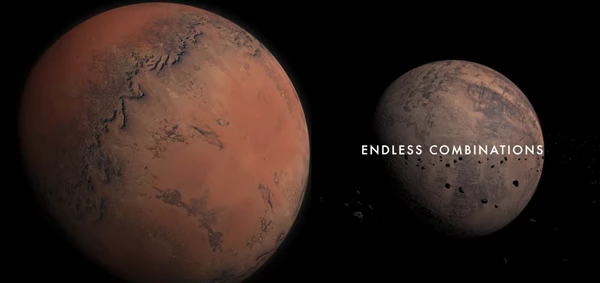
- Planets & Moons: 50 high-quality planets and moons, with detailed textures ready for immediate use.
- Planetary Rings: Add rings to any planet or moon to create stunning ringed planets.
- Meteors & Space Motion: 4K videos to make your scene dynamic and alive.
- Suns & Light Effects: Suns, lens flares, and cinematic lighting to enhance visual appeal.
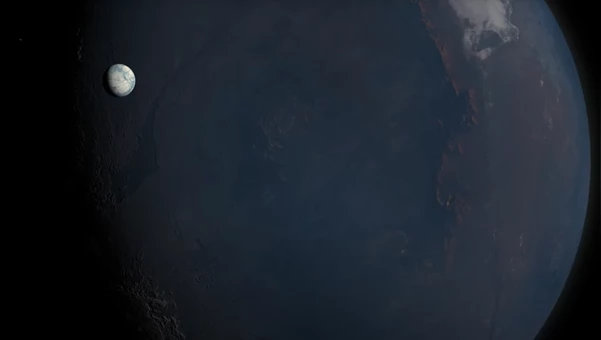
- Planet Closeups: High-resolution photos and videos for close-up shots and special effects.
How it works:
All files are either PNGs with transparent backgrounds or 4K videos with alpha channels, meaning you can use them in any image or video editing software like After Effects, Premiere, Photoshop, or DaVinci Resolve.
Simply place a black background, drag the elements onto the scene, adjust their size and position, and that’s it—your scene is ready.
Instead of hours of modeling and animating, focus on creativity, lighting, and storytelling.
This is like a toolset for making spaces, you don’t build it from the ground up, but it’s totally realistic and professional and cinematic. You can have scenes made in a few clicks that would’ve otherwise taken hours to perfect as a beginner.
Be More Professional Without the Hassle
Even with ready-made elements, a few simple tips can make your scene more realistic and cinematic:
- Proper layering: Place elements on separate layers. For example, stars behind planets, meteors slightly forward. This creates real depth and a sense of space for the viewer.
- Creative combination of elements: Combine multiple planets and rings, or add various moons. This generates fresh visual effects and prevents the scene from looking repetitive.
- Lighting and effects: Adding a bit of glare, flares, and sunlight on stars and planets enhances realism and cinematic feel. Small adjustments in light intensity or colors can add a professional touch.
- More natural motion: Animating subtle rotation or scale—like a planet slowly rotating or a meteor gently growing and shrinking—makes the scene appear more alive.
- Small but impactful details: Adding tiny particles, faint fog, or background glow can make the scene cinematic and engaging without overcomplicating it.
With a few minor tricks in layering, light, and motion, even a scene built with a few clicks can look professional, lively, and stunning—and that’s where SOL Space VFX Elements really shines.
Hassle-Free Space Scenes, Ready for You
With SOL Space VFX Elements, you can spend less time trying to make stars, planets, or meteors and get to placing them exactly how you want. It’s all there—the possibilities are endless. Focus on lighting, animation, camera angles, and storytelling to take your real-time projects to a professional level with jaw-dropping graphics. Even as a beginner, you can have a scene in place in just a few clicks that will look like you spent hours crafting it.
Not only will your scenes look more realistic, but they will also have that dynamic, cinematic quality that every filmmaker strives for. A perfect combination of elements, good lighting, and motion will take any project to the next level.

Files Password : gfxplugin.com OR 123456