When Movements Speak
Have you ever explored creating effects with the ComicStyle for After Effects? We’ve all seen animation or motion graphics scenes full of motion, but something feels missing… that sense of excitement and energy that automatically grabs you when you read a comic or manga. A character runs, a ball is thrown, and an explosion happens, yet the real thrill isn’t felt in the scene. It’s like a magical layer is missing that could bring everything to life.
This is where the manga/comics-style helpers come into play. You can add motion lines to make things move as if they’re drawn faster, you can outline the trajectories of items, you can halftone, and you can use comic printing effects to pass along the cute/comic vibe to your scene.
In other words, it brings your scene to life where it looks like everything is living and in motion. Even the smallest motion, if brought to life through these assets, makes the scene that much more amazing.
What Are Manga and Comics?
You might have seen manga or comics before, but you might not know exactly what makes them so appealing.
- Manga: Japanese visual stories that show character movements and emotions in a very unique and engaging way. Even a glance or a quick movement can convey a big feeling.
- Comics: Illustrated stories that use effects and visuals to emphasize motion and the excitement of scenes.
Some Tangible Examples:
- A character running fast, with speed lines appearing behind them to make their movement feel quick.
- When a big hit occurs, focus lines help the intensity and energy of the scene reach the viewer.
- Shadows and backgrounds using halftones mimic comic print pages, adding the distinct comic style to the scene.
By combining these effects, even a simple movement can appear energetic and alive, making the scene feel more real and exciting. In short, these effects are the magic that turns ordinary scenes into something you can’t take your eyes off.
How Did We Work Before These Tools?
Before manga and comic-style tools existed, creating energetic and exciting scenes meant doing everything manually, step by step.
For example:
- Speed Lines: Had to be drawn one by one using Shape Layers and Masks. Any small change meant adjusting everything again. Time-consuming and required a lot of patience.
- Halftones and Comic Effects: Layer Styles and Pattern Overlays could help, but often didn’t look natural or realistic. Shadows and backgrounds were either too stiff or too messy.
- Focus Lines and Motion Paths: All done manually. A simple hit or fast movement meant redrawing lines and adjusting paths.
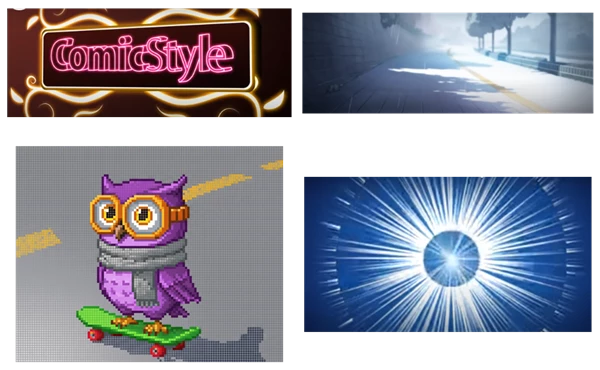
Result? Boring and time-consuming. Scene energy and excitement decreased, and with multiple action-packed scenes, you’d spend hours just to create something ordinary.
Simply put, without dedicated tools, making a manga or comic scene was like running through a swamp: you move, but don’t get far, and energy drains away.
Professional Tool: ComicStyle for After Effects
ComicStyle for After Effects is like a professional magic that speeds things up and makes things more fun when it comes to manga and comic effects in After Effects. You don't have to spend hours creating speed lines, lines of force, and halftones by hand anymore; it's all pre-made and editable.
Features and Applications:
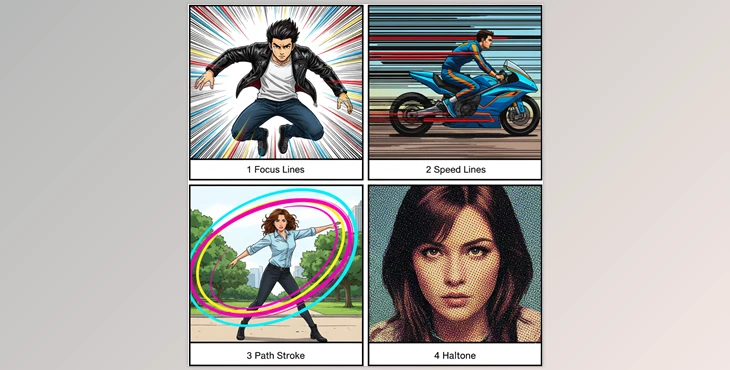
- Focus Lines:
When a major hit or explosion happens, these lines convey the intensity and focus of the scene to the viewer.- Example: When a character punches with force, these lines double the energy and excitement of the impact.
- Speed Lines:
Show fast movements of characters or objects.- Example: A racing car or a character running fast will have speed lines behind them, making the scene more dynamic and lively.
- PathStroke:
Follows the path of objects with lines or colors, clarifying movements.- Example: In motion graphics, the movement of a ball or sword becomes easier to follow, and viewers can see the exact path.
- Halftone:
Makes shadows and backgrounds resemble printed comic pages.- Adds a comic-style look and transfers the artistic, captivating feel of comics to the scene.
Real Examples:
- A hero’s movement in an action scene, combined with speed and focus lines, doubles the excitement of the scene.
- A ball’s path in motion graphics visualized with PathStroke makes movement easier to follow.
- Even shadows and backgrounds using halftones bring a comic feel to the scene, taking it out of the ordinary.
In short, this plugin makes every movement and every scene in your projects look alive, thrilling, and awesome without spending hours.
Professional Yet Simple Tips
Now that we have the ComicStyle for After Effects, how can we make scenes truly engaging and lively without making them cluttered or confusing? Here are some simple but professional tips:
- Combine Focus and Speed Lines:
Using both together makes scenes truly dynamic, allowing viewers to feel movement and energy more easily.- Example: A character running fast with focus lines behind them amplifies the excitement and pressure of motion.
- Set Halftone Opacity Properly:
Halftones create comic-style shadows and effects, but if too strong, the scene looks artificial and messy.
Adjust opacity to keep the comic effect natural and professional. - Use PathStroke on Curved Paths:
Movements are usually curved. Using PathStroke on curves makes motion smooth and natural.- Example: A ball or sword movement in an action scene appears clear and fluid.
- Preview and Avoid Overdoing Effects:
Always preview your scene to see how everything looks.
Adding effects is good, but overdoing it can make the scene messy and confusing. Balance is key to professional results.
By following these simple tips, even casual users can create dynamic, exciting, and professional-looking scenes without spending hours on manual adjustments.
Bring the Energy of Comics to Your Projects
With ComicStyle for After Effects, your animation and motion graphics are no longer boring and mundane; they become exciting, alive, and professional. Every punch and explosion has real power.
Major Benefit? Saves you time. You don't have to waste time hand-drawing speed lines, depth lines, halftones, and every time you need to change something, you can just tweak and get it right away.
So, if you want your projects to have the feel of manga and comics, and scenes to be energetic and exciting, try these effects. Once your scenes come alive with these tools, you’ll enjoy watching them, and your projects will look far more professional.

Files Password : gfxplugin.com OR 123456