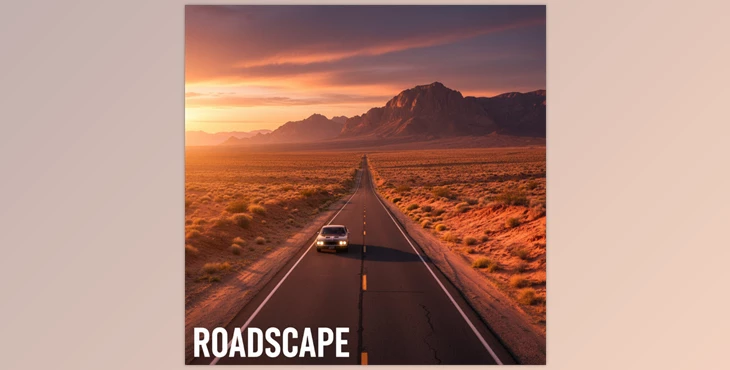
Build Roads Easily!
Have you ever created anything using the Roadscape (Blender Road Generator)? Imagine you’re creating a city or a natural environment and something’s missing… roads!
The very roads that not only define the movement paths for people or vehicles but also shape the appearance of your environment. Drawing complex roads with interwoven intersections, natural terrain slopes, and urban details like curbs, guardrails, lane markings, and streetlights has always been a major headache. Even if you spend hours on it, the result often still looks artificial and rigid.
Now imagine designing a mountainous road with tunnels and bridges, having plants and grass alongside the road, and everything perfectly aligned with the terrain… With traditional methods, this means days of work and countless adjustments.
But what if there was a tool that could do all of this automatically? A tool that draws roads on the terrain, manages intersections on its own, places curbs and lane markings correctly, and scatters natural roadside details. You just define the main path, and everything else takes shape by itself, making your environment look realistic and ready in no time.
Hassle-Free Road Building
You may have heard the term Procedural Road Building, which might sound a bit confusing. Simply put, it means the roads form themselves on the terrain and adapt to their surroundings without needing to manually create each section.
Here are some real-world examples that all designers face:
- Building a small city or modern neighborhood?
Just draw the main road paths, and the rest of the details will generate automatically. - Adding curbs, guardrails, or lane markings?
The tool places everything correctly in its proper place—no manual work or wasted time. - Want a road with an underground tunnel or a bridge over a river?
A simple setting adjusts the road automatically. - Want grass, trees, stones, or natural plants alongside the road?
The tool handles it automatically, ensuring everything aligns perfectly with the terrain.
These features make your environment look highly natural and professional, without wasting time on repetitive details. It’s like magically creating roads and all their elements!
Before Roadscape, What Did We Do?
Before professional tools like Roadscape came along, building roads was frustrating and time-consuming. In reality, everything had to be done manually and with great precision.
For example:
- To draw a road, we started with Mesh and Extrude, manually shaping every curve and slope.
- Curbs, guardrails, and lane markings were all added manually, and moving them around was difficult.
- We tried to make roads align with the terrain slopes and intersections, but the results often looked artificial.
- Roadside details like plants, stones, and grass were scattered using Particle Systems, requiring hours to make them look natural and non-uniform.
The main problem?
All of this took a lot of time, was prone to errors, and roads still often looked unnatural. A true nightmare for any environment or city designer!
Roadscape: The Tool You’ve Always Needed
Roadscape 4.x is a professional Blender add-on that builds roads automatically and accurately on the terrain. No more spending hours crafting a complex road with intersections, slopes, and bridges.
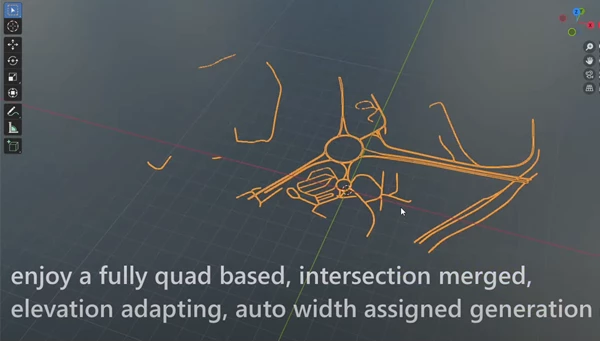
What It Does
- Automatic Road Generation: Got GIS or OSM paths? Roads generate automatically with all curves and elevation changes.
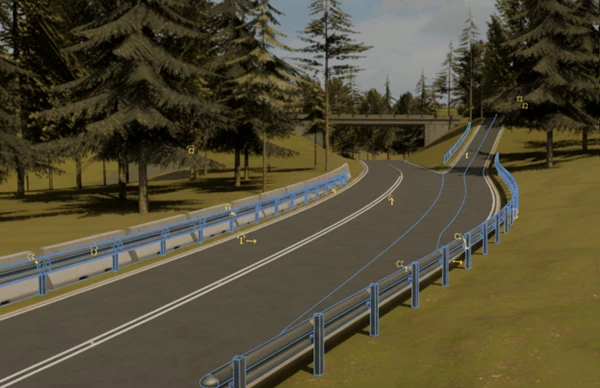
- Urban and Road Details: Curbs, guardrails, lane markings, streetlights, and anything you can imagine are added automatically.
- Terrain Adaptation: Roads fit perfectly on the terrain, whether as bridges, tunnels, or flat surfaces—no manual adjustments needed.
- Natural Scattering: Grass, plants, or stones along the road? Everything is scattered naturally and aligns with the terrain.
- Professional Control: You can customize road width, slope, elevation, and details anywhere you want.
- Game Development Support: Ready-to-use UVs for game engines, OSM path cleanup, and optimization tools.
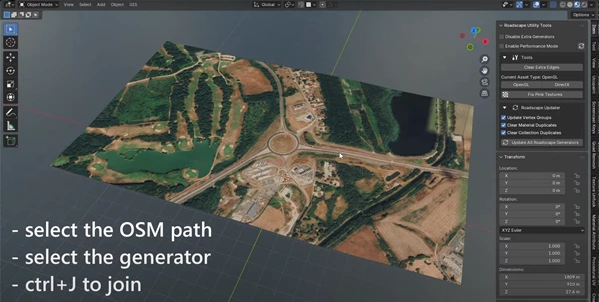
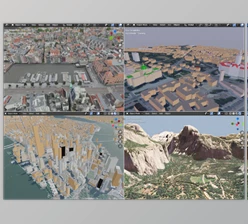
Think of an urban setting with dozens of crossroads, overpasses, and underpasses. Before, it would take hours to construct roads, build curbs, paint road lines, and add roadside props. Now, with Roadscape, you just have to draw the paths. It takes mere minutes, and dynamic generation populates everything. Roads appear naturally and professionally as if they were in a miniature real-world setting!
Pro Tips to Make Your Work Easier
If you want to build roads with Roadscape that look realistic while keeping workflow fast and easy, here are some simple but professional tips:
- Keep your terrain low-poly:
Before generating roads, reduce your terrain polygons. This speeds up processing and makes it easier for the tool to adapt to the terrain, especially in large or highly detailed environments. - Import Paths via OSM or Curves:
Bring in real-world or custom paths and use Lazy Mode for intersections. This allows roads to automatically merge without manually adjusting intersections. - Scatter Roadside Details:
Use Roadscape’s scattering system for grass, plants, stones, or other natural details. Enable LOD so distant views are lighter and close-up details appear fully. - Use Bridges and Tunnels:
Convert parts of the road into bridges or tunnels to create diverse and realistic environments. This not only enhances the visual quality but also provides a more authentic experience for viewers or players.
💡 Following these tips, your roads will look both natural and beautiful, and working with Roadscape will be fast and hassle-free.
Road Building is No Longer Hard!
Roadscape eliminates the need to spend hours placing roads, intersections, and roadside features. It's all automatic and intelligent. Roads conform to the landscape; there are already bridges and tunnels in place, curbs and road markings are in place just as they should be, and plants and other foliage disperse with ease.
It saves time, brings a more professional appearance to projects, and outputs like a designer. You can build an entire city block or a detailed forest path in mere minutes instead of hours.
Don't be intimidated if you're a Roadscape rookie and new to Blender—it'll have you operational in no time for rapid, realistic roads and environments. Paths and intersections form easily, and all small and large details are added automatically. Get ready to draw your path and let Roadscape handle the rest. The result is not only fast but also conveys a strong sense of realism and professional quality, making the process of creating natural or urban environments enjoyable!

Files Password : gfxplugin.com OR 123456