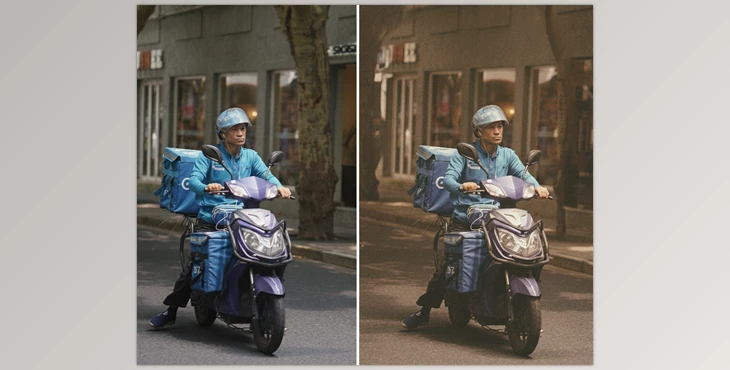
Why Don’t Our Photos Ever Have That Film Feel?
Have you ever created anything using the Core Color Lightroom Presets? Many times, our digital photos don’t turn out the way we imagine them. Colors look flat and lifeless, contrast is either too strong or too weak, and that nostalgic, pleasant vibe of old films—which makes a photo feel more real and alive—is completely lost.
For instance, when you take a picture of a face, it's not smooth and natural, the lighting on the features is almost dull or too bright. When you take a picture of a sunset or a beach, colors are oversaturated or faded, never giving off that cinematic, cozy vibe. Even nighttime shots are taken with too much or too little lighting and appear bland instead of the whimsical vibe of analog.
The reality is, no matter how much time you spend tweaking settings in Lightroom or Photoshop, achieving that true film look isn’t easy. Everyone looks for a quick and simple way to give photos more life, make colors warmer and more natural, and get a professional result without spending hours adjusting color, contrast, and shadows.
What Did We Do Before?
Before presets such as Core Color Lightroom Presets existed, achieving that real film feel was a hassle. Typically, our process was:
- First, wrestling with Basic and Tone Curve tools in Lightroom—manually adjusting exposure, contrast, highlights, and shadows one by one to get something close to the desired look.
- Colors? They had to be manually adjusted, too! Every photo had different lighting and tones, so there was no fixed formula. Red, green, blue… each channel needed separate tweaks to look natural.
- Sometimes, a portrait would take half an hour, a beach sunset an hour, and a night photo even longer to get an acceptable result.
- Result? Often, it looked artificial and didn’t convey the film vibe, or after hours of work, the photo still wasn’t that great. And if a photo was different, you had to start all over again.
In short, without professional tools like presets, achieving the natural and appealing look of analog film was exhausting and time-consuming.
Core Color Lightroom Presets: Film-Quality Color & Style in Your Pocket
Core Color Lightroom Presets means you can stop spending hours adjusting color, contrast, and light to make your digital photograph resemble something that was taken with a classic film. Instead, you can import, click, and go! So quick, so easy, and so professional.
There are 5 core styles with various options subdivided by camera situation and type:
- Core / Base - Portraits and everyday pictures. Colors are natural, skin comes across as great (not waxy or fake), and there are some options with Mild for lower contrast and saturation, which works well for landscapes or brighter pictures.
- Classic - Old film-inspired pictures, softer colors, lesser contrast, blacks are less dark, highlights are sometimes softer, and blue is more teal. Works well for landscapes, professional work, and images that need a classic feel.
- Retro - Old film style pictures, slightly "imperfect" for strong colors, soft highlights, sometimes grainy or noisy, it's as if someone took the picture on expired or slightly faulty film. Nods to character and nostalgia. When combined with diffusion filters (Glimmer Glass Black Pro-Mist) it looks cinematic.
- R+ and R++ - Retro variations. R++ is strong.
- Sepia - Ten sepia styles, warm browns, milder versions like Casual are everyday/lifestyle pictures, while stronger versions like Night are more dramatic night photography. Strong warm colors with highlights/midtones that have some blue/green.
Additional Professional Features:
- Noise/Grain: From Fine to Heavy, with Crisp to preserve details or Soft for a gentle analog feel.
- Color Grading: Separate color effects can be applied on top of any style for additional toning.
- Camera Profile Compatibility: Works with Fujifilm, Sony, Nikon, and Leica profiles, with the option to apply on other brands.
- Customization: Adjust exposure, white balance, saturation, colors, and contrast to get exactly the look you want.
With this collection, you no longer need hours of manual tweaking. A few simple clicks bring your digital photos to life, making them vibrant, professional, and authentically film-like—whether portraits, landscapes, night shots, or artistic projects.
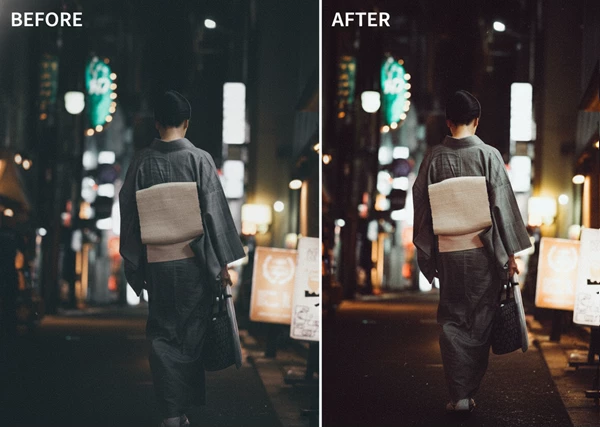
Little Tricks to Make Your Photos Look Even More Professional
Once your photo is ready with Core Color Lightroom Presets and a chosen style, a few simple tips can make the final result look even more polished:
- Mixing Styles: Combine styles, like Core with Classic or Core with Retro. This gives your photo a unique, film-like feel while keeping it natural.
- Adjusting Exposure and White Balance: Even with the best preset, minor tweaks to exposure and white balance can make the photo look more natural and appealing. Slight adjustments to highlights, shadows, or skin tones can make a big difference.
- Grain and Color Effects: Adding grain makes photos feel truly analog. Choose between Fine and Heavy, Crisp to preserve details, or Soft for a more vintage feel. Additional color grading can enhance the mood and depth of your image.
- Choosing the Right Style for the Scene:
- Sepia works great for night or artistic shots, giving warm browns and soft highlights for a dramatic, classic feel.
- Mild is better for bright landscapes or when you want more natural contrast.
- Fine-Tuning: Minor tweaks to saturation, hue, or sharpness can elevate a photo. It helps skin look natural, and colors appear harmonious.
- Lens Effects and Filters: Adding a diffusion filter like Glimmer Glass or Black Pro-Mist—especially with Retro—makes the photo feel cinematic, with soft, attractive light.
By following these simple tips, photos become not only quick and easy but also fully professional and authentically film-like without spending hours.
Why It’s Worth Trying
With Core Color Lightroom Presets, there's no need to spend hours trying to get the right color, contrast, and lighting; with a digital photograph, you can easily transform any image into a classic photograph, a professional look from days gone by that has that nostalgic feel of films you've always wanted.
From portraits to landscapes, from nighttime exposure to creative endeavors, with a click and a few options, photographs become vibrant, eye-catching, and professional colorized images with the ability to layer styles, add grain and color wash over it, adjust exposure or white balance to get exactly what you want.
In the end, Core Color Lightroom Presets is an amazing tool with no risk of trying—it's only a few clicks to make your digital photographs appear as if they're actual film photos. Go ahead—re-create that nostalgic feel of cinematic film with your photos!

Files Password : gfxplugin.com OR 123456