When the Sound is Late!
Are you familiar with what the AE MonkeySauce Plugin by Ebberts + Zucker and Orrin Zucker can do? Have you ever worked on an animation or motion graphics project and wanted the sounds to sync perfectly with the movements? Like when a character jumps, it jump sound is supposed to happen as they jump or when a ball bounces and bounces on screen, it's impact sound is supposed to coincide. Even that "pop" noise when text comes into view goes a long way (or doesn't) when it's out of sync—but it's supposed to be perfectly tuned to the animation, so it works with the audience perception.
Without the right tools, finding that perfect timing in the timeline can take a lot of time and be really frustrating. You have to manually move each sound, adjust its length, make sure it aligns with the keyframes, and if there are multiple sounds and layers, it becomes completely confusing. Plus, any small change in the animation means readjusting all the sounds, which wastes time and energy.
But what if you could do it with one simple click? Sounds synced. In order. On time. Your timeline is not a chaotic blend of sounds, misplaced and mis-timed. You have it all perfect down to the last keyframe. You have all the assets you need for your project without worry of open applications and lost files. You focus on your creative process instead of banging your head against the wall.
What Did We Do Without Tools?
Before professional tools came along, in After Effects, we had to do everything manually. That means finding every audio file and placing it on the timeline, then dragging and adjusting its length and timing to match the motion.
If the project was busy and had multiple sounds playing simultaneously, it got really complicated. We had to pre-compose to keep the timeline somewhat organized, but it could still easily get messy. Any small change in the animation meant moving all the sounds again, and everything would fall apart.
Now imagine doing all of this manually, one by one, with precision! It takes time, mistakes are likely, and in the end, the timeline becomes a real nightmare. In short, without tools, syncing sounds was exhausting and nerve-wracking.
Let’s Make Things Easy!
This is where AE MonkeySauce comes in. This tool is designed for After Effects to handle all sound syncing quickly, cleanly, and effortlessly. No more spending hours manually moving sounds on the timeline.
Its main features are really practical:
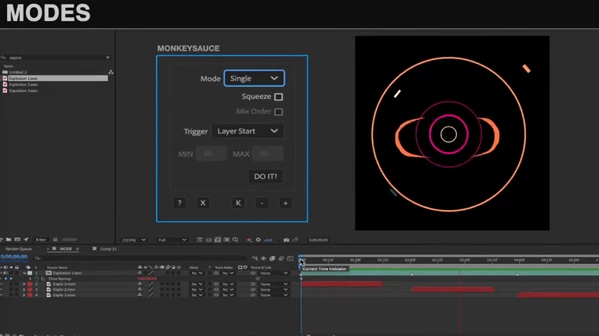
Sound Placement Modes:
- Single: Each audio file is placed in a separate pre-comp, keeping the timeline organized and making any changes easy to apply.
- Sequence: Multiple effects play one after another, or even randomly; no need to worry about their order.
- Expanded: Works like Sequence but gives each sound its own pre-comp; nothing gets interrupted, and everything plays smoothly.
- Squeeze: Shortens audio clips so they finish before the next marker; perfect for fast, explosive effects.
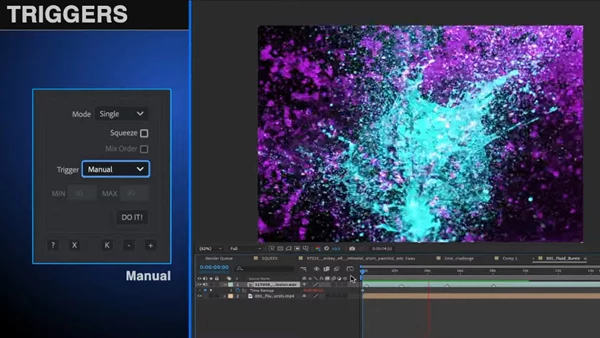
Smart Triggers:
You can place sounds manually or use random repetition synced with the start, middle, or end of layers.
With Marker Sync, sounds match the existing markers perfectly, and if you want to add natural variation with Random Sync, everything is done automatically.
Helper Tools:
- Move effects without hassle
- Remove extra markers
- Convert keyframes into markers for easy syncing
With these features, your project no longer becomes cluttered or confusing. All sounds play precisely on time without stress, and you can focus on real creativity and design instead of time-consuming manual adjustments.
A Few Professional Tips
Now that you know how AE MonkeySauce makes work easier, here are some tips to make your project even more professional and natural:
- Arrange Layers Before Using Sequence or Expanded:
Before applying Sequence or Expanded mode, organize your layers in the correct order. This ensures sounds play exactly in the order you want and prevents later adjustments. - Use Mix Order for Natural Variation:
When you have multiple audio files, enabling Mix Order can randomize their playback. This makes sounds feel more natural and avoids a monotonous, artificial effect—especially for ambient or background sounds. - Squeeze for Short or Explosive Sounds:
If a sound is very short or you have a fast, explosive effect, use Squeeze mode. It adjusts the length of the sounds to finish before the next marker, maintaining motion sync. - Marker Sync on Reference Layers:
For more precise animation syncing, use Marker Sync. You can sync sounds to a reference layer to ensure all sounds play exactly on time without disrupting the timeline.
By following these simple tips, your project will be faster to complete and look more professional and natural. You can focus on creativity without your nerves being tested or your timeline getting messy.
Why It Is Worth It
No more wasted time or complicated processes to sync sounds. With a professional standard such as AE MonkeySauce, it's done in no time, easily and seamlessly. There's no longer a need to extend the production process for timeline shifts or the fear of losing sound cohesion.
AE MonkeySauce allows you to emphasize actual creative and design elements instead of technical and time-consuming aspects. Your projects will look and feel more natural and professional, and there will be more pleasurable output for the viewer. It's as simple as a few clicks to get everything in order, in sync, and is interesting!

Files Password : gfxplugin.com OR 123456