When Video Editing Takes Longer Than the Video Itself
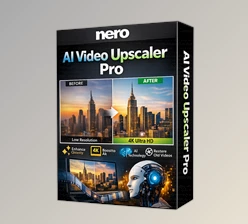
Are you aware of the Nero Video? Have you ever attempted to create a video that was just too simple and ended up taking more time adjusting and playing with settings and tools than actually conceptualizing the video? You’re not alone. And it’s not necessarily that we don’t know how to edit, it’s just that software can either be too limited or too complicated, making it a frustrating endeavor instead of a fun one.
What Does Video Editing Actually Mean and Where Is It Useful?
Video editing is the process of using images and sound to convey your message. It ranges from cutting and pasting film segments to color adjustment, sound balancing and editing, enhancement, and pacing. It's a valuable skill for Instagram reels, YouTube segments, educational videos, lectures, and personal footage. When one possesses the software and hardware, it's easier to focus on content creation without battling technical requirements.
What Usually Happens Without Professional Tools?
Most users either rely on default Windows tools, which quickly become limiting, or turn to heavy software that requires significant time and effort to learn. The result is usually one of these: either the final quality suffers, or the project is left unfinished because continuing becomes too exhausting—especially when working with multiple layers of video, audio, and effects.
How Does Nero Video Make Things Easier?
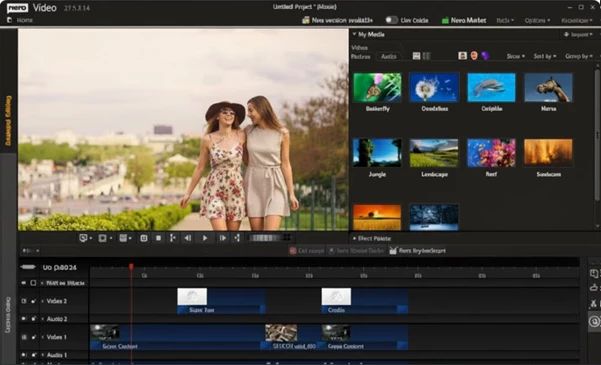
This is where Nero Video comes into play and makes video editing a simple, digestible process instead of an overwhelming, difficult one. The interface allows you to get started right away without watching extensive tutorials, but also facilitates more professional editing with a few added touches.
- For the novice but also the professional
- Easy to jump in and get to work
- Not overwhelming, nor limiting
Multi-Layer Editing: Complete Control Over Video and Audio
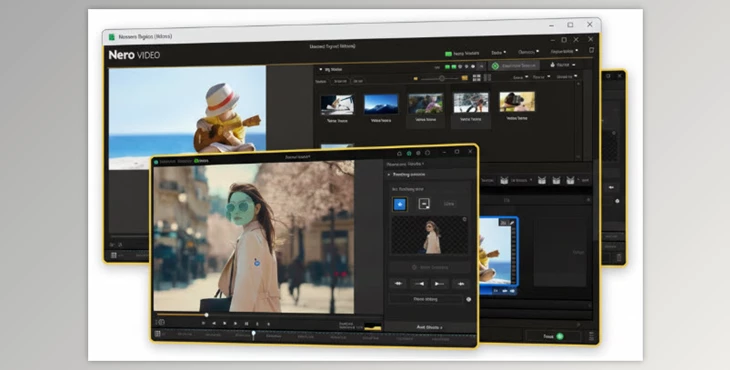
First of all, multi-layer editing is made very simple. You can place multiple videos, images, music, and sounds on the timeline simultaneously and control each separately. This is especially useful for adding text, background music, or combining multiple camera angles.
- Supports HD, 4K, and even 8K quality
- Perfect for vlogs, tutorials, product demos, and social media content
- Maintains full quality in the final output
- Ready-Made Effects Without Complicated Settings
One of the features that makes editing easier is the collection of ready-to-use effects. These allow you to make your videos look professional without dealing with complex technical adjustments.
- Green Screen: Quickly remove backgrounds
- Picture in Picture: Display multiple videos simultaneously, ideal for tutorials, interviews, and demo videos
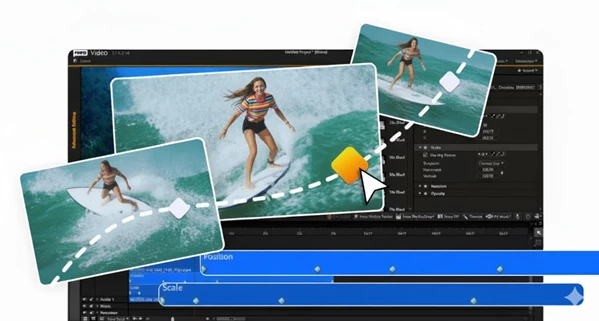
- Motion Tracking: Smart alignment with subject movement; highlights objects, adds visual appeal, without needing heavier software
Full Support for Vertical Videos
Nero Video pays special attention to vertical videos. If you’re creating content for Instagram, Reels, or Stories, you won’t need to make major adjustments after editing.
- Optimized for social media
- Clean output without cropping or stretching
Real Time-Saving Features
AI-powered smart file management helps you spend less time searching for clips and sounds, keeping your focus on editing.
- Find files faster
- Organize complex projects efficiently
- Perfect for projects with large files
In short, Nero Video bridges the gap between idea and final output. Whether making a simple clip, a tutorial, or more serious content, you can achieve results without hassle or wasted time.
Tips to Make Your Videos Look More Professional
Even small edits can make a video much more engaging. Take it step by step.
- Always use multi-layer editing: Keep audio, video, text, and effects on separate layers for better control. Changes won’t disrupt the entire project.
- Don’t underestimate audio: Clean sound makes even a simple video feel professional. Keep the background music lower than the main audio and use fade-in/fade-out.
- Use Motion Tracking wisely: Great for following subjects, introducing people, or emphasizing points. Avoid overuse; apply only where it enhances understanding.
- Think vertical for social media: For Instagram or Reels, set the project to vertical from the start. This prevents distortion or poor cropping.
- Less is more with effects: Too many effects clutter the video. One or two well-placed effects are more impactful than ten random ones.
- Maintain video rhythm: Shorten long sequences, especially at the beginning. The quicker the viewer engages, the more likely they’ll watch until the end.
- Watch the video before final output: Identify areas that feel slow or cluttered and adjust.
- Match output settings to the platform: YouTube and Instagram have different resolution and format requirements. Correct settings preserve quality and avoid compression issues.
Even following these simple tips can turn an ordinary video into a professional-looking piece. You’ll have more control over the output, and the final result will be cleaner and more appealing.
When Tools Don’t Get in Your Way
Nero Video ensures you’re no longer worried about software complexity. Instead, your focus is on your ideas and story. Rather than constantly thinking “how do I edit this part?”, you can concentrate on “what should I create and what message should I convey?”
It's user-friendly for novices to jump on and get started, and professional enough to have all necessary aspects for creation and editing down to the smallest detail. The system in place for editing is multi-track, Motion Tracking; there are effects preloaded, and file organization is easy.
In other words, Nero Vide strikes a perfect balance between simplicity and professionalism. Not so simple that it limits you, and not so complex that it discourages you. With this software, you can create anything from short clips to high-quality educational videos or social media content—without feeling that the work is difficult or time-consuming. If you’re looking for a tool that gets the job done, delivers professional output, and is enjoyable to use, this software is definitely worth trying.

Files Password : gfxplugin.com OR 123456