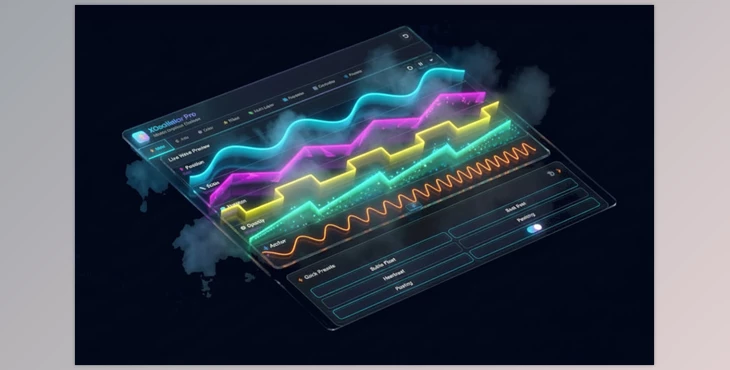
Effortless Motion!
Have you explored the features of the XOscillator Pro? We all know it's a pain and takes ages to animate motion graphic designs. How do you animate a heartbeat effect for a logo? How do you circle them and get them to wave across the screen? How do you achieve that camera shake effect that feels more alive?
Without the right tools, you end up spending hours keyframing, struggling with the graph editor, and writing cumbersome expressions. Even when everything is set, the movements can still appear artificial or repetitive.
Moreover, every time you want to make a small change, you have to manipulate all the keyframes again—meaning wasted time and frustration. In short, giving a natural and dynamic feel to movements can be one of the biggest challenges for motion designers.
What Does Smart Motion Mean?
With modern tools like XOscillator, you no longer need to create every movement manually or wrestle with the graph editor. This tool generates the motion for you, allowing you to focus only on the feel and mood of your project.
For Example:
- A button on the screen that “breathes” and gently bounces up and down when the mouse hovers over it—without having to create thousands of keyframes.
- A logo or text that moves like a wave across the scene; the middle moves faster while the edges move slower, all with just a few clicks.
- A camera that shakes naturally and randomly, each time slightly different, as if held by a real cinematographer.
- Colors and effects like Glow, Blur, or Transparency oscillate—for instance, a light softly turning on and off, or a fog effect on text increasing and decreasing, without any keyframing.
These types of movements make your projects appear more alive, natural, and engaging. You no longer need to worry about artificial motion; everything on the screen feels as if it’s truly breathing or moving.
What Does the Traditional Method Look Like?
Before professional tools like XOscillator arrived, most motion designers had to create every movement manually, making projects tedious and time-consuming.
For Example, Without a Plugin:
- You have to keyframe position, scale, rotation, or color for every layer. Even a simple movement like a button bouncing up and down can require multiple keyframes.
- When dealing with multiple layers, you have to copy and adjust keyframes to synchronize the motion. The smallest change means reworking everything.
- You can use default expressions, but sometimes they are complex and limited. If they don’t work correctly, the movements can appear unnatural, random, or odd.
Main Problems:
- Time-consuming: A few hours can be spent on a simple movement.
- High chance of errors: One wrong number or missing keyframe can ruin the entire animation.
- Artificial results: Even when done correctly, movements can look stiff, repetitive, and lifeless.
In reality, this traditional method leads to frustration, wasted time, and excessive effort for even simple motions—making designers seek tools that eliminate these hassles.
What is XOscillator Pro and How Does It Work?
XOscillator Pro is an After Effects plugin that turns hours of tedious keyframing and graph editor work into just a few minutes. You no longer need to create every movement manually or control layers one by one.
Main Features of XOscillator Pro
Advanced Wave Engine:
Over 35 different types of motion:
- Make a button or icon move up and down like a real heartbeat.
- Make a layer bounce like a spring.
- Create natural and random camera shakes or movements that never repeat.
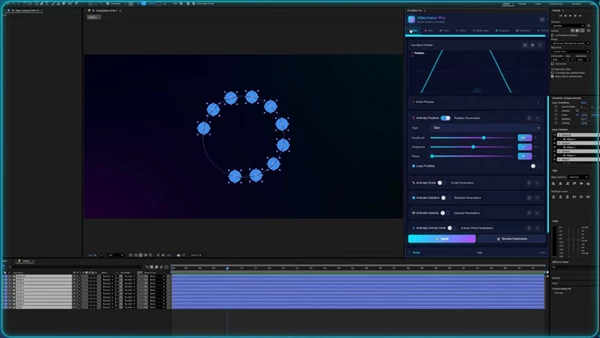
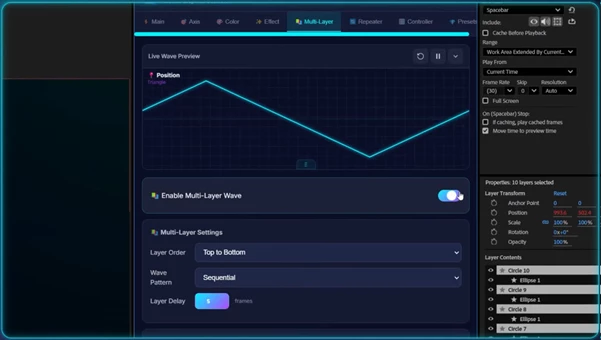
Live Preview: When you adjust the frequency or intensity of motion, you see the result instantly on the panel. No more guessing or multiple trials to get it right.
Multi-Layer Control:
Move up to 50 layers simultaneously. For example:
- Create a motion wave where circles in the center move faster, while circles at the edges move slower.
- All layers move in a coordinated pattern with slight variations.
Central Controller:
A master slider lets you adjust the speed or intensity of all layer movements with a single motion, without touching each layer individually.
Animation on Colors and Effects:
Everything on the layers can be animated and oscillated:
- Colors, Glow, Blur, Tracking, and even Transparency.
- For example, text can softly turn on and off, or a button’s light can increase and decrease—no keyframing required.
Repeater Tool:
Copy layers and automatically apply waves or effects across them in sequence.
- Example: A wave motion on dozens of circles, moving one by one with a delay, all with a few clicks.
In simple terms, XOscillator Pro makes projects feel alive, natural, and fluid, while saving you time. Even complex multi-layer movements or color and effect oscillations are ready with just a few clicks.
Pro Tips for More Natural Motion
When you want your motion graphics projects to feel natural and dynamic, a few simple techniques can make your workflow easier and more professional. These tips ensure even complex movements are smooth and lifelike:
Combine Multiple Waves:
Instead of a single wave, combine several types of waves to create natural and non-repetitive motion.
- Example: A button both bounces elastically and shakes slightly.
Use the Central Controller:
Adjust the speed or intensity of multiple layers at once with a slider, without touching each layer individually.
Animate Colors and Effects:
Don’t limit motion to position and scale. Animating Glow, Blur, Transparency, or colors adds depth and life to your project.
Preview in Live Panel:
Check and adjust movements in the live panel before final application to ensure they look natural and save time.
Following these simple tips makes your motion graphics projects not only more professional and engaging but also naturally harmonious, drawing viewers in and giving you greater control over every movement.
Fun and Easy Motion
XOscillator Pro adds life to your motion graphics without having to fight keyframes and expressions for hours on end. Select some layers, apply motion/wave, and you're done. No more boring/public enemy movements as XOscillator takes care of all the calculations and sync from him.
With XOscillator, even complex multi-layer projects are ready quickly and effortlessly. You can control motion, color, effects, and layer combinations, all appearing natural and appealing. Ultimately, this frees your time to focus on ideas and creativity, producing projects that are professional, eye-catching, and full of life.

Files Password : gfxplugin.com OR 123456