Downloadable Files
You can download FacePro for free at the end of this page.
✨ Meet Your New Portrait Secret Weapon
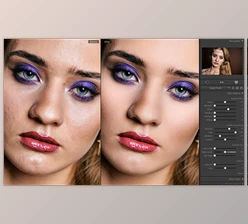
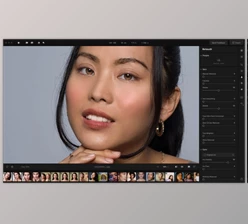
Ever spent hours painstakingly perfecting a portrait image? Zooming in, carefully masking the skin by hand, and removing every imperfection… only to think it still looks fake? Not anymore with FacePro. FacePro is the groundbreaking AI face retouching tool that simplifies complex portrait editing into a quick, intuitive, professional process. With face-aware masking, pixel-perfect skin masking, and powerful retouching modules, you can create beautiful, natural results in just a few clicks. Use it for beauty images, interviews, social media posts, and cinematic scenes. It’s that easy and beautiful.
🎯 What Is FacePro and Why Does It Matter?
FacePro is an artificial intelligence face-enhancement plug-in for Adobe After Effects and Adobe Premiere Pro (compatible with Mac and Windows). What makes FacePro so powerful? Its use of artificial intelligence allows it to perform the following:
Automatically Detects Faces and Creates Masks
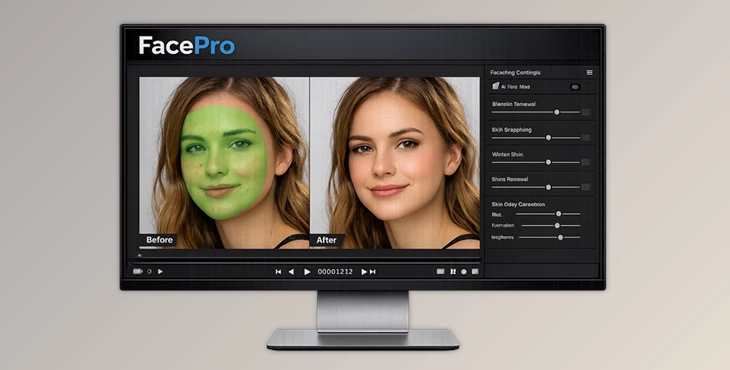
Unlike other video editing plug-ins, FacePro automatically detects faces and creates masks—but it’s not just any old mask. FacePro creates a precise skin mask by identifying and separating the skin from the hair, eyes, eyebrows, lips, and the background, allowing only the skin to be affected by any adjustments. Why does this matter?
Because accurate masking is the foundation of professional retouching. When adjustments stay exactly where they should, your edits look clean, natural, and believable.
🧠 Context-Aware Blemish Removal
FacePro uses a specially trained AI model to remove:
- Acne
- Pimples
- Minor scars
- Spots
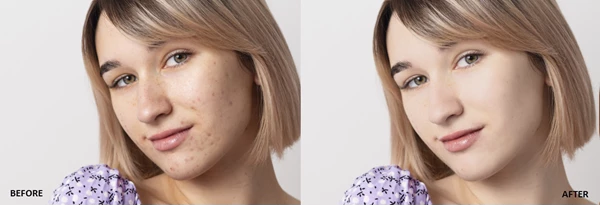
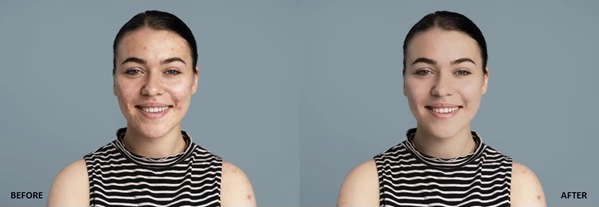
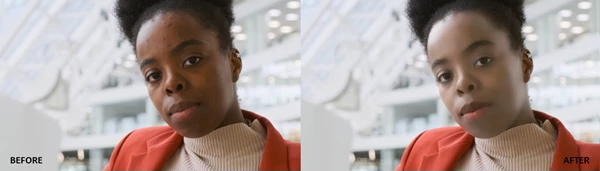
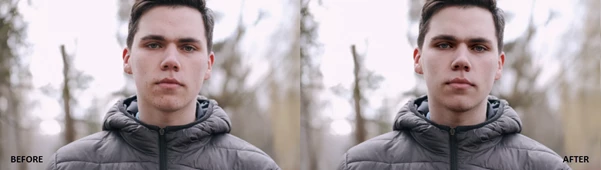
It understands the surrounding skin texture and blends seamlessly without flattening the natural structure. The result? Clean skin that still looks real—not plastic.
🌿 Natural Skin Smoothing
Unlike traditional blur-based tools, FacePro smooths uneven texture while intelligently preserving fine details. That means:
- No waxy skin
- No lost pores
- No artificial shine
Just healthy, refined, professional skin tones. These features dramatically improve your final result because they maintain realism—something audiences subconsciously notice immediately.
🚀 Professional Tool Overview
FacePro is a GPU-accelerated plugin built for creators who want fast, high-quality portrait enhancement inside their editing timeline. It simplifies the workflow into three intuitive steps:
- Apply Blemish Removal (if needed)
- Adjust Smoothing, Details, Whitening, Shine Removal, and Color Correction
- Review and refine the AI-generated face mask
That’s it. No complex node systems. No time-consuming manual masking.
⭐ Features
🧩 AI Face Mask
- Automatic face detection
- Pixel-level skin isolation
- Supports multiple faces
- Mask refinement controls
- Optional skin color-based masking
- Support for external masks
This ensures every adjustment is applied precisely to the intended area.
🩹 Blemish Removal
- An AI-trained model specifically for facial imperfections
- Context-aware blending
- One-slider simplicity
Perfect for interviews, beauty content, wedding videos, and commercial shoots.
💎 Smooth Face & Detail Preservation
- Smooths uneven texture
- Preserves fine details
- Maintains natural skin appearance
Ideal for close-up shots where realism is critical.
🤍 Whitening
- Brightens and evens skin tone
- Creates a luminous complexion
- Enhances clarity without overexposure
Great for fashion, beauty campaigns, and high-end portraits.
✨ Shine Removal
- Reduces unwanted specular highlights
- Corrects localized exposure
- Maintains texture
Especially useful in studio lighting or outdoor shoots under harsh sunlight.
🎨 Color Correction Controls
- Adjust hue, saturation, lightness
- Control density and contrast
- Natural or stylized results
You can subtly enhance realism—or push for creative, cinematic looks.
🎬 Real-World Use Cases
With FacePro, you can:
- Retouch interviews in documentary films
- Polish wedding footage
- Enhance influencer or YouTube content
- Refine commercial beauty ads
- Improve cinematic close-ups
For example, imagine editing a 4K close-up shot. Normally, manual masking would take significant time. With FacePro, the face is detected instantly, imperfections are removed with one slider, and smoothing is applied only to skin—preserving eyelashes, eyebrows, and lips automatically. The time savings alone can transform your workflow.
🛠 Pro Tips for Natural Results
Even though FacePro makes retouching easy, here are a few tips to get the most professional outcome:
1️⃣ Don’t Over-Smooth
Start with a light touch and gradually add smoothing while preserving detail. Skin always has texture.
2️⃣ Blemish Removal Should be First
Clean up the blemishes before smoothing so you don’t overly soften the skin.
3️⃣ Refine the Mask When Necessary
Zoom in and check your mask. Refining it can make all the difference.
4️⃣ Combine Shine Removal With Color Adjustment
Dialing down the highlights and performing slight color correction can give that cinematic sheen.
5️⃣ Honor The Face’s Character
Retouching should be enhancing, not erasing.
🌟 Final Thoughts
FacePro isn’t just another retouching plugin—it’s a smart AI assistant built directly into your editing workflow. It saves time.
It protects realism.
It delivers professional-grade results. Whether you’re a content creator, filmmaker, or professional editor, FacePro gives you the tools to create stunning portraits effortlessly—without sacrificing authenticity. If you care about beautiful, natural-looking faces in your projects, FacePro is absolutely worth exploring.

Files Password : gfxplugin.com OR 123456