Downloadable Files
You can download expressCode for free at the end of this page.
Meet a Smarter Way to Write Expressions
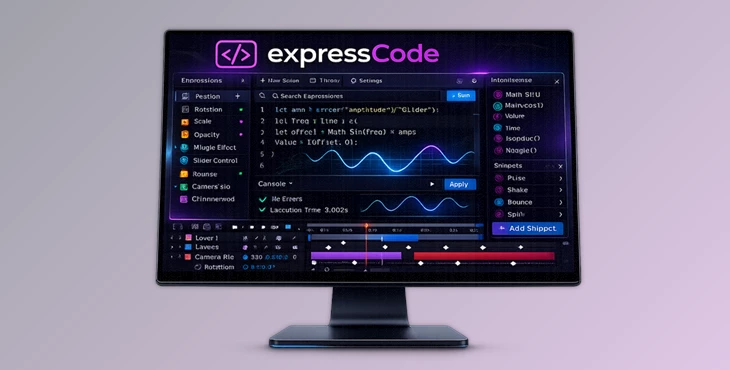
If you’ve ever worked in After Effects, you know how powerful expressions can be—and how frustrating they are to manage inside the tiny timeline editor. Scrolling through layers, opening properties one by one, fixing errors blindly… it breaks your creative flow. That’s exactly where expressCode changes the game. It brings the full power of a modern code editor—similar to VS Code—directly into After Effects. You get smart suggestions, real-time error detection, hover documentation, and the ability to edit any expression in your comp instantly. No more hunting through the timeline. No more guessing what went wrong. If expressions are part of your workflow, this tool will completely transform how you work.
What Is expressCode and Why Does It Matter?
At its core, expressCode is a professional expression and script editor built specifically for After Effects. But instead of feeling like a basic text box inside the timeline, it gives you a fully featured development environment.
A Simple Definition
Think of expressCode as bringing the intelligence of VS Code directly into your After Effects workflow. It lets you:
- Edit all expressions in one central place
- Use IntelliSense for smart auto-completion
- Detect errors in real time
- Organize reusable expressions and scripts in a personal library
Real-World Use Cases
Imagine you’re working on a motion graphics project with 50 layers using similar expressions for animation timing. Normally, updating them means manually opening each one. With expressCode:
- You can search and find identical expressions instantly.
- Select them all.
- Update them simultaneously.
Or picture debugging a complex expression. Instead of trial and error inside the timeline, you see inline error messages as you type—before rendering anything. These features dramatically:
- Reduce production time
- Minimize technical mistakes
- Improve consistency across projects
- Keep you focused on creativity instead of troubleshooting
A Professional Tool That Elevates Your Workflow
expressCode is designed for motion designers, animators, and technical artists who rely on expressions and scripting inside After Effects. It removes friction and makes coding feel natural, fast, and organized. Instead of working layer by layer, you work intelligently.
Features
IntelliSense Code Completion
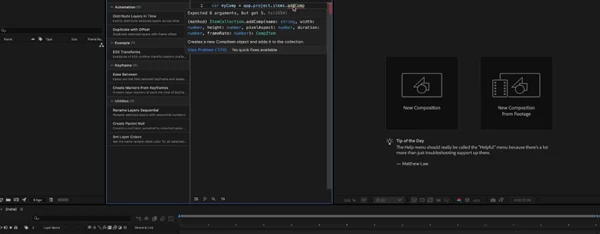
As you type, expressCode suggests properties, methods, and parameters specific to After Effects expressions and scripts. Hover documentation and parameter hints mean you no longer need to constantly search the API documentation. Result? Faster writing, fewer mistakes, and smoother coding.
Real-Time Error Detection
Powered by TypeScript-based diagnostics, expressCode shows inline errors instantly. You know exactly what’s wrong—and where—before applying the expression. No more guessing why something “isn’t working.”
You fix it immediately and move on.
Expression & Script Library
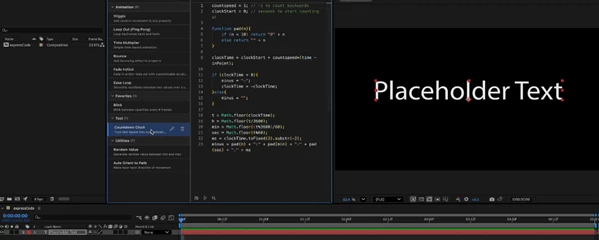
Save your most-used expressions and scripts into organized libraries. Apply them to multiple layers with one click. This is perfect for:
- Frequently used bounce expressions
- Custom rigging setups
- Team-standard animation systems
You build your own toolkit and reuse it anytime.
Expression & Library Search
Large projects can quickly become overwhelming. expressCode lets you search through all expressions and library items in seconds. You always find what you need—no matter how big your comp gets.
Select Identical Expressions
Need to update repeated expressions across many layers? Simply select identical expressions and edit them together. Batch updates become effortless.
Reveal in Timeline
Click an expression and instantly jump to its exact location inside After Effects. No more endless scrolling through layers trying to locate the right property.
Auto-Highlight Layers
Select a layer in the timeline, and ExpressCode automatically scrolls to and highlights its expressions. Your workflow stays perfectly synced.
Monaco Editor Power
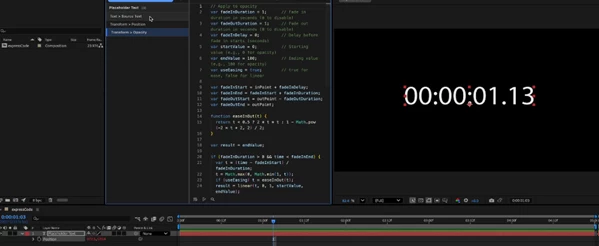
Built on the same editor engine that powers VS Code, expressCode supports:
- Multi-cursor editing
- Advanced find & replace
- Syntax highlighting
- Familiar keyboard shortcuts
It feels professional because it is professional.
Batch Operations
Select multiple expressions and edit them at once. Apply library items to several layers simultaneously. What used to take minutes now takes seconds.
Pro Tips to Get the Most Out of expressCode
Build a Personal Expression Library Early
Start saving your most-used expressions immediately. Over time, you’ll build a powerful custom toolkit that dramatically speeds up new projects.
Use Search Before Editing
Before rewriting an expression, search your project. You might already have something similar ready to reuse.
Fix Errors as You Type
Don’t ignore inline diagnostics. Treat real-time error detection as your assistant. Clean code leads to smoother animations and fewer rendering surprises.
Batch Edit for Consistency
If you’re working on branded content or template projects, use “Select Identical Expressions” to ensure consistency across all layers.
Sync with Timeline for Faster Navigation
Use the auto-highlight and reveal features to quickly move between visual elements and code. It keeps your creative momentum alive.
Final Thoughts
expressCode isn’t just another utility—it’s a workflow upgrade. It transforms how you write, manage, and debug expressions in After Effects. By combining the intelligence of a modern code editor with deep integration inside your comp, it saves time, reduces frustration, and improves the overall quality of your projects. If expressions are part of your creative process, expressCode will feel like something you should have had from the beginning. Try it, explore its features, and experience how much smoother your After Effects workflow can become.
 expressCode VS Code's powerful editor for AE by Aescripts (v1.2.3).rar (Size: 21.4 MB - Date: 4/4/2026 2:06:40 PM)
- Aescripts - expressCode v1.2.1.rar (Size: 21.1 MB - Date: 2/16/2026 10:21:40 AM)
- Aescripts - expressCode v1.2.rar (Size: 12.6 MB - Date: 2/8/2026 12:54:31 PM)
- Aescripts - expressCode v1.1.1.rar (Size: 12.6 MB - Date: 1/24/2026 2:21:21 PM)
- Aescripts - expressCode v1.0.rar (Size: 13.3 MB - Date: 12/15/2025 2:00:33 PM)
Files Password : gfxplugin.com OR 123456