Aescripts - MaskPro:
The MaskPro plugin boosts your After Effects experience by providing advanced mask manipulation features. This panel simplifies mask management with selection, copy, paste (keyframed or non-keyframed), and deletion functions for masks.
You can pre-compose layers based on their masks or bounding boxes and freeze or defreeze masks. Also, MaskPro allows smooth transition of shapes with masks and vice-versa, creation of mattes, and splitting masks into separate layers for finer detail. When dealing with complex compositions or even optimizing your workflow, it doesn’t matter because MaskPro offers great ease and accuracy for all your masking needs.
Some great features of Aescripts - MaskPro:
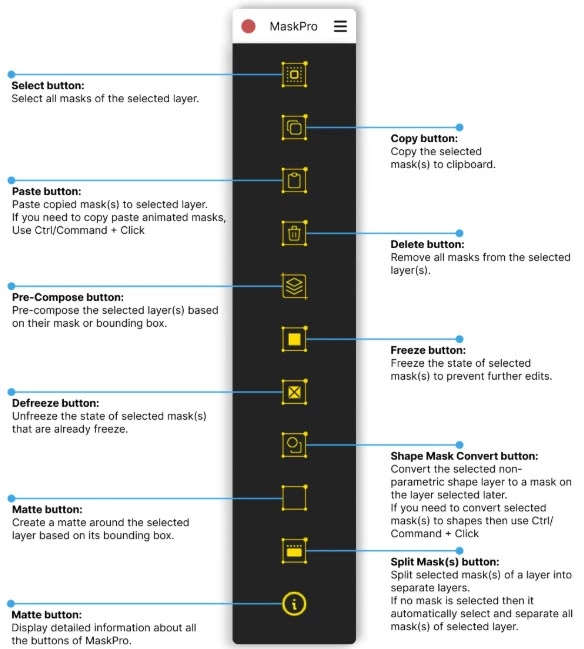
- Specifications Mask for selection of layers, just one click.
- Copy and paste the sequence of selected masks into layers with or without keyframes effortlessly.
- Delete all masks within selected layers quickly.
- Pre-compose selected layers based on masks or bounding boxes.
- Single click to freeze and defreeze selected masks.
- Convert shapes into masks and vice versa.
- Create a matte around the layer in a single click.
- Split the selected masks into individual layers for more flexibility.
"Aescripts - MaskPro" Samples:
Aescripts - Download MaskPro 1.1 from the below link now!

Files Password : gfxplugin.com OR 123456