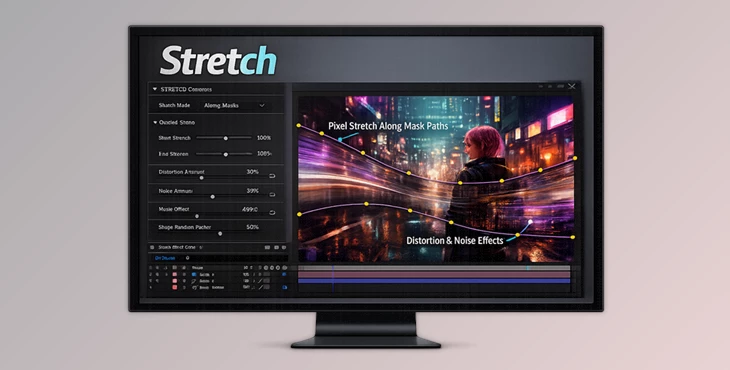
Downloadable Files
You can download the product Stretch for free at the end of this page.
Bring Your Pixels to Life
Have you ever wanted to pull, push, or stretch an image just exactly along a defined line within After Effects? That’s what Stretch allows you to do—and it looks gorgeous. Rather than relying on “standard” distortion effects that provide a mechanical or expected result, Stretch enables you to deform pixels along lines with curvature using two masks. The deformation looks dynamic and organic—and not at all mechanical. If you create motion graphics, abstract works, typographic pieces, or even experimental projects, this is a powerful tool you’ll want to play around with.
What Is Stretch and Why Does It Matter?
At its core, Stretch is a powerful After Effects plugin that allows you to stretch pixels along or across two mask shapes. These masks define a custom path — and the pixels follow that path naturally.
Simple Definition
Stretch is a pixel deformation tool that uses two masks to define how and where an image is stretched — either along the path or across it.
Real-World Use Cases
- Turning static backgrounds into flowing motion textures
- Creating liquid-style transitions between scenes
- Designing distorted typography effects
- Simulating fabric, waves, or elastic motion
- Making abstract animated lines and streaks
Why These Features Improve Your Results
Traditional distortion tools often lack precision. With Stretch:
- You control the exact path of deformation.
- The result feels organic and directional.
- Animations become smoother and more dynamic.
- You avoid unnatural warping artifacts.
Because the stretching follows mask shapes, the effect feels intentional — not random. That control dramatically improves the visual quality of your final composition.
Meet Stretch – A Professional Tool for Creative Distortion
Stretch was built for motion designers looking for accurate and controllable pixel deformation without complex setups, simplifying the sophisticated distortion process and making it a delight to work with. It gives life to static visuals and transforms them into fluid compositions — directly in After Effects.
Features
Stretch Images with Two Masks
Define two mask shapes and stretch pixels either along or across the masks. This gives you directional control over deformation.
Stretch with Ramp
Use the Stretch Ramp for precise control over how pixels stretch across the defined path. This allows gradual or sharp transitions depending on your creative goal.
Distortion Along the Path
Combine Noise and Ramp to distort stretched pixels for more organic results.
You can animate distortion using Noise Offset, adding dynamic motion to your design.
Randomize with Strips
Add fine details using the Strips Random Factor. This introduces variation, preventing the stretch from looking too uniform or artificial.
Animate with Loop
Create seamless flow animation with a single click. Perfect for backgrounds, motion textures, and looping social media visuals.
Opacity Ramp
Control transparency both along and across the stretch using Opacity Ramps. This is excellent for soft fades, depth simulation, or atmospheric effects.
Wireframe Mesh Preview
Turn on Mesh Wireframe Preview to visualize the deformation structure. This helps fine-tune results before rendering.
Adjustable Base Mesh Points
Control the number of base mesh points for better accuracy and smoother stretching results.
Real Project Examples
- Music visualizers with flowing textures
- Sci-fi HUD distortions
- Liquid-style logo reveals
- Experimental typography animations
- Abstract motion backgrounds for advertising
Stretch makes these effects faster to create and easier to control compared to traditional displacement workflows.
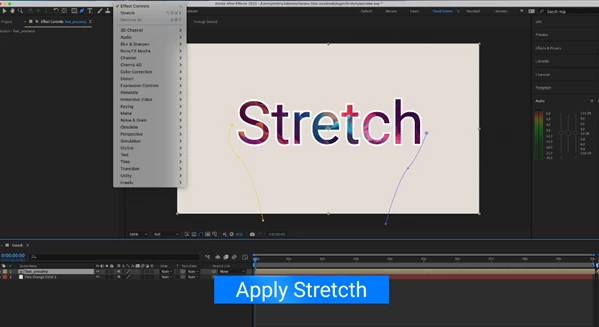
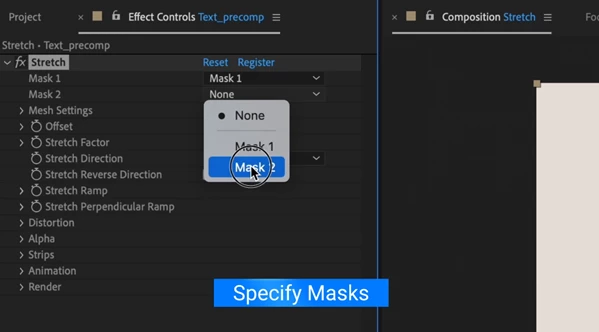
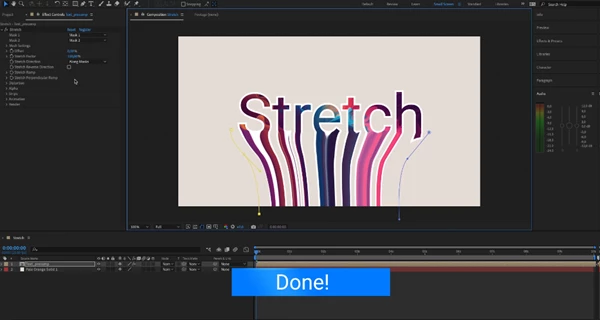
Pro Techniques & Creative Tips
Here are some friendly, practical tips to get more professional results:
Mask shapes should be smooth and well-designed
No extreme angles or sharp corners, unless you’re after that effect Use the noise effect with relatively small values for a more realistic appearance More natural animation when Noise Offset changed more dramatically (slowly) More Base Mesh Points for more detailed deformation Greater flexibility when changing parameters But it is more difficult if there are too many points
Combine with Blending Modes
Stretch works beautifully when layered with blending modes for light streaks, abstract overlays, or glitch effects.
Use Opacity Ramp for Depth
Gradual transparency changes make the stretch feel like it exists in 3D space rather than a flat distortion. These small adjustments can dramatically elevate the final result.
Final Thoughts – A Creative Playground Inside AE
Stretch is more than just a distortion plugin — it’s a creative shaping tool. It gives you control, flexibility, and animation power without complicated setups. Whether you’re creating flowing backgrounds, dynamic transitions, or experimental visual effects, Stretch helps you achieve smooth, organic, and professional-looking results. If you’re ready to transform static pixels into animated motion paths, this tool is absolutely worth exploring.

Files Password : gfxplugin.com OR 123456