
Red Giant Universe:
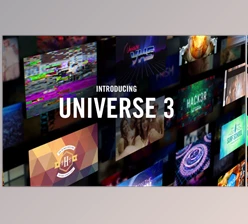
Maxon Universe combines a powerful collection of video editing and visual effects plugins developed over decades, powering the needs of motion graphics artists, video editors, and filmmakers. It integrates easily into all of your favorite editing and compositing software tools, so you can apply stylized effects and transitions to your footage, create and animate text, and make the most out of your assets in no time. Real-time GPU acceleration empowers creators to customize a library of effects that range from retro pixel art and dithering (newly added) to glitchy, stylized looks and film emulation that give your projects a professional touch with modern ease.
Gfx plugin details of Red Giant Universe
This product is a collection of plugins compatible with a range of video editing software, including Adobe Premiere Pro, After Effects, Final Cut Pro, and more. For additional details, please visit the homepage link in the sidebar.
To search for similar products to Red Giant Universe, click here.
Some great features of Red Giant Universe:
Visual Effects & Stylization
- Authentic retro and modern-day looks
- Glitch, vintage, and artistic filters
- Film emulation and finishing tools
Motion graphics creation
- Looping backgrounds & animated patterns
- Progress bars, shapes, lines & layer cloning
- Dynamic visual systems for trailers, games & more
Transitions & narrative flow
- Cinematic transitions such as:
- 3D motion, glitch, camera shake, radial wipe
- Bokeh fades
- Helps ensure a seamless visual narrative across cuts
Credit sequences
- Hacker or terminal-style scrolling text
- Type reveals and dynamic typography
Pixel Art & Dither Suite (New)
- Six new plugins for pixel art rendering and dithering effects.
- Advanced customization:
- Color palettes for pixel density, real-time preview, and more.
- Custom swatch imports for tailored looks.
Generators
- Noise patterns
- Dynamic, customizable backgrounds
Distortions & Special Effects
- Lens and heat distortions
- RGB separation
- Blur and warping effects.
Blurs & Glows
- High-quality bokeh
- Fast motion blurs
- Soft cinematic glows
Utility Tools
- Handheld camera simulation
- Fix fisheye distortion
- Layer combining, picture-in-picture compositing.
Real-Time GPU Acceleration
- Faster previews with reduced render time;
- Smoother iterative design.
Software Integration
- Seamless compatibility with popular editing and compositing platforms.
"Red Giant Universe" Samples:
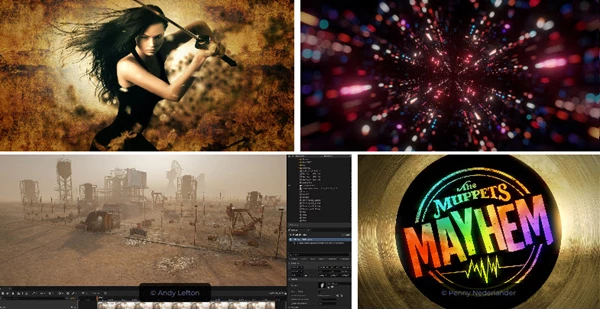
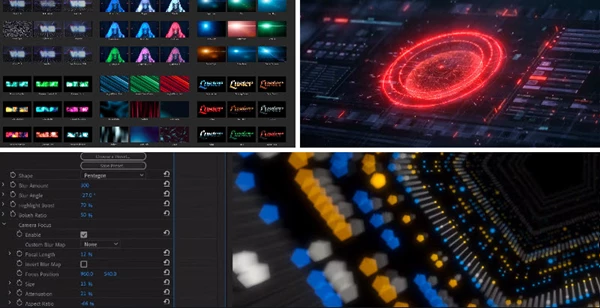
Easiest Way to Run a .sh File on Mac
Follow these simple steps:
1️⃣ Open Terminal
Press Command (⌘) + Space
Type Terminal
Press Enter
2️⃣ Drag & Drop the File
Locate your
.shfile in FinderDrag the file and drop it directly into the Terminal window
The full file path will automatically appear
3️⃣ Add bash Before the Path
Click at the beginning of the line in Terminal and type:
bash
Make sure there is a space after bash.
Example:
bash /Users/yourname/Desktop/script.sh
4️⃣ Press Enter
Your script will now run.
⚠️ If You Get a “Permission Denied” Error
Run this once (using drag & drop again):
chmod +x
Then drag the file into Terminal, press Enter, and try running it again.
Maxon - Download Red Giant Universe 2026.0.1 (Win, Mac-2025.3.2) from the below link now!
 Maxon - Red Giant Universe v2026.0.1 (Win).rar (Size: 1.7 GB - Date: 11/6/2025 3:13:01 PM)
- Maxon - Red Giant Universe v2026.0 (Win).rar (Size: 1.8 GB - Date: 9/14/2025 12:18:13 PM)
- Maxon - Red Giant Universe v2025.3.3 (Win).rar (Size: 1.8 GB - Date: 7/17/2025 2:49:59 PM)
- Maxon - Red Giant Universe v2025.3.2 (Mac).rar (Size: 2.2 GB - Date: 6/21/2025 6:19:54 PM)
- Maxon - Red Giant Universe v2025.3.2 (Win).rar (Size: 1.7 GB - Date: 6/21/2025 6:18:38 PM)
- Maxon - Red Giant Universe v2025.3.1 (Win).rar (Size: 1.8 GB - Date: 4/26/2025 11:03:16 PM)
- Maxon - Red Giant Universe v2025.3.0 (Win).rar (Size: 1.8 GB - Date: 4/3/2025 4:53:46 PM)
- Red Giant Universe v2025.2.0 (Win).rar (Size: 840.7 MB - Date: 2/13/2025 2:16:58 PM)
- Red Giant Universe v2025.2.1 (Mac).rar (Size: 2.0 GB - Date: 2/4/2025 3:17:05 PM)
- Red Giant Universe v2025.1.1 (Win).rar (Size: 1.8 GB - Date: 12/8/2024 3:02:08 PM)
- Red Giant Universe v6.1.0 (WIN, MAC).rar (Size: 3.5 GB - Date: 10/16/2024 8:20:38 PM)
- Red Giant Universe 2025.0 (Win).rar (Size: 1.7 GB - Date: 10/16/2024 8:19:52 PM)
- Red Giant Universe v2025.1.0 (Win).rar (Size: 1.2 GB - Date: 10/16/2024 8:19:52 PM)
- Red Giant Universe 2024.4.1 (Win).rar (Size: 1.7 GB - Date: 10/16/2024 8:19:26 PM)
- Red Giant Universe 2024.4.0 (Win).rar (Size: 1.8 GB - Date: 10/16/2024 8:19:18 PM)
- Red Giant Universe 2024.0.0 (Mac).rar (Size: 2.4 GB - Date: 10/16/2024 8:18:50 PM)
- RED GIANT UNIVERSE 2024.3.0 (WIN).rar (Size: 1.9 GB - Date: 10/16/2024 8:18:45 PM)
Files Password : gfxplugin.com OR 123456


2/19/2026 12:04:18 PM
For installing ".sh" files on Mac, see the end of this page's description.
9/13/2024 5:16:33 PM
Use contact us for installation problems.
10/12/2023 11:07:42 AM
Mac Installation Help: 1. Exit AE PR and other software, double-click to install Maxon App Installer, close after completion, do not log in 2. Install Universe Installer and close after completion 3. Install the patch Maxon Patch.pkg and complete