Downloadable Files
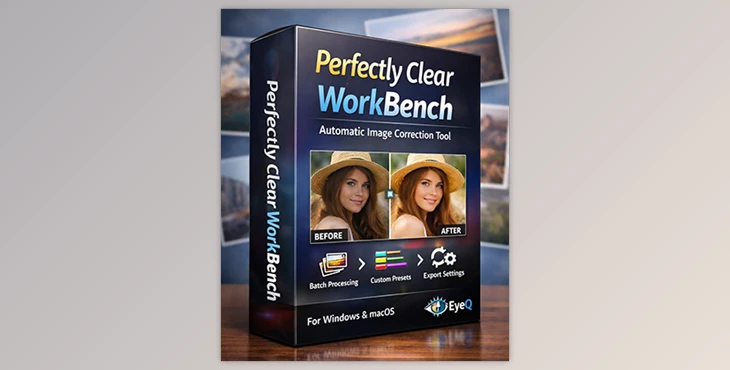
You can download Perfectly Clear WorkBench for free from the end of this page.
Meet Your New Image Correction Assistant
Ever wished your photos could fix themselves in seconds — without spending hours adjusting sliders?
That’s exactly what Perfectly Clear WorkBench is built for. This desktop application lets you see powerful automatic image corrections happen in real time. With just a few clicks, you can compare before-and-after results, tweak settings, and create your own custom presets.
Whether you're evaluating image correction technology or preparing settings for integration into your platform, this tool makes the process fast, visual, and surprisingly satisfying.
What Is Perfectly Clear WorkBench and Why Does It Matter?
Perfectly Clear WorkBench is EyeQ’s desktop demo software for Windows and macOS that allows you to evaluate the capabilities of Perfectly Clear automatic image correction technology in real time.
In simple terms:
You load an image.
The software automatically enhances it.
You instantly see the before and after.
You fine-tune corrections if needed.
You create and export custom presets.
Real-World Use Cases
Imagine you’re:
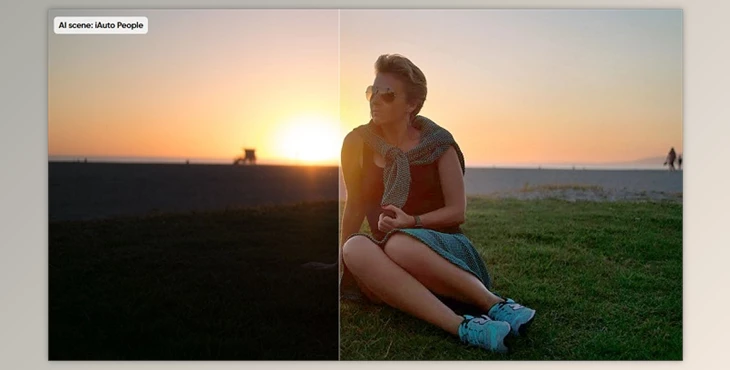
Testing how automatic correction improves underexposed photos.
Comparing original vs. enhanced portraits to evaluate skin and tone adjustments.
Preparing a preset for integration into your own application or imaging platform.
Batch processing multiple images to see consistent results.
The ability to see immediate visual feedback makes decision-making faster and more accurate. Instead of guessing how settings will affect images in your platform, you test them live.
And that’s what improves your final output:
controlled automation + visual verification + customizable presets.
Professional Tool Overview – What Makes It Powerful?
Perfectly Clear WorkBench is designed as a professional evaluation and preset-creation environment for Perfectly Clear technology. It simplifies testing, customization, and exporting of processing settings.
Features
Real-Time Image Correction
Automatically applies corrections as soon as you load an image. You can instantly evaluate improvements in exposure, color, clarity, and overall image balance.
Before & After Comparison
View original and corrected images side by side on screen. This visual comparison makes it easy to measure impact and fine-tune adjustments.
Custom Preset Creation
Adjust correction settings to your preference and save them as custom presets. These presets can later be used in your own implementation of the technology.
Batch Processing
Process multiple images at once to evaluate how your settings perform across different scenarios. This is especially useful for testing consistency.
Quick Export of Processing Settings
Once satisfied with your adjustments, export the processing settings for integration into your own platform.
Real Impact in Practical Projects
For example:
A developer preparing an imaging feature for an app can test multiple presets before deployment.
A product team can evaluate how automatic corrections improve large image sets.
A company integrating Perfectly Clear into its workflow can quickly validate visual quality before launch.
Instead of trial-and-error in production, everything is tested visually in advance.



Pro Tips for Better Results
Want to get more out of Perfectly Clear WorkBench? Here are a few practical tips:
Start with Automatic, Then Refine
Let the software apply its automatic correction first. Then make subtle adjustments instead of drastic changes. Small refinements often produce more natural results.
Use Before/After Frequently
Constantly switch between original and corrected views. This helps prevent over-processing and keeps results realistic.
Test Presets on Different Image Types
Don’t judge a preset based on one image. Apply it to portraits, landscapes, low-light shots, and high-contrast images to ensure consistency.
Keep It Natural
If skin tones, highlights, or colors start looking artificial, scale back. The best corrections are the ones viewers don’t consciously notice.
These small habits can significantly improve how professional and balanced your final settings feel.
Why It’s Worth Exploring
Perfectly Clear WorkBench is more than just a demo tool — it’s a practical environment for testing, refining, and preparing automatic image correction settings with confidence.
It saves time. It makes evaluation visual and intuitive. It gives you control over automation.
If you're working with image correction workflows or integrating Perfectly Clear technology into your platform, this tool can make the entire process smoother and more predictable.
Explore its features, experiment with presets, and see how much difference smart automation can make.
 Perfectly Clear WorkBench Automatic Image Correction Tool by EyeQ (Win-v5.1.0.3218).rar (Size: 271.0 MB - Date: 5/30/2026 1:08:38 PM)
- Perfectly Clear WorkBench Automatic Image Correction Tool by EyeQ (Win-v5.1.0.3204).rar (Size: 270.9 MB - Date: 4/25/2026 1:47:06 PM)
- Perfectly Clear WorkBench Automatic Image Correction Tool by EyeQ (Win-v5.0.4.3169).rar (Size: 255.2 MB - Date: 4/9/2026 11:10:25 AM)
- Perfectly Clear WorkBench Automatic Image Correction Tool by EyeQ Win (v5.0.2.3107).rar (Size: 255.2 MB - Date: 2/22/2026 2:04:36 PM)
- Perfectly Clear WorkBench Automatic Image Correction Tool by EyeQ v5.0.2.3103 (Win).rar (Size: 255.2 MB - Date: 2/19/2026 12:18:40 PM)
- Perfectly Clear WorkBench Automatic Image Correction Tool by EyeQ v5.0.2.3097 (Win).rar (Size: 255.0 MB - Date: 2/14/2026 2:22:03 PM)
- EyeQ - Perfectly Clear WorkBench v5.0.2.3093 (Win).rar (Size: 255.0 MB - Date: 2/12/2026 11:49:41 AM)
- EyeQ - Perfectly Clear WorkBench v5.0.2.3090 (Win).rar (Size: 255.0 MB - Date: 2/10/2026 12:27:47 PM)
- EyeQ - Perfectly Clear WorkBench v5.0.1.3059 (Win).rar (Size: 213.6 MB - Date: 1/28/2026 10:20:03 AM)
- EyeQ - Perfectly Clear WorkBench v5.0.1.3057 (Win).rar (Size: 212.9 MB - Date: 1/28/2026 1:18:02 AM)
- EyeQ - Perfectly Clear WorkBench v5.0.1.3054 (Win).rar (Size: 212.9 MB - Date: 1/27/2026 7:48:37 AM)
- EyeQ - Perfectly Clear WorkBench v4.8.0.2876 (Win).rar (Size: 223.8 MB - Date: 11/15/2025 2:10:54 PM)
- EyeQ - Perfectly Clear WorkBench v4.8.0.2871 (Mac).rar (Size: 199.1 MB - Date: 11/10/2025 11:58:58 AM)
- EyeQ - Perfectly Clear WorkBench v4.8.0.2871 (Win).rar (Size: 223.8 MB - Date: 10/23/2025 1:35:14 PM)
- EyeQ - Perfectly Clear WorkBench v4.8.0.2863 (Mac).rar (Size: 199.1 MB - Date: 10/21/2025 12:24:28 PM)
- EyeQ - Perfectly Clear WorkBench v4.8.0.2860 (Win).rar (Size: 223.8 MB - Date: 10/17/2025 10:42:18 PM)
- EyeQ - Perfectly Clear WorkBench v4.8.0.2858 (Win).rar (Size: 223.8 MB - Date: 10/9/2025 2:29:04 PM)
- EyeQ - Perfectly Clear WorkBench v4.8.0.2857 (Win).rar (Size: 223.8 MB - Date: 10/5/2025 2:08:13 PM)
- EyeQ - Perfectly Clear WorkBench v4.8.0.2857 (Mac).rar (Size: 199.1 MB - Date: 10/4/2025 1:35:44 PM)
- EyeQ - Perfectly Clear WorkBench v4.8.0.2855 (Win).rar (Size: 223.8 MB - Date: 9/30/2025 10:50:48 PM)
- EyeQ - Perfectly Clear WorkBench v4.8.0.2853 (Win).rar (Size: 223.7 MB - Date: 9/25/2025 7:05:12 PM)
- EyeQ - Perfectly Clear WorkBench v4.8.0.2852 (Win).rar (Size: 223.8 MB - Date: 9/20/2025 12:56:35 PM)
- EyeQ - Perfectly Clear WorkBench v4.8.0.2852 (Mac).rar (Size: 199.1 MB - Date: 9/18/2025 12:44:38 PM)
- EyeQ - Perfectly Clear WorkBench v4.8.0.2849 (Mac).rar (Size: 199.1 MB - Date: 9/4/2025 2:41:16 PM)
- EyeQ - Perfectly Clear WorkBench v4.8.0.2849 (Win).rar (Size: 223.7 MB - Date: 9/3/2025 1:39:20 PM)
- EyeQ - Perfectly Clear WorkBench v4.8.0.2847 (Mac).rar (Size: 198.4 MB - Date: 8/30/2025 1:12:47 PM)
- EyeQ - Perfectly Clear WorkBench v4.8.0.2846 (Win).rar (Size: 222.6 MB - Date: 8/30/2025 1:12:39 PM)
- EyeQ - Perfectly Clear WorkBench v4.8.0.2840 (Mac).rar (Size: 198.7 MB - Date: 8/7/2025 12:35:35 PM)
- EyeQ - Perfectly Clear WorkBench v4.8.0.2830 (Mac).rar (Size: 196.6 MB - Date: 8/2/2025 1:00:12 PM)
- EyeQ - Perfectly Clear WorkBench v4.8.0.2835 (Win).rar (Size: 223.2 MB - Date: 7/19/2025 2:09:15 PM)
- EyeQ - Perfectly Clear WorkBench v4.8.0.2830 (Win).rar (Size: 220.0 MB - Date: 7/12/2025 12:26:24 PM)
- EyeQ - Perfectly Clear WorkBench v4.7.0.2825 (Mac).rar (Size: 196.6 MB - Date: 7/7/2025 1:17:49 PM)
- EyeQ - Perfectly Clear WorkBench v4.7.0.2825 (Win).rar (Size: 221.0 MB - Date: 7/7/2025 1:17:41 PM)
- EyeQ - Perfectly Clear WorkBench v4.7.0.2807 (Mac).rar (Size: 196.5 MB - Date: 6/21/2025 6:27:12 PM)
- EyeQ - Perfectly Clear WorkBench v4.7.0.2807 (Win).rar (Size: 221.0 MB - Date: 6/21/2025 6:27:05 PM)
- EyeQ - Perfectly Clear WorkBench v4.7.1.2786 (Win).rar (Size: 220.6 MB - Date: 5/6/2025 1:03:50 PM)
- EyeQ - Perfectly Clear WorkBench v4.7.0.2785 (Mac).rar (Size: 196.3 MB - Date: 5/4/2025 1:35:32 PM)
- EyeQ - Perfectly Clear WorkBench v4.7.0.2785 (Win).rar (Size: 220.6 MB - Date: 5/4/2025 1:35:25 PM)
- EyeQ - Perfectly Clear WorkBench v4.7.0.2783 (Win).rar (Size: 220.6 MB - Date: 4/26/2025 11:04:01 PM)
- EyeQ - Perfectly Clear WorkBench v4.7.0.2780 (Mac).rar (Size: 196.3 MB - Date: 4/21/2025 11:57:52 AM)
- EyeQ - Perfectly Clear WorkBench v4.6.1.2732 (Mac).rar (Size: 196.3 MB - Date: 3/13/2025 12:30:47 PM)
- EyeQ - Perfectly Clear WorkBench v4.6.1.2731 (Win).rar (Size: 219.8 MB - Date: 3/12/2025 12:13:41 PM)
- Perfectly Clear WorkBench v4.6.1.2727 (Mac).rar (Size: 195.6 MB - Date: 3/3/2025 12:10:05 PM)
- Perfectly Clear WorkBench v4.6.1.2727 (Win).rar (Size: 217.8 MB - Date: 3/3/2025 12:09:58 PM)
- Perfectly Clear WorkBench v4.6.1.2724 (Mac).rar (Size: 195.6 MB - Date: 2/24/2025 3:19:54 PM)
- Perfectly Clear WorkBench v4.6.1.2724 (Win).rar (Size: 217.8 MB - Date: 2/19/2025 12:00:37 PM)
- Perfectly Clear WorkBench v4.6.1.2723 (Mac).rar (Size: 195.6 MB - Date: 2/18/2025 12:20:02 PM)
- Perfectly Clear WorkBench v4.6.1.2723 (Win).rar (Size: 217.8 MB - Date: 2/18/2025 12:19:55 PM)
- Perfectly Clear WorkBench v4.6.1.2721 (Mac).rar (Size: 195.6 MB - Date: 2/16/2025 11:16:25 AM)
- Perfectly Clear WorkBench v4.6.1.2721 (Win).rar (Size: 217.8 MB - Date: 2/13/2025 2:23:30 PM)
- Perfectly Clear WorkBench v4.6.1.2720 (Win).rar (Size: 217.8 MB - Date: 2/12/2025 11:53:41 AM)
- Perfectly Clear WorkBench v4.6.1.2718 (Mac).rar (Size: 195.6 MB - Date: 2/11/2025 4:44:08 PM)
- Perfectly Clear WorkBench v4.6.1.2718 (Win).rar (Size: 217.8 MB - Date: 2/11/2025 4:44:01 PM)
- Perfectly Clear WorkBench v4.6.1.2717 (Mac).rar (Size: 195.6 MB - Date: 2/9/2025 2:22:06 PM)
- Perfectly Clear WorkBench v4.6.1.2717 (Win).rar (Size: 217.8 MB - Date: 2/9/2025 2:21:58 PM)
- Perfectly Clear WorkBench v4.6.1.2716 (Win).rar (Size: 217.8 MB - Date: 2/6/2025 12:01:14 PM)
- Perfectly Clear WorkBench v4.6.1.2715 (Mac).rar (Size: 195.6 MB - Date: 2/1/2025 2:13:04 PM)
- Perfectly Clear WorkBench v4.6.1.2715 (Win).rar (Size: 217.8 MB - Date: 2/1/2025 2:12:56 PM)
- Perfectly Clear WorkBench v4.6.1.2714 (Win).rar (Size: 217.8 MB - Date: 1/29/2025 2:59:25 PM)
- Perfectly Clear WorkBench v4.6.1.2713 (Mac).rar (Size: 195.6 MB - Date: 1/25/2025 1:34:34 PM)
- Perfectly Clear WorkBench v4.6.1.2713 (Win).rar (Size: 217.8 MB - Date: 1/25/2025 1:34:26 PM)
- Perfectly Clear WorkBench v4.6.1.2712 (Win).rar (Size: 217.8 MB - Date: 1/16/2025 12:11:08 PM)
- Perfectly Clear WorkBench v4.6.1.2711 (Mac).rar (Size: 195.6 MB - Date: 1/12/2025 1:08:29 PM)
- Perfectly Clear WorkBench v4.6.1.2711 (Win).rar (Size: 217.8 MB - Date: 1/12/2025 1:08:21 PM)
- Perfectly Clear WorkBench v4.6.1.2710 (Mac).rar (Size: 195.6 MB - Date: 1/9/2025 11:55:30 AM)
- Perfectly Clear WorkBench v4.6.1.2710 (Win).rar (Size: 217.8 MB - Date: 1/9/2025 11:55:22 AM)
- Perfectly Clear WorkBench v4.6.1.2709 (Mac).rar (Size: 195.6 MB - Date: 12/23/2024 11:15:34 AM)
- Perfectly Clear WorkBench v4.6.1.2709 (Win).rar (Size: 217.8 MB - Date: 12/19/2024 12:41:01 PM)
- Perfectly Clear WorkBench v4.6.1.2707 (Mac).rar (Size: 195.6 MB - Date: 11/24/2024 1:20:20 PM)
- Perfectly Clear WorkBench v4.6.1.2707 (Win).rar (Size: 217.8 MB - Date: 11/24/2024 1:20:12 PM)
- Perfectly Clear WorkBench v4.6.1.2706 (Mac).rar (Size: 195.6 MB - Date: 11/9/2024 12:14:20 PM)
- Perfectly Clear WorkBench v4.6.1.2706 (Win).rar (Size: 219.4 MB - Date: 11/6/2024 10:40:01 AM)
- Perfectly Clear WorkBench v4.6.1.2703 (Mac).rar (Size: 195.6 MB - Date: 10/26/2024 4:27:49 PM)
- Perfectly Clear WorkBench v4.6.1.2703 (Win).rar (Size: 217.7 MB - Date: 10/26/2024 4:27:41 PM)
- Perfectly Clear WorkBench v4.6.1.2698 (Win).rar (Size: 217.6 MB - Date: 10/16/2024 5:42:10 PM)
- Perfectly Clear WorkBench v4.6.1.2698 (Mac).rar (Size: 195.6 MB - Date: 10/16/2024 5:42:07 PM)
- Perfectly Clear WorkBench v4.6.1.2695 (Win).rar (Size: 217.6 MB - Date: 10/16/2024 5:42:04 PM)
- Perfectly Clear WorkBench v4.6.1.2690 (Mac).rar (Size: 195.6 MB - Date: 10/16/2024 5:41:59 PM)
- Perfectly Clear WorkBench v4.6.1.2662 (Mac).rar (Size: 195.6 MB - Date: 10/16/2024 5:41:56 PM)
- Perfectly Clear WorkBench v4.6.1.2658 (Win).rar (Size: 217.8 MB - Date: 10/16/2024 5:41:53 PM)
- Perfectly Clear WorkBench v4.6.0.2644 (Mac).rar (Size: 196.7 MB - Date: 10/16/2024 5:41:46 PM)
- Perfectly Clear WorkBench 4.6.1.2690 (Win).rar (Size: 217.6 MB - Date: 10/16/2024 5:41:40 PM)
- Perfectly Clear WorkBench 4.6.1.2689 (Win).rar (Size: 217.6 MB - Date: 10/16/2024 5:41:37 PM)
- Perfectly Clear WorkBench 4.6.1.2685 (Win).rar (Size: 217.6 MB - Date: 10/16/2024 5:41:32 PM)
- Perfectly Clear WorkBench 4.6.1.2679 (Win).rar (Size: 217.6 MB - Date: 10/16/2024 5:41:26 PM)
- Perfectly Clear WorkBench 4.6.1.2663 (Win).rar (Size: 217.7 MB - Date: 10/16/2024 5:41:18 PM)
- Perfectly Clear WorkBench 4.6.1.2658 (MAC).rar (Size: 195.6 MB - Date: 10/16/2024 5:41:13 PM)
Files Password : gfxplugin.com OR 123456





2/4/2025 12:04:48 PM
Não consigo dicionar o crack versão windows
After installation, Open the Crack folder, copy all to the installation folder and replace.
2/4/2025 12:57:54 AM
Não consigo dicionar o crack versão windows
10/8/2023 2:36:06 PM
Download link tested no problem, Download with internet download manager, use chrome browser.