Downloadable Files
You can download Diffracta Pinhole for free from the bottom of this page.
Give Digital Footage the Look of a Pinhole Camera
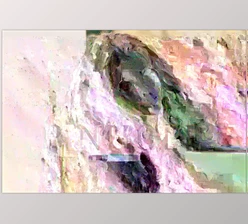
Diffracta Pinhole is a plugin for After Effects and Premiere Pro that simulates the process of taking pictures with a pinhole camera. It recreates everything from the camera opening and body to exposure, film chemistry, and the final print.
Rather than adding a simple vintage filter to your footage, Diffracta Pinhole calculates how light passes through the camera and reaches the film. Changing the camera settings produces a different image from the same footage.
The plugin is suitable for music videos, opening titles, dream sequences, and experimental films where unusual optical effects are part of the visual style.
Three Different Camera Types
Diffracta Pinhole includes three main camera designs. Each handles light or film placement differently, affecting the appearance of the final image.
Camera type | Characteristics |
|---|---|
Matchbox | A traditional pinhole camera with flat film behind a small opening. |
Film Canister | Uses curved film to produce a wide image with curved horizontal lines and straight vertical lines. |
Zone Plate | Uses clear and dark rings to focus light through diffraction, producing brighter images with halos around lights. |
Matchbox is a good starting point for recreating the appearance of a traditional homemade pinhole camera.
Control the Pinhole Size
A traditional pinhole camera uses a tiny opening rather than a lens. The size of this opening affects image sharpness, brightness, and the appearance of light sources.
Making the hole smaller does not always produce a sharper image. When the opening becomes too small, diffraction softens the picture. A large opening also creates blur.
The following settings show how different hole sizes behave at a distance of 24 mm from the film:
Pinhole diameter | Aperture | Result |
|---|---|---|
0.11 mm | f/220 | Soft image caused by diffraction |
0.22 mm | f/110 | Optimum pinhole sharpness |
0.65 mm | f/37 | Increased image blur |
Unlike a regular lens, a pinhole has no specific plane of focus. When the opening becomes wider, both near and distant light sources grow into soft shapes.
Film and Darkroom Simulation
The film simulation follows the process of capturing a negative and producing a final image.
Diffracta Pinhole supports several capture mediums:
Color negative film
Black and white film
Paper negative
Digital sensor
Film images can go through a simulated darkroom printing process or a minilab scan. There are settings for film aging, expired film, and lab correction.
Light leaks come through the simulated camera body, while grain and halation are produced as part of the film simulation itself.
Exposure and Shooting Modes
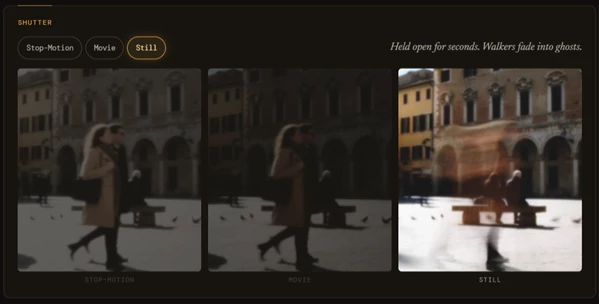
The plugin measures the light in your footage and calculates exposure with film reciprocity correction. It offers three shooting modes: Stop-Motion, Movie, and Still.
Still mode simulates long-exposure photography by collecting light from multiple video frames. Moving people may appear as transparent figures, while moving lights leave visible trails across the image.
Movie and Stop-Motion modes are less demanding and suitable for scrubbing through the timeline. Still mode requires more processing because it reads multiple source frames for each output frame.
Camera Mods for Custom Optical Effects
Camera Mods are optional additions that change how the simulated camera handles light and movement. They remain inactive or neutral until you change their settings.
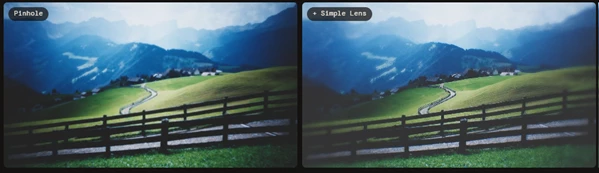
Simple Lens
The Simple Lens mod replaces the pinhole with a single plastic meniscus lens, similar to those found in disposable cameras.
It lets approximately 100 times more light enter the camera. The center of the image becomes sharper, while the edges remain soft. Reducing the aperture improves corner sharpness, and animating the focus distance produces focus transitions.
Front Filter
Front Filter places an optical element in front of the camera opening.
A glass wedge separates colors through a prism effect, while a diffraction grating creates small rainbow patterns around light sources.
Sun Glint
Sun Glint recreates the light patterns caused by imperfections around a needle-made pinhole. The shape of the opening determines the glint pattern, and its intensity is adjustable.
Motion Trail
Available in Still mode, Motion Trail controls the length of streaks produced by moving subjects.
The setting ranges from 100% for full exposure trails to 0% for frozen movement. Exposure time, film reciprocity, and film color remain unchanged.
Build Cameras That Cannot Exist in Real Life
Since Diffracta Pinhole simulates each camera component separately, you are not limited to realistic camera designs.
Some possible combinations include:
Curved Film Canister geometry with an 8×10 large-format film.
A Simple Lens combined with a prism or diffraction grating.
Film expired for 20 years, used at 24 frames per second.
A moving layer used as the pinhole shape.
Camera body geometry that changes during a shot.
These combinations are particularly suitable for experimental videos and abstract visual effects.
Discover Different Looks with Randomize
The Randomize feature builds a different camera setup each time you use it. It selects combinations of film format, focal length, pinhole size, film stock, aging, light leaks, and printing settings.
Your selected camera type remains unchanged during randomization.
Enabling Randomize Mods includes additional optical effects such as Simple Lens, Front Filter, and Sun Glint. It is a convenient way to discover unexpected camera combinations without setting every parameter individually.

Files Password : gfxplugin.com OR 123456