Downloadable Files
You can download BubbleCraft for free from the bottom of this page.
Realistic Soap Bubbles for After Effects
BubbleCraft is an After Effects plugin for creating realistic soap bubbles directly inside your composition. Unlike stock bubble footage, it generates bubbles based on your own scene. Each bubble bends the image behind it, reflects its surroundings, and responds to lighting and camera movement.
The plugin uses physical calculations to reproduce the changing colors of soap film. It also simulates how bubbles grow, float, join together, and burst into small liquid droplets.
Four Bubble Creation Modes
BubbleCraft offers four modes for different types of bubble animations.
Mode | Description |
|---|---|
Single Bubble | Place a single bubble in your scene and control its size, position, rotation, wobble, and bursting point. |
Bubble Stream | Generate multiple bubbles from a box or mask emitter with wind, rise, drag, and turbulence controls. |
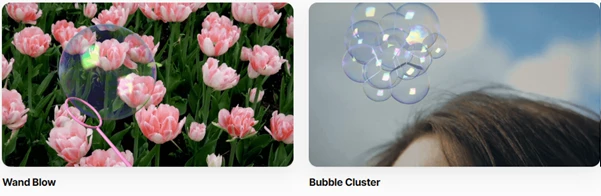
Wand Blow | Simulate bubbles growing from a wand ring before breaking free and floating away. The wand can be shown or hidden. |
Bubble Cluster | Generate groups of bubbles that share walls and form realistic foam structures. |
Bubble movement is calculated based on time, seed, and user settings. Each frame can be rendered independently, which supports timeline scrubbing, out-of-order rendering, and render farm workflows.
Realistic Soap Film Colors
The rainbow colors of real soap bubbles come from light interference within a thin liquid film. BubbleCraft recreates this effect through physical calculations across the visible light spectrum rather than using a simple color gradient.
Thicker films produce soft pastel colors, while thinner films display deeper magenta and gold tones. The film can turn black as it becomes extremely thin before bursting.
Available controls include:
Film Thickness: Adjust the thickness of the bubble surface.
Thickness Variation: Introduce differences in film thickness across the bubble.
Iridescence: Control the shifting colors of the soap film.
Drainage: Simulate the film becoming thinner at the top as the bubble ages.
Turbulence: Keep colors moving across the surface.
Dispersion and Edge Glow: Add colorful light separation and glowing edges.
Physically Simulated Bubble Bursts
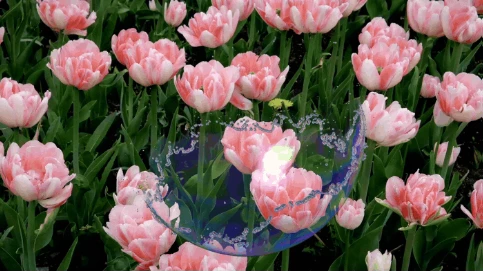
When a bubble pops, its surface does more than simply disappear. A small opening spreads across the film, moving faster through thinner areas. Liquid collects around the opening and breaks into small droplets.
There are several ways to trigger a burst:
At the end of a bubble's lifetime.
At random intervals.
Through keyframe animation.
When a bubble touches a mask.
The burst point, duration, edge roughness, and amount of liquid around the rim are adjustable. Droplet size, speed, and lifetime can be controlled separately.
Place Smoke or Other Layers Inside Bubbles
Bubbles can contain animated smoke or another layer from your After Effects composition.
For instance, a product image, logo, or portrait can appear inside a floating bubble. When working with smoke, you have separate controls for its color, amount, and size.
The smoke remains inside the bubble until it bursts. Once the film breaks, the smoke escapes and spreads outward.
This feature works with all four bubble modes.
Lighting, Refraction, and Scene Integration
BubbleCraft includes several features for combining generated bubbles with existing footage and motion graphics.
Refraction and Reflections
Each bubble bends the image behind its surface. Reflection sources include sky environments, studio lighting, the original layer, or a selected environment layer.
Lighting and Shadows
Sun, window, and softbox lighting options produce highlights on the soap film. Bubbles can cast soft shadows with a caustic ring similar to the light pattern produced by real soap bubbles.
Camera and Depth of Field
Bubbles move through 3D space using either the After Effects composition camera or BubbleCraft's own camera. Aperture and focus depth determine the depth of field for individual bubbles.
Motion Blur
Shutter-angle motion blur affects both moving bubbles and liquid droplets. It works with keyframe-controlled bursts as well.
Separate Rendering Outputs
BubbleCraft provides five output modes for compositing:
Output Mode | Rendered Content |
|---|---|
Over the Layer | Bubbles combined with the original layer |
Bubbles Only | Generated bubbles separately |
Film Only | The soap film surface |
Liquid Only | Simulated liquid elements |
Coverage Matte | A matte for custom compositing and color grading |
These outputs give compositors access to individual parts of the bubble effect for further editing.
Built-in Look and Motion Presets
Look presets control the appearance of the soap film and refraction, while motion presets control bubble movement, emission, wand behavior, and foam structures.
Look Presets | Motion Presets |
|---|---|
Default | Bubble Machine |
Rainbow Swirl | Gentle Float |
Morning Sky | Breeze |
Aging Film | Wand Blow |
Oil Slick | Drifting Down |
Pearl | Swirling |
Crystal Orb | Pop Cascade |
Radiate | |
Wand: Slow Giant | |
Wand: Quick Puffs | |
Foam: Floating | |
Foam: Popping Away |
Look and motion presets can be mixed independently and customized through the effect settings.
GPU Rendering and Performance
BubbleCraft runs as a native After Effects effect and supports the following rendering technologies:
Metal
OpenCL
DirectX 12
Multithreaded CPU rendering
Draft quality is available while working on animations, with high-quality rendering available for the final output.

Files Password : gfxplugin.com OR 123456