Downloadable Files
You can download Caliper for free from the bottom of this page.
Measure Every Detail of Your Artwork
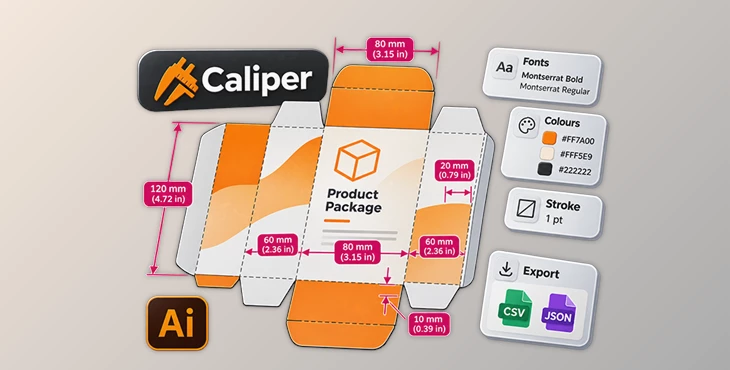
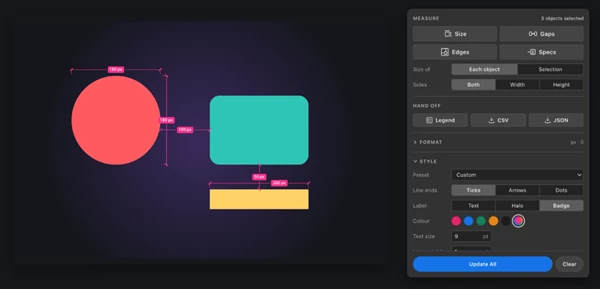
Caliper is an Adobe Illustrator extension that adds measurements and technical specifications to your designs. It measures object widths, heights, gaps between elements and distances to artboard edges.
Unlike Illustrator's built-in Dimension tool, which measures one line at a time, Caliper measures an entire selection in one click. All measurements appear on a separate layer, leaving the original artwork unchanged.
The extension is designed for projects where accurate measurements and clear design specifications are important.
Measurement Units and Drawing Scale
Caliper supports two measurement units on the same label. For instance, a packaging design can display its dimensions in both millimetres and inches. Values can appear as decimals or fractions.
The drawing scale setting is particularly useful for architectural plans, signage and large-format designs. If a floor plan uses a scale of 1:100, Caliper displays its real-world measurements in metres or feet rather than the actual size of the artwork in Illustrator.
Automatic Design Specifications
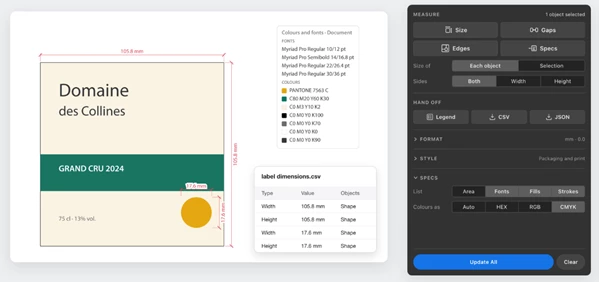
The Specs feature collects technical information from selected objects and displays it in specification cards.
These cards can include:
Font names
Font sizes
Leading (line spacing)
Stroke information
CMYK colours
RGB colours
HEX colour codes
Spot colours
Objects with identical styles share a single label, reducing unnecessary information on the artboard.
For UI designers, these cards provide developers with the typography and colour values used in the design.
Custom Measurement Styles
Caliper includes different label styles to keep measurements readable across different backgrounds. Halo and badge labels are particularly helpful when placing dimensions over photographs or dark artwork.
The extension includes style presets for packaging, print, UI hand-off and signage. Designers can save their own style settings and reuse them in future sessions.
Update Measurements After Editing
Dimensions remember the objects they measure. When you resize or move an object, select Update All to refresh its measurements.
Caliper redraws existing dimensions based on the updated artwork. If a measured object has been deleted, its dimensions are flagged.
There is no need to remove and recreate every measurement after editing a design.
Design Hand-Off and Data Export
Caliper can generate a legend containing all fonts and colours used in the document, including spot colours.
Measurement data can be exported in two formats:
Format | Purpose |
|---|---|
CSV | Working with measurements in spreadsheets |
JSON | Sharing structured measurement data with developers |
The dimensions themselves are regular Adobe Illustrator artwork. Printers, developers and other team members can open and print the document without installing Caliper.
Where Caliper Is Useful
Packaging design: Adding dimensions to dielines, panels and packaging layouts.
UI and app design: Documenting element sizes, spacing, typography and colours.
Signage and exhibition design: Showing real-world measurements at a defined drawing scale.
Floor plans: Measuring layouts in metres or feet.
Technical illustrations: Adding accurate dimensions to product sketches and technical drawings.

Files Password : gfxplugin.com OR 123456